14
2H:17 Residual capacity
Displayed in small letters at the bottom left, it
indicates the memory available space for videos.
5307 Residual capacity
Displayed in small letters at the bottom left, it
indicates the memory available space for pictures
A series of symbols are also displayed on the TFT screen at the same time; some similar to those
already seen, others more specific.
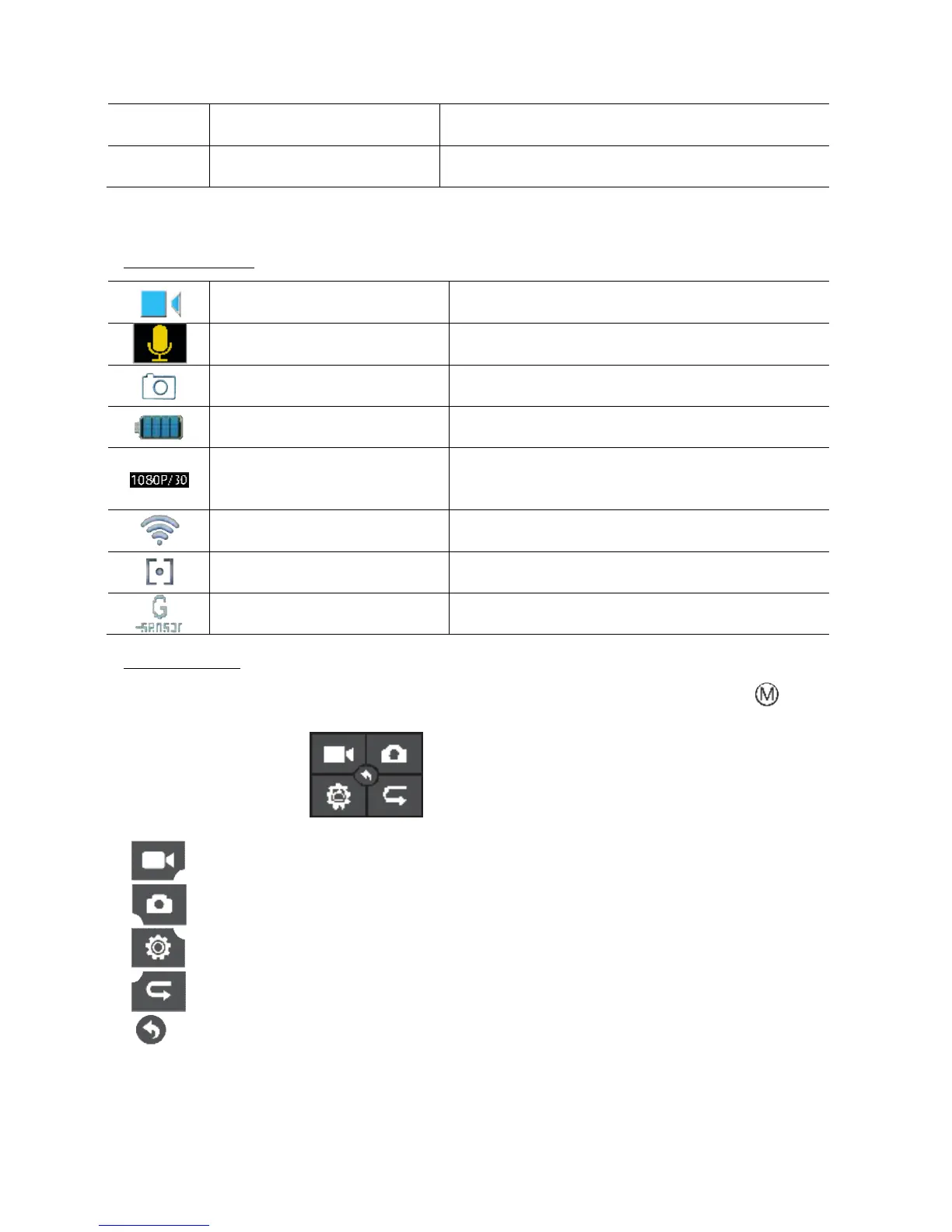
TOUCH TFT SYMBOLS
Displayed in the upper left corner, it indicates the
Displayed in the whole TFT display during the
Displayed at the top left with the shutter key is
Displayed on the bottom right, it indicates the
battery level.
Video/Photo resolution
Displayed in the bottom left corner, it indicates
the resolution active in that moment. If in photo
mode, it displays resolution in mega pixels
Displayed at the top left, it indicates Wi
connection on the video camera
d at the top centre, it indicates that
exposure meter SPOT mode is on
Displayed at the top left, it indicates that
automatic movement detection is on
ACCESS TO MENUS
To access the various menus, touch the centre of the touch screen and then the letter on the
left of the screen.
The following will appear
- Select to edit video settings.
- Select to edit photo settings.
- Select to edit common settings.
- Select to view photos and videos.
- Select to return to the previous menu.



 To Next Page