EasyManua.ls Logo

Ninglu AM706D - Operating Instructions; Display Overview

Ninglu AM706D
36 pages
Print Icon
To Next Page IconTo Next Page
To Previous Page IconTo Previous Page
Loading...
11
Operating Instructions
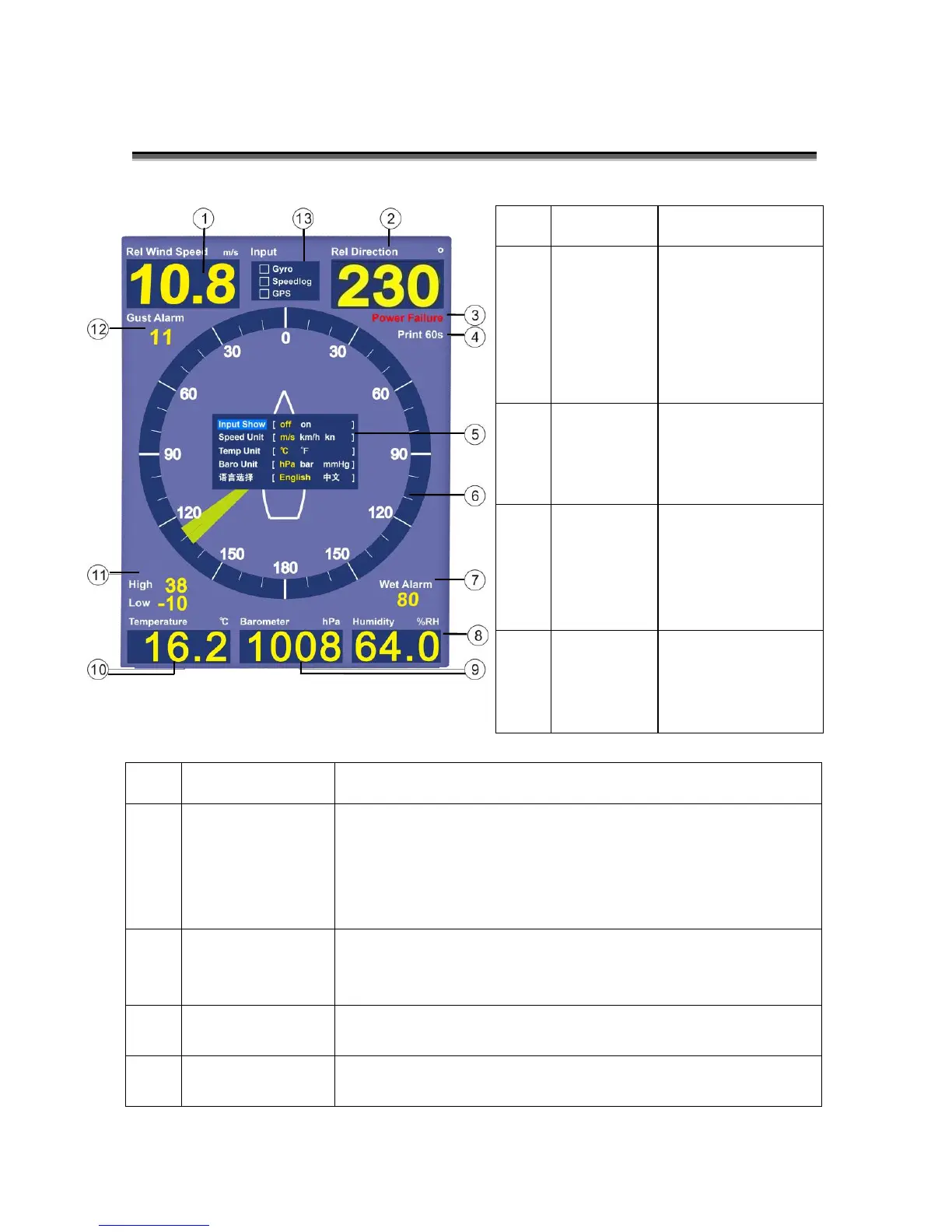
Display
No.
Display
Explanation
5
Menu
Press [MENU] to open window
Use direction keys to set up parameters
Press [OK] to save settings and exit
Automatically save settings and exit without operation
in 10s
6
Relative wind
direction
analog display
Analog display the relative direction of wind and ship
bow
7
H.HUM alarm
Set Value
Press [H.HUM] to set alarm value or turn off
8
Current
relative HUM
Display current relative humidity
No.
Display
Explanation
1
Current
relative/tr
ue wind
speed
Press [MODE] to
switch relative/
true mode.
Press [MODE] to
switch speed
unit.
2
Current
relative/tr
ue wind
direction
Press [MODE] to
switch relative
or true mode.
3
Power
failure
alarm
Anyone of two
channels power
supply failure
causes Power
Failure Alarm
4
Print set
value
Press [PRINT] to
select the
interval time of
printing.

Table of Contents