9
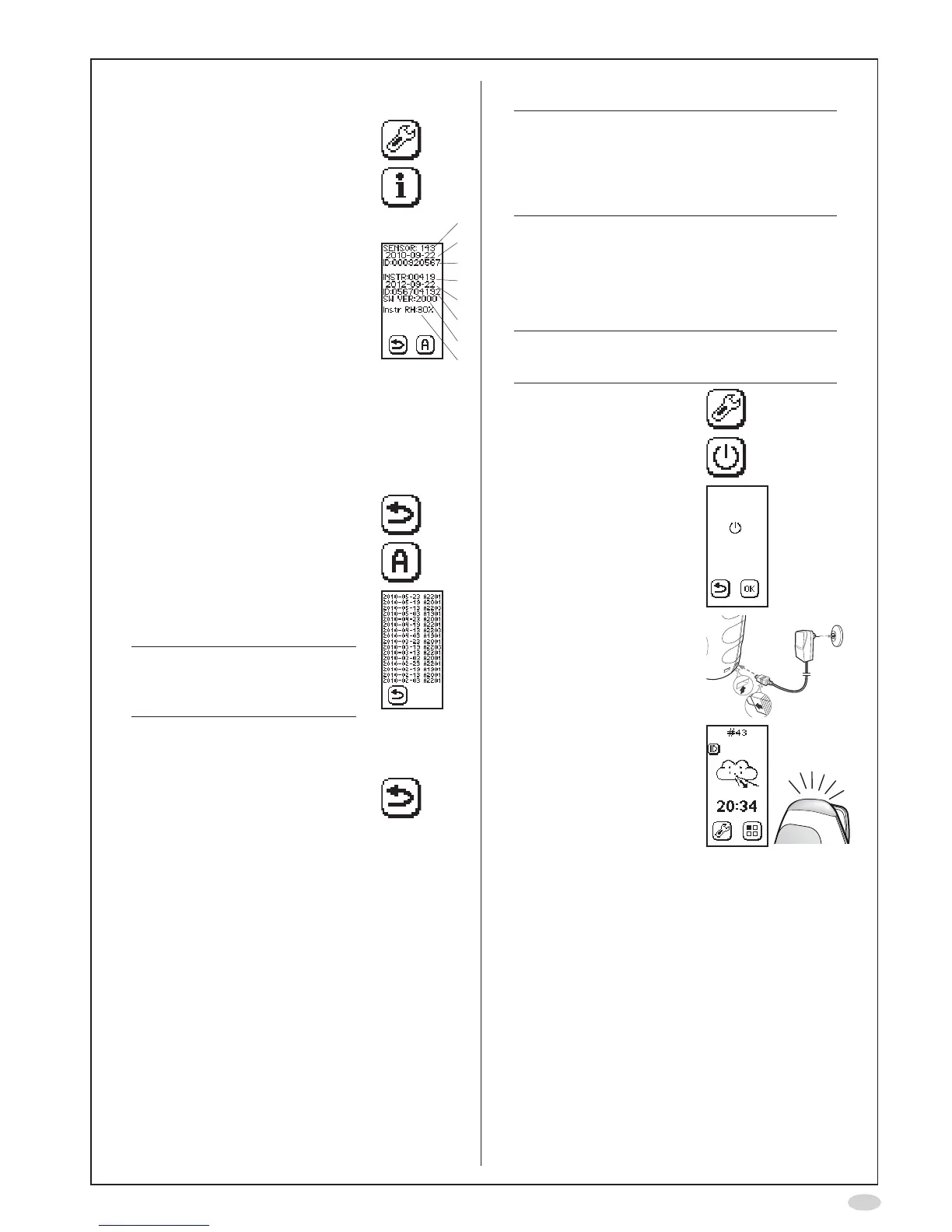
Information menu
1. SelectSettings
2. SelectInformationmenu
3. Theinformationscreenshows:
A. Numberofremainingsensor
measurements
B. Sensorexpirationdate
C. SensorserialNo.
D. Numberofremaining
instrument measurements
E. Instrumentexpirationdate
F. InstrumentserialNo.
G. Instrumentsoftwareversion
H. AmbientRH(relative
humidity),measuredinside
theinstrument(thevalue
maydifferfromRHmeasured
outsidetheinstrument)
A
B
C
D
E
F
G
H
4. SelectReturntogobacktothe
Settingsscreen
...alternativelyselectAlerttoview
the alert codes
5. Thealertcodeinformationscreen
isshown,showingthe16latest
alerts
Note!
Thealertcodesinthelistare
onlytobeusedincontactwith
Customersupport
• Date of the alert
•Alertcode(forcustomersupport
purposeonly)
6. SelectReturntogobacktothe
Information screen
Turn off NIOX MINO
®
Note!
Whenwithinthespeciedoperating
conditions(seepage15)itisrecommended
tokeepNIOXMINOwithinstalledSensor
connectedtoapoweroutletwhenever
possible.
1. Pulloutthepowersupplyunitconnectorfrom
NIOX MINO
Moving NIOX MINO
Theinstrumentcanbemovedtoanotherpower
outletwithoptimizedinitiatingstartup.
Note!
Theinstrumentmustbeconnectedtothe
newpoweroutletwithinafewminutes.
1. SelectSettings
2. SelectControlledpower
off
3. SelectOKtoconrm
4. Movetheinstrumentand
connectittoapower
outlet
5. Waituntiltheinstrument
is ready to use


 To Next Page