10
General care
•UseanewNIOX
®
Filter(patientlter)foreach
newpatient.
•Cleantheinstrumentwithaclothdampenedwith
70%ethanol,isopropanolorsimilardisinfectant.
Becarefulwhenusingdisinfectants,asexcessof
alcohol(ethanol)mightpermanentlydamagethe
Sensor.Donotusespraydetergents.
Note!
Never attempt to open or service the
NIOX MINO
®
instrumentorSensor.
Preventive inspections
Beforeeachmeasurement,visuallyinspect:
•thatNIOXMINOisnotdamaged
•thattheSensorisinplace
• that a NIOX Filter is attached
•thatthePowersupplycordisundamagedand
correctly connected to the instrument and to the
poweroutlet.
Ifanyitemismissingordamaged,contactyour
localCircassiarepresentativeorCircassiaAB.
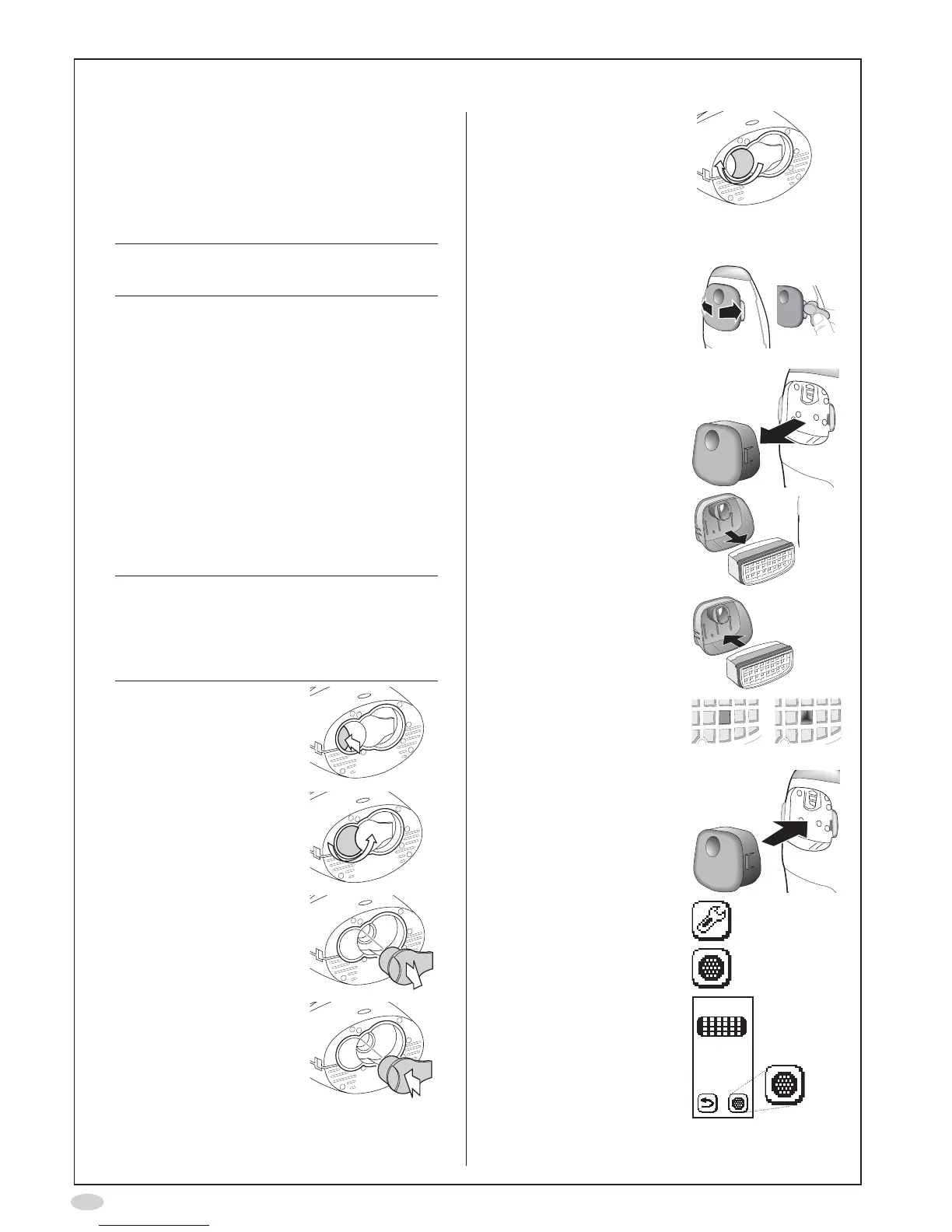
Change Sensor
Caution!
BecarefulwhenopeningtheSensor
can.Theinsideoftheopeninghassharp
edges.
DonottouchorcleanthewhiteSensor
membrane
1. Pressandholdtheblue
button...
...whileturningtheorange
swivel
2. RemovetheSensor
3. InsertthenewSensor
4. Turnbacktheorange
swiveluntillocked
Change NOscrubber
1. Spreadthelatchesapart,
oneatatime,
(Optionally:Usethered
tooldeliveredwiththe
instrument to spread the
latchesapart)
...andcarefullypullout
the cover
2. Removetheused
NOscrubberfromthe
cover
3. Insertthenew
NOscrubberintothe
cover
Makesuretouseanew
NOscrubber,withan
unbroken hole
Unbroken Broken
4. Replacethelidandmake
sure it snaps in place
5. SelectSettings
6. SelectNOscrubber
7. AgainselectNOscrubber


 To Next Page