7
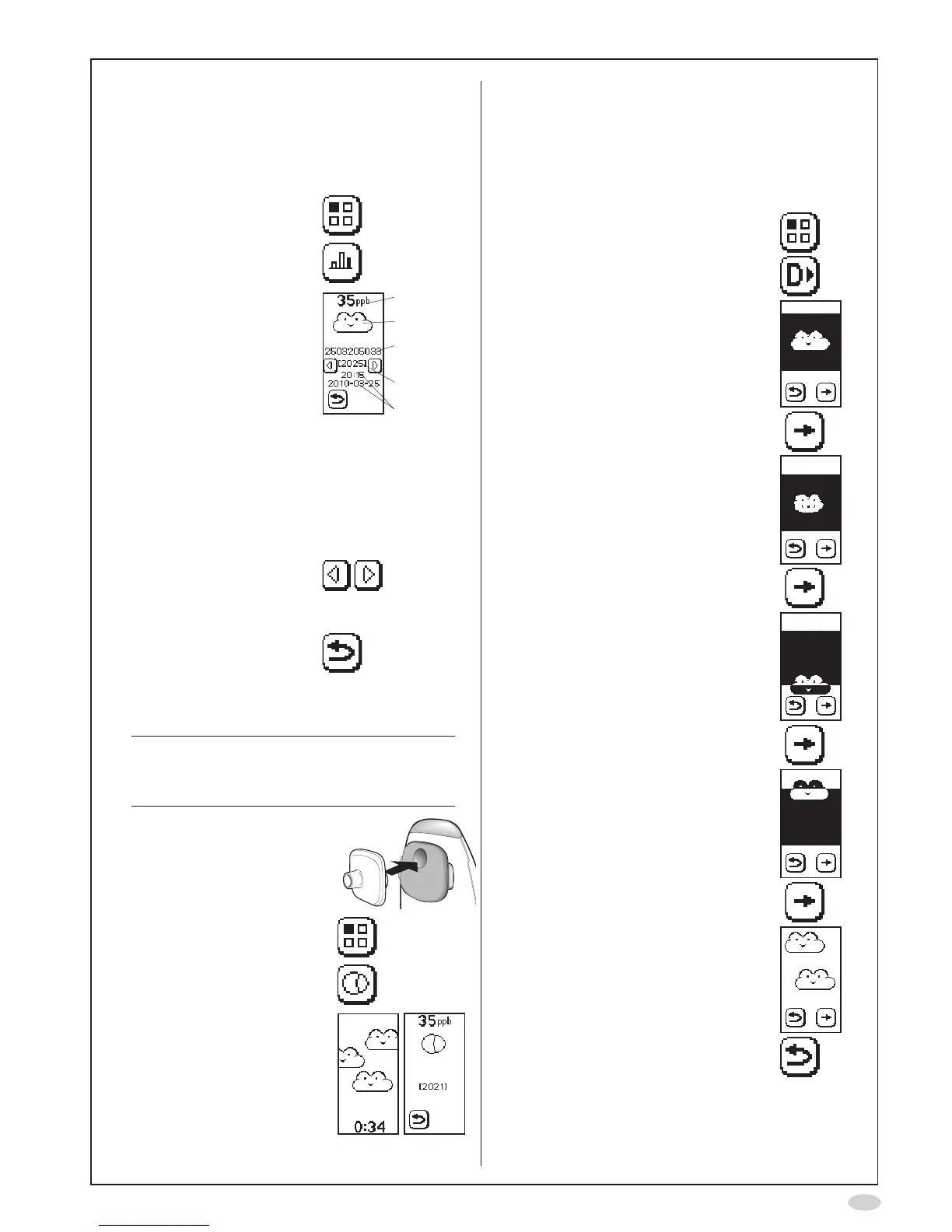
View stored results
A measurement result is automatically displayed at
theendofameasurement.Allpreviousresultsare
storedintheinstrument,andcanbeviewedatany
time.
1. SelectMode
2. SelectMeasurement
results
3. Thelateststored
measurement is
displayed,showing:
A. FeNO value
B. Measurementmode
C. PatientID
(ifentered)
D. Sequencenumber
(eachmeasurement
resultisgivena
uniqueidentication
number)
E. Timeanddateof
measurement
A
B
C
D
E
4. Usethepreviousand
next buttons to step
throughthestored
measurements
5. SelectReturntogoback
to the Mode screen
Ambient NO measurement
Note!
A completed ambient NO measurement is
countedasonemeasurementfortheSensor
and NIOX MINO
®
.
1. Attachanewpatientlter
2. SelectMode
3. SelectAmbient
measurement
4. Waitforresult
(approximately4minutes)
Demonstration mode
Usethismodeforanewpatientinorder
todemonstratethedifferentstepsduringa
measurementandthecorrespondingillustrations
onthedisplayaswellaslightandaudiofeed-back.
(Soundvolumehastobeactivated.)
1. SelectMode
2. SelectDemo
3. Theinhalationscreenisshownand
thetoplightisturnedoff
4. UsetheForwardbuttontoadvance
to the next screen
5. Thenormalexhalationscreenis
shown
Correctexhalationpressure:The
cloudinasteadycenteredposition,
thetoplightislit,andtheaudio
emits a constant sound
6. UsetheForwardbuttontoadvance
to the next screen
7. Theexhalationtooweekpressure
screenisshown
8. UsetheForwardbuttontoadvance
to the next screen
9. Theexhalationtoostrongpressure
screenisshown
10.UsetheForwardbuttontoadvance
to the next screen
11.Thewaitforresultscreenisshown
(staticview)
12.SelectReturntogobacktothe
Mode screen


 To Next Page