11
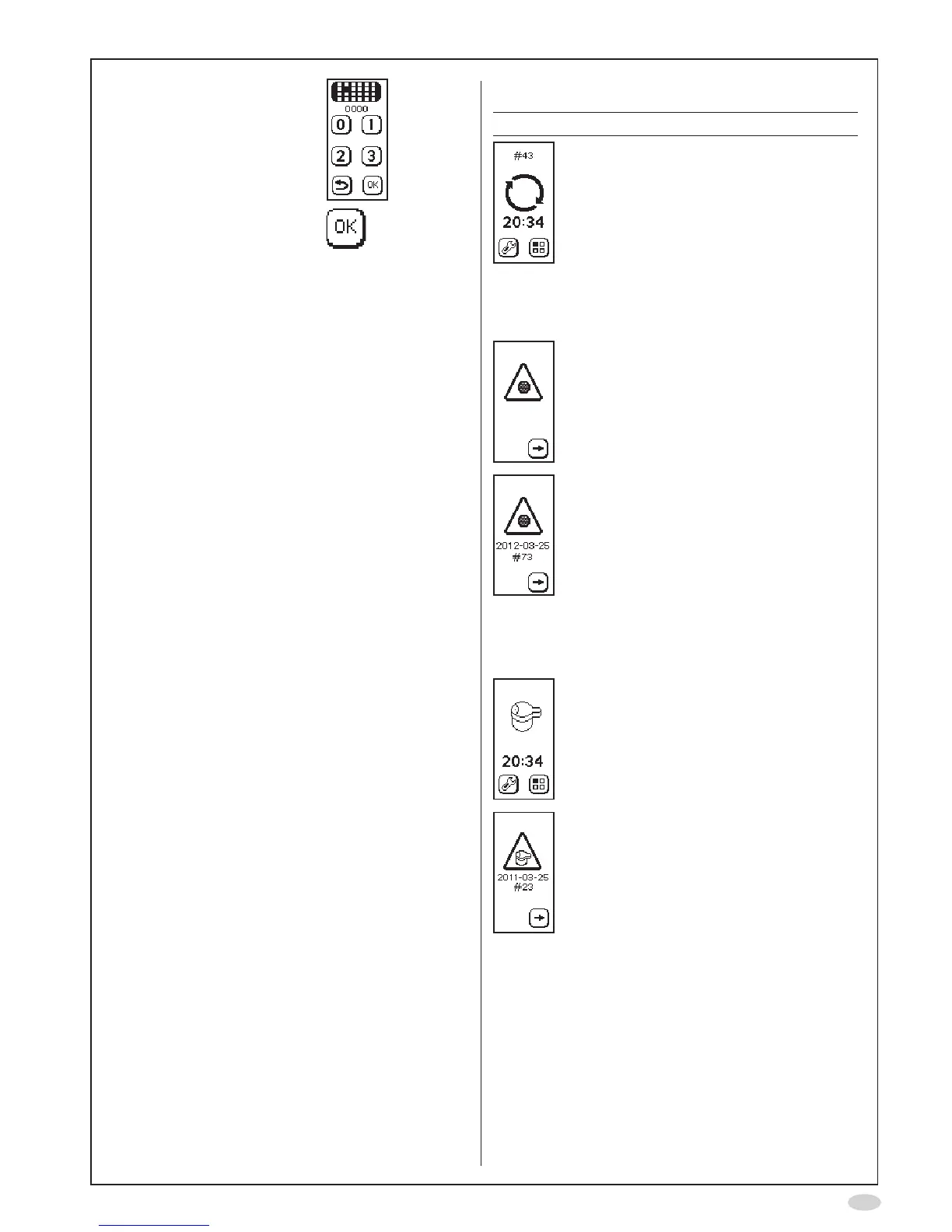
8. Inputthepasscode0000
usingthenumberbuttons
toconrmthatanew
NOscrubberisinstalled
9. SelectOK
Disposal of used/expired products
• Used or expired NIOX MINO
®
Sensorsshouldbe
recycledaccordingtothelocalrecyclingprogram
forelectronicequipment.Notethatthereisa
LiMnO
2
batteryinsidetheSensorunit*.
•AnexpiredNIOXMINOshouldberecycled,
accordingtothelocalprogramforelectronic
equipment.NotethatthereisaLiMnO
2
backup
batteryinsidetheinstrument*.
•TheNOscrubbercontainspotassium
permanganateandshouldbedisposedofas
hazardouswasteinaccordancewiththelocal
wastedisposalregulations.
NIOXMINOisRoHScompliant.
*Thebatteriesarenotuser-replaceableparts.
Return shipments
ContactyourlocalCircassiarepresentativeor
CircassiaAB.
Support
PleasecontactyourlocalCircassiarepresentative
orCircassiaTechnicalSupportifyouencounter
problems,whichyoucannotsolvewiththeactions
statedinthismanual.
Forcontactdetails,seeback-page,andprovidethe
followinginformation:
•Yourname,addressandtelephonenumber.
•SerialNo.(bothinstrumentandSensor).
•Problemdescription(asthoroughaspossible).
•Alertcodesorlists.
Limited warranty
CircassiaABprovidesaLimitedWarrantyforthis
instrumentandoriginalaccessoriesdeliveredwith
thisinstrument.Conditionsaredenedwhenthe
itemsarepurchased.
DoNOTtrytorepairtheinstrument.ItisNOT
permittedtoopentheinstrument.Anyattempt
willmakethewarrantyinvalidandperformance
accordingtothespecicationscannotbe
guaranteed.
Troubleshooting
Warning Action
Theinhalationwastooweak
to initiate a measurement
or an exhalation into the
instrumentwasperformed
priortoaninhalation-Stop
the procedure immediately
whenthiswarningappears.
Wait until the main menu
screen is displayed and repeat
theinhalationwithastronger
inhalationforce.
NOscrubberreminder.
Thesymbolisshownatrst
start-upoftheinstrument
as a reminder to insert and
setthesoftwareforanew
NOscrubber.SeeInstallation
and set-upsectionpage4.
NOscrubberalmostexpired-
OrderanewNOscrubber.
Thesymbolisshownwhen
10%ofthemeasurementsare
remainingor2weeksbefore
expiration date and continue
untiltheNOscrubberhas
expired.ANOscrubbercanbe
usedfor1000measurements
or1year.RefertotheChange
NOscrubbersectionpage10.
NoSensorconnected-
ConnectaSensor.
Sensoralmostexpired–Order
anewSensor.
Thesymbolisshownwhen
10%ofthemeasurements
areleftor2weeksbefore
expiration date and continue
untiltheSensorhasexpired.
RefertotheChangeSensor
sectionpage10.


 To Next Page