EN OPERATION
Nobles Speed Ex (03--08)
6
MACHINE SETUP
INSTALLING BRUSH
FOR SAFETY: Before installing brush, turn off
machine and unplug power cord from wall outlet.
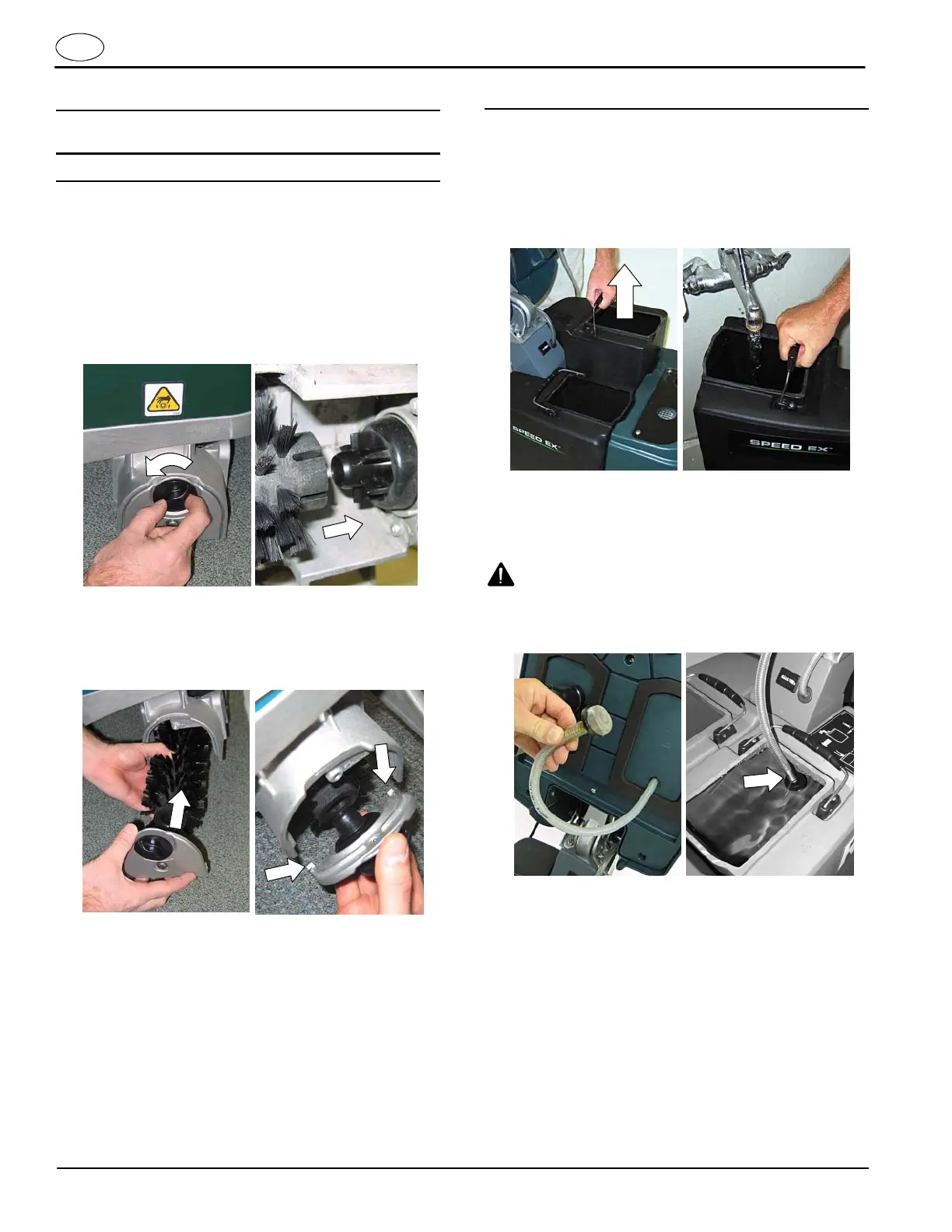
1. Remove the brush idler plate from the brush base.
T urn the idler plate locking knob counter--clockwise
to remove (Figure 1).
2. Connect the slotted end of the brush to the drive
hub (Figure 2).
FIG. 1 FIG. 2
3. Connect the idler plate to the brush and reinstall
the idler plate. Make sure the idler plate hooks
engage the brush base and that the locking knob is
secure (Figure 3).
FIG. 3
NOTE: If storing the machine for an extended period,
remove the brush to prevent a flat spot.
FILLING SOLUTION TANK
1. Lift the cover and remove the solution tank from the
machine(Figure4).
2. Fill the solution tank with 5 gal/19 L of clean water
(122°F/5 0°C maximum temperature) (Figure 5).
Partially fill if unable to lift a full tank.
FIG. 4 FIG. 5
ATTENTION: Do not use the recovery tank to fill
the solution tank. Dirt from the recovery tank may
cause damage to the solution pump.
W ARNING: Fire Or Explosion Hazard, Do Not
Use or Pick Up Flammable Materials.
3. Submerge the solution hose screen into the
solution tank and close the cover.
FIG. 6





 To Next Page