System Setup
3-13
Part 1603227-12
E 2016 Nordson Corporation
Wall / Rail Mount System Air Supply
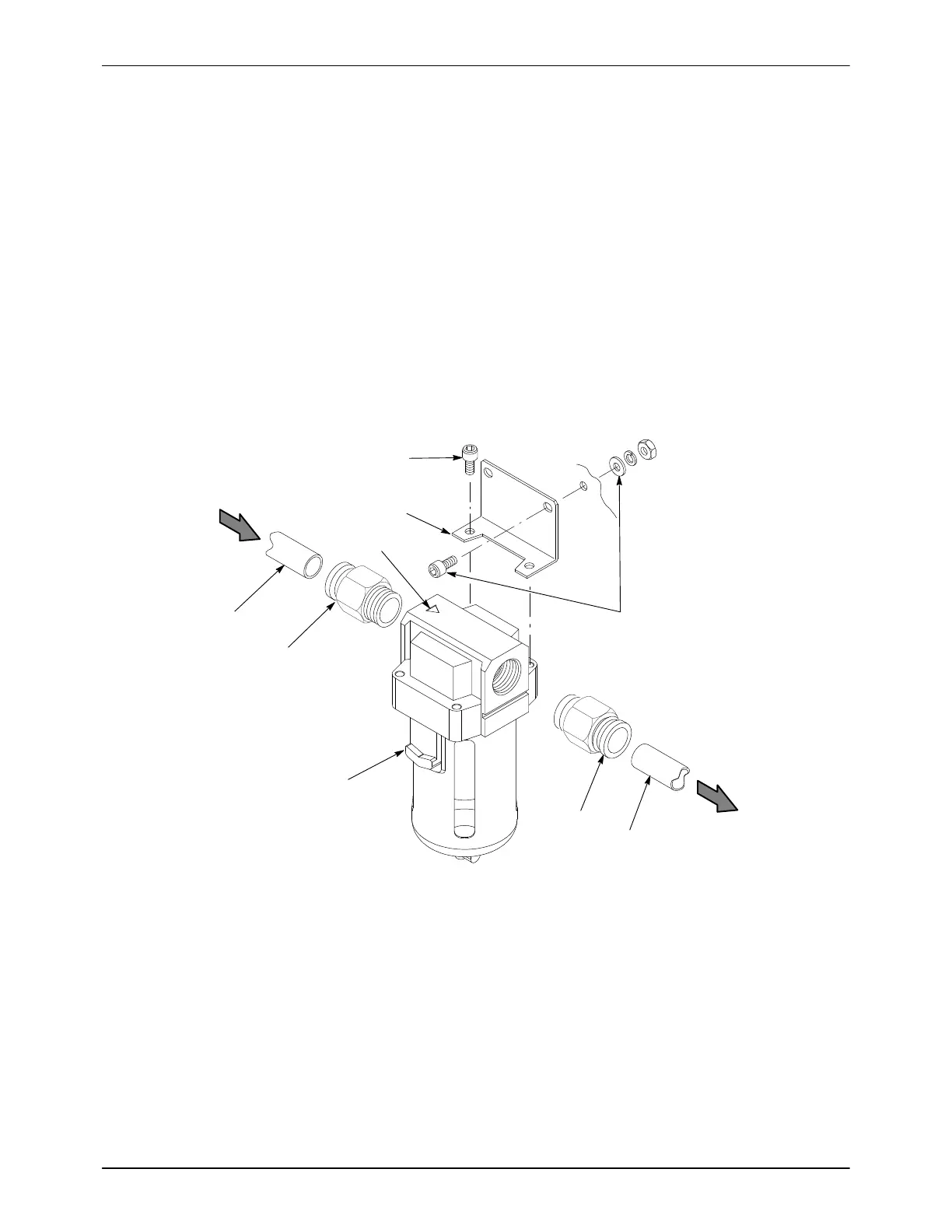
See Figure 3-14.
1. Use the mounting bracket (4) as a template to mark and drill mounting
holes in the selected mounting surface. Make sure there is sufficient
clearance to connect air tubing and change the filter element.
2. Install the two male connectors (2) included in the kit in the filter input
and output ports.
3. Install the mounting bracket on the filter, using the included M5 screws
(3), on the side of the filter opposite the release latch (6).
4. Mount the filter with customer-supplied fasteners (7).
5. Note the orientation of the flow indicator (5) on the top of the filter. Cut
10-mm blue air tubing to the required lengths to connect the air supply
to the filter and the filter to the controller, then connect the tubing.
1
1
2
2
3
4
6
5
7
FROM SUPPLY
TO CONTROLLER
Figure 3-14 Air Filter Installation − Wall and Rail Mount Systems
1. 10-mm air tubing (blue)
2. 10-mm tube x 1/2 male connectors
3. M5 screws
4. Bracket
5. Flow indicator
6. Release latch
7. Customer-supplied fasteners


 To Next Page