Repair
6-7
Part 1603227-12
E 2016 Nordson Corporation
Cable Replacement
Cable Removal
1. Disconnect the gun cable from the controller.
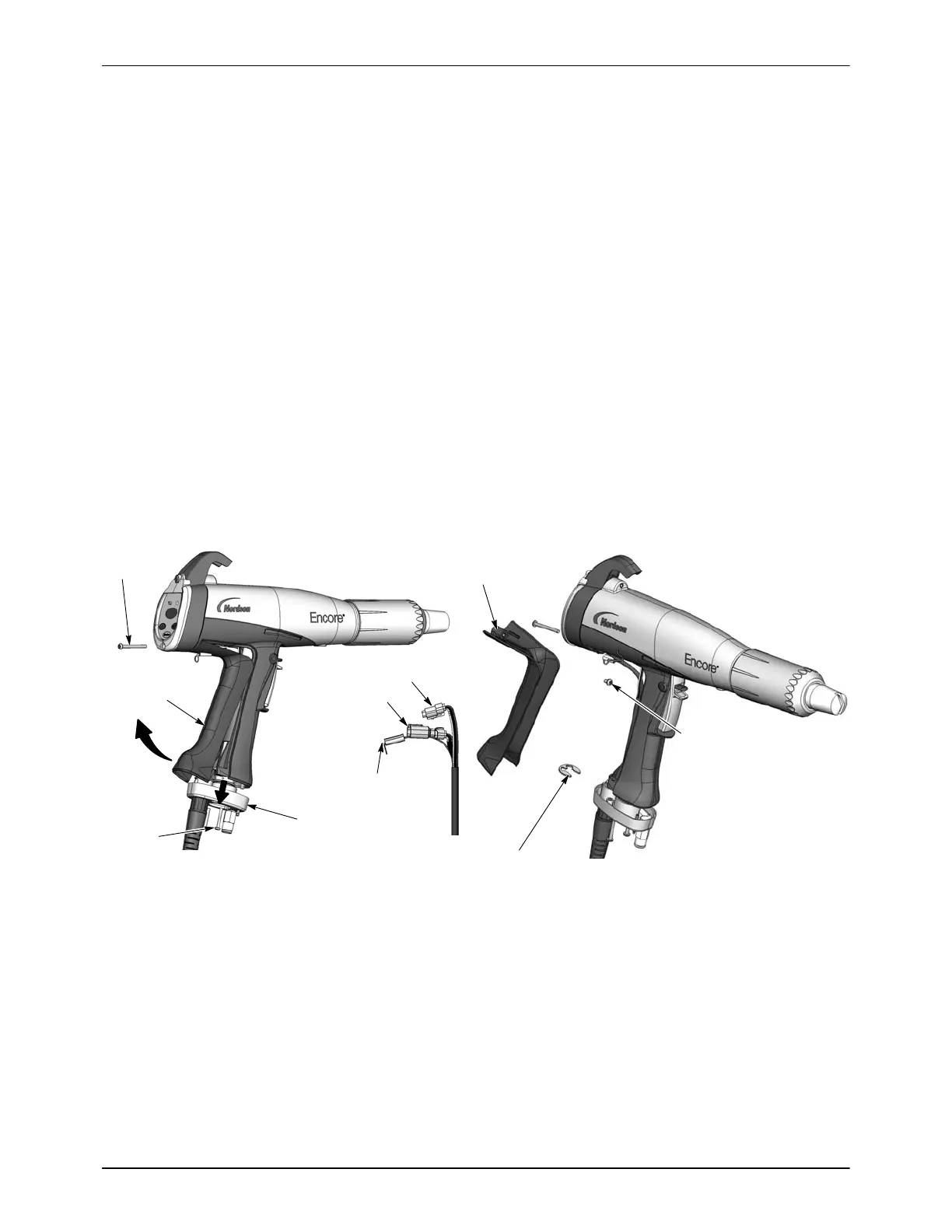
2. See Figure 6-7, View A. Remove the two M3 x 20 screws (22) securing
the handle base (21) to the handle.
3. Remove the lower M3 x 35 screw (12) from the display module.
4. Pull the base away from the handle enough to free the bottom edge of
the ground pad (18) from the base.
5. Pull the bottom edge of the ground pad out and away from the handle.
6. See Figure 6-7, View B. Remove the M3 x 8 screw, lock washer (16,
17), and ground terminal from the ground pad.
7. Remove the retaining ring (19) from the cable.
8. See Figure 6-7, View C. Pull the cable connectors out of the handle.
Insert a small flat-bladed screw driver in the slots of the power supply
and display connectors to release the catch and disconnect them.
9. Pull the cable out of the handle base, feeding the connectors through
the base one at a time.
18
22
21
19
16
18
VIEW A
VIEW B
VIEW C
17
Power Supply
Ground
Display
12
Figure 6-7 Cable Replacement
12. M3 x 35 screw
16. M3 x 6 screw
17. Lock washer
18. Ground pad
19. Retaining ring
21. Handle base
22. M3 x 20 screws


 To Next Page