Norstar Orientation /
11
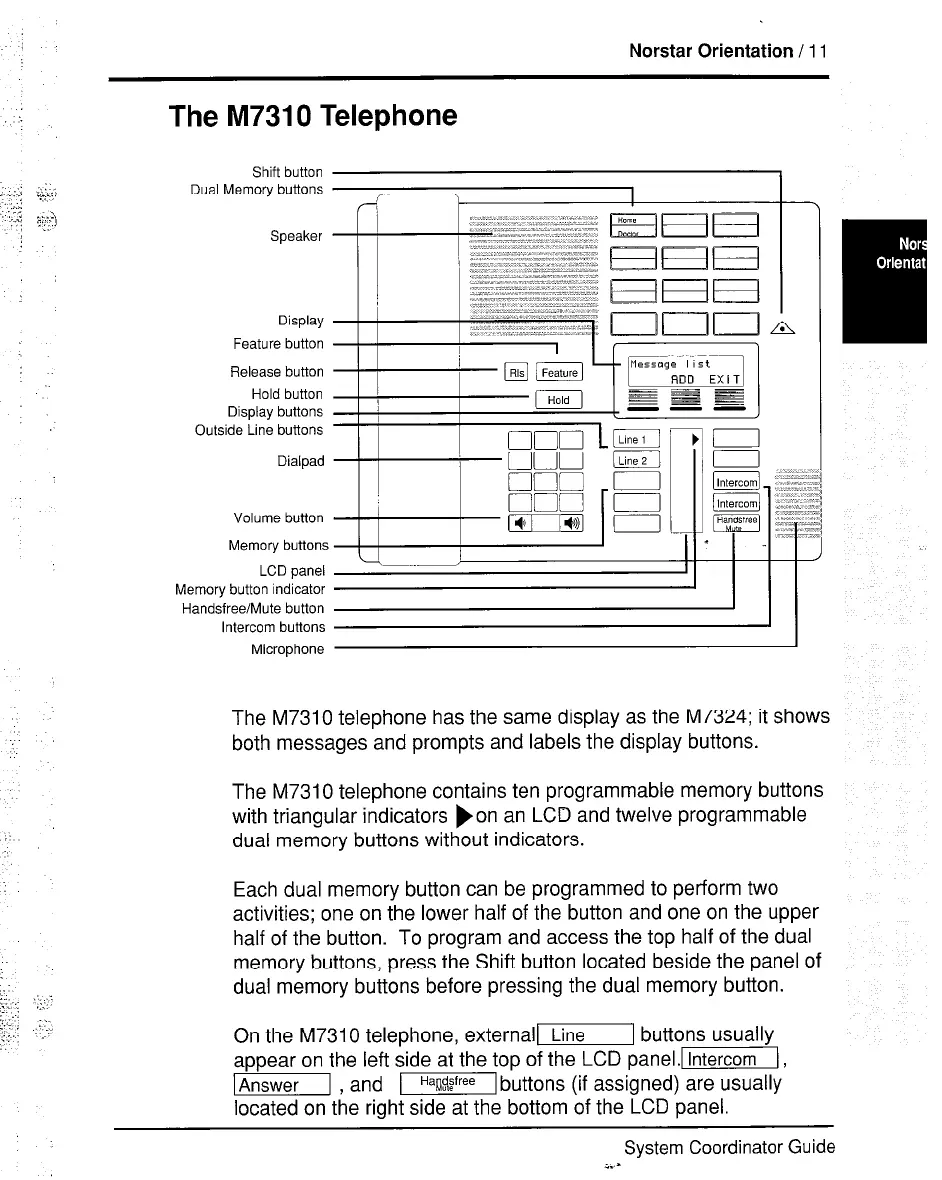
The M7310 Telephone
Shift button
Dual Memory buttons
Speaker
Display
Feature button
Release button
Hold button
Display buttons
Outside Line buttons
Dialpad
Volume button
Memory button:
LCD panel
Memory button indicator
Handsfree/Mute button
Intercom buttons
Microphone
The M7310 telephone has the same display as the M7324; it shows
both messages and prompts and labels the display buttons.
The M7310 telephone contains ten programmable memory buttons
with triangular indicators )on an LCD and twelve programmable
dual memory buttons without indicators.
Each dual memory button can be programmed to perform two
activities; one on the lower half of the button and one on the upper
half of the button. To program and access the top half of the dual
memory buttons, press the Shift button located beside the panel of
dual memory buttons before pressing the dual memory button.
On the M7310 telephone, externalll buttons usually
appear on the left side at the top of the LCD panel.l[,
m , and -buttons (if assigned) are usually
located on the right side at the bottom of the LCD panel.
System Coordinator Guide
i.s


 To Next Page