Northstar EXPLORER 550/550i Installation and Operation Manual
36
10-6-2 Managing fuel consumption curves
Renaming a curve
1 Press
one or more times until the
Setup menu is displayed, then select Fuel.
2 Select Fuel consumption curve. Select Name
and select the name of the curve to rename.
3 Select Rename and press
. Change the
name.
10-6-3 Using fuel consumption curves
Deleting a curve
1 Press
once or more until the Setup
menu is displayed, then select Fuel.
2 Select Fuel consumption curve. Select Name
and select the name of the curve to delete.
3 Select Delete.
Selecting a curve
1 You must make a fuel consumption curve
before you can use it (see section 10-6-1).
2 On the Fuel display, press
, select Fuel
consumption curve and select the name of
the curve to use.
3 On the fuel display, press
if necessary
to select Fuel curve and display the fuel
consumption curve.
Note
a On a multi engine boat, keep the RPM of all
engines similar while using a curve.
b The shape of the curve depends on the type
of speed sensor you selected when making
the curve (see sections 10-5-1 and 10-5).
Using a curve
Compare your boat’s performance now, at the
current RPMs, with the boat’s performance when
you made the curve. You can compare your
boat’s performance now with a curve made
under ideal conditions or with a curve made
under similar conditions.
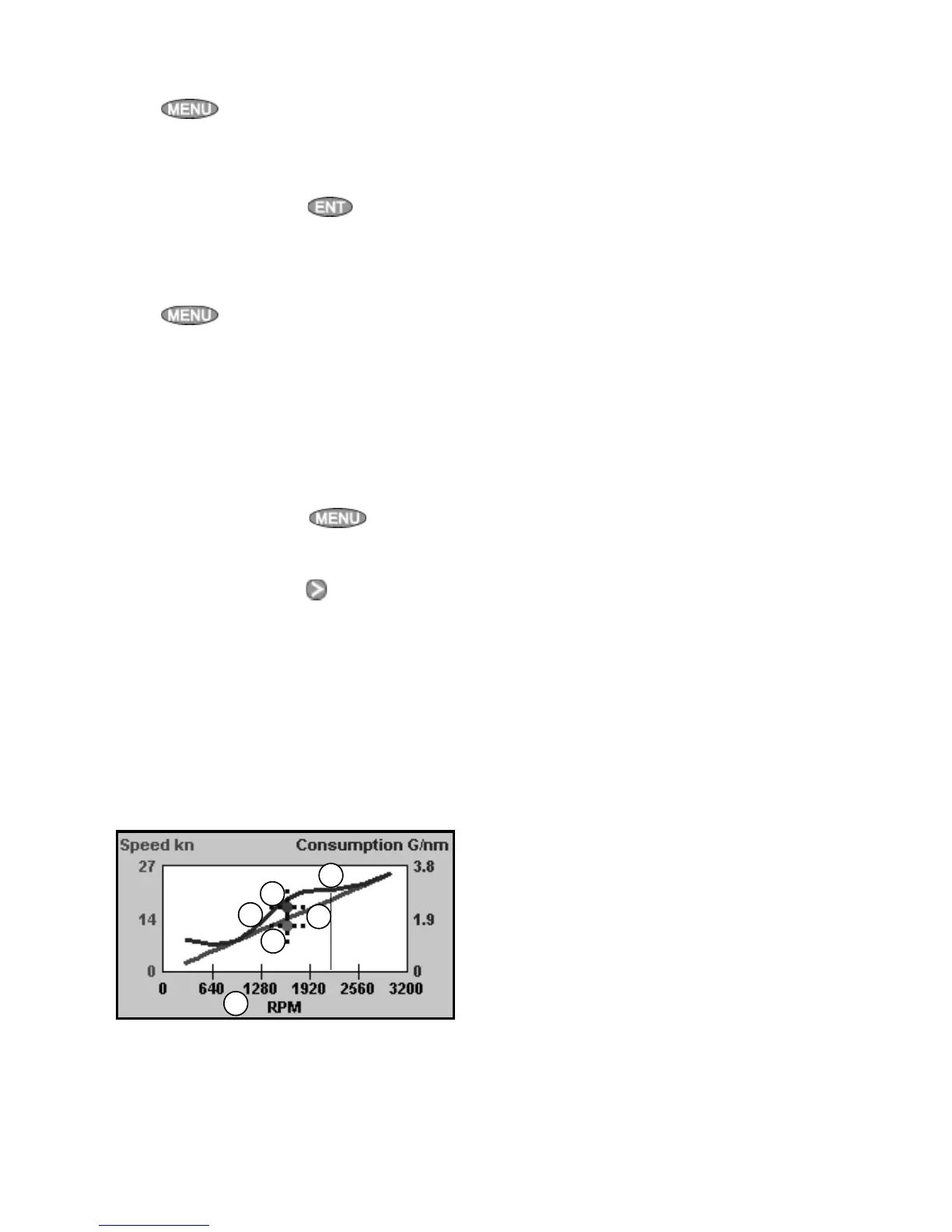
Information in a curve
A RPM of the boat now. For a twin engine boat,
the RPM is the average of the two RPMs.
B Red curve: boat speeds at different
RPMs recorded when you made this fuel
consumption curve.
C Red marker: the boat speed now. This marker
is below the red curve, showing that the boat
speed now at this RPM is less than when you
recorded the curve.
D Blue curve: fuel consumption at different
RPMs recorded when you made this fuel
consumption curve.
E Blue marker: the fuel consumption now. This
marker is below the blue curve, showing
that the fuel consumption now at this RPM is
better than when you recorded the curve.
F If the blue curve has a dip, then running the
boat at this RPM will give the best speed for
the least fuel consumption.
C
D
E
F
A
B



 To Next Page