Switches and Indicators Product Overview
LCD2-80 Instruction Manual — P/N 53242:B1 10/25/2012 11
1.6.2 Piezo
The LCD2-80 sounder will be activated when any new alarm or trouble is
received from the panel. It is silenced by the ACKNOWLEDGE switch.
1.6.3 Address Switches - SW1 and SW2
In ACS mode, these rotary switches must be set to the address of the
LCD2-80 on the EIA-485 line. Set the TENS rotary switch (SW1) to the
number in the tens position of the LCD2-80’s address. Set the ONES
rotary switch (SW2) to the ones position.
1.6.4 ACS/TERM Mode Switch - SW10
Set to A (ACS mode) or T (Terminal mode).
1.6.5 DIP Switches - SW3
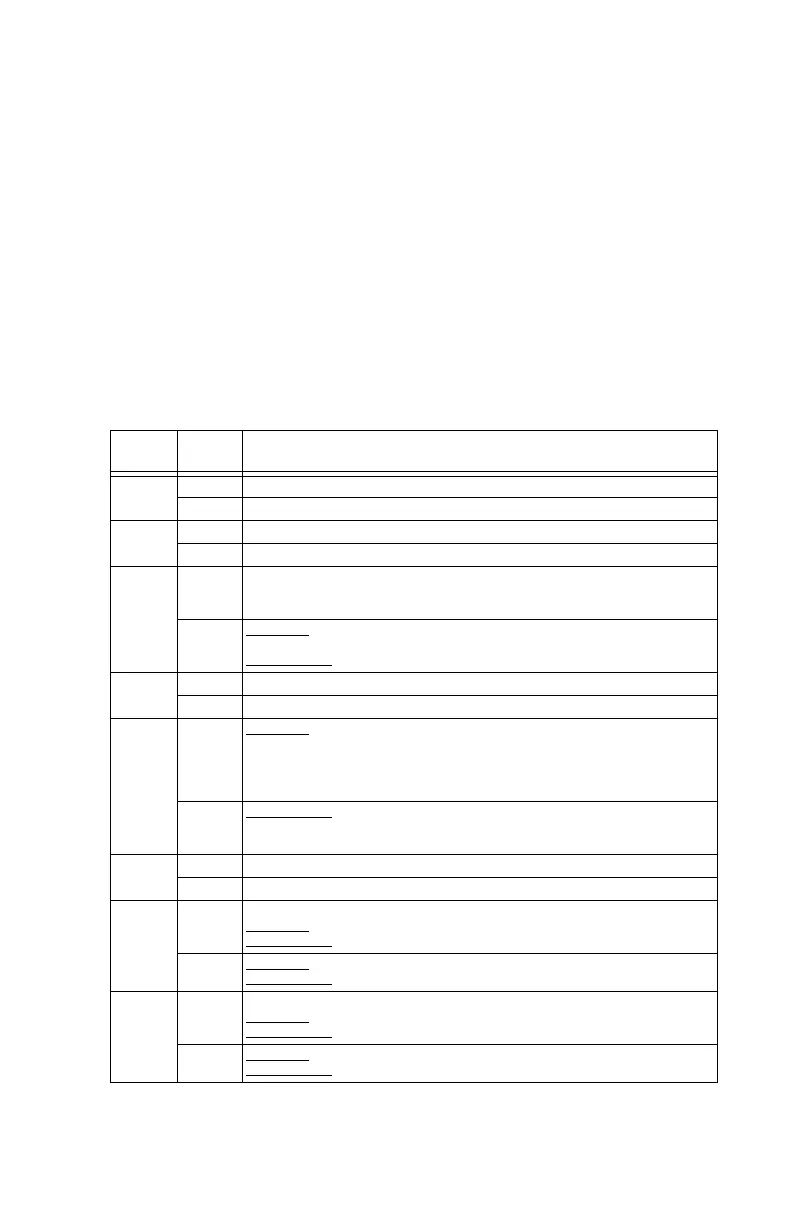
DIP
Switch #
Setting Description
3-1
ON Control keys locked.
OFF Control keys unlocked.
3-2
ON Piezo disabled.
OFF Piezo enabled.
3-3
ON ACS Mode: Set ON to do a database download.
Terminal Mode: Set ON for communication with panels release 15 and later that
support the LCD2-80.
OFF ACS Mode
: Set OFF for normal operation, when there is no download being
performed.
Terminal Mode
: Set OFF if the LCD2-80 is used with a legacy panel.
3-4
ON Set ON to connect to PC for updating LCD2-80 firmware.
OFF Set OFF when not connected to PC for updating LCD2-80 firmware.
3-5
ON ACS Mode
: When the LCD2-80 is set for ACS Mode (switch 3-6 is set to ON), and
it will be used in receive-only mode, switch 3-5 must be set to ON. Otherwise, set
to OFF. When in ACS receive-transmit mode the panel supervises the LCD2-80,
but the LCD2-80 does not have control of the fire alarm control panel; it only
annunciates fire alarm control panel events.
OFF Terminal Mode
: When the LCD2-80 is set to Terminal Mode (switch 3-6 is set to
OFF), the last LCD2-80 on the EIA-485 line should be set to ON. All others on the
EIA-485 line should be set to OFF.
3-6
ON Set ON for ACS Mode. Note: This setting must be made before power-up.
OFF Set OFF for Terminal Mode.
3-7
ON EIA-485 Termination:
ACS Mode
: Set ON on last LCD2-80.
Terminal Mode
: Set ON.
OFF ACS Mode
: Set OFF on all but last LCD2-80.
Terminal Mode
: Do not use. Always set to ON.
3-8
ON EIA-485 Termination:
ACS Mode
: Set ON on last LCD2-80.
Terminal Mode
: Set ON.
OFF ACS Mode
: Set OFF on all but last LCD2-80.
Terminal Mode
: Do not use. Always set to ON.
Table 1.2 SW3 DIP Settings


 To Next Page