44
ML0044B December 1, 2017 Copyright 2017 Bitronics, LLC
3.6.1 Display Screens (Optional Display)
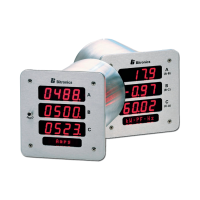
The PPXIITD can display several per-phase and total quantities for the circuit being
monitored. In order to make all quantities available, the display scrolls from quantity to
quantity approximately every 5 seconds. The quantities are refreshed once a second.
The Alphanumeric display at the bottom of the instrument indicates to the user what
quantity is being displayed. The Alphanumeric display also provides the user with
primary engineering units (Watts, kWatts, MWatts, etc.). Listed in Appendix A4 are
standard screens available in the PPXIITD. Configurable screen enable settings allow
the user to enable or disable each of the display screens, in order to view only a
selected subset of all the measurements the meter is capable of displaying. Refer to
the A3 on Setup Mode for instructions on programming Screen Enable Settings (Setup
menu -
1.6
Scrn Ena) and setting Custom Screens.
The following screens are enabled by default:
Amps A,B,C
Volts AN,BN,CN
Volts AB,BC,CA
Total Watts / Total Vars
VAs Total / Power Factor
Frequency
Demand Amps A,B,C
The Default HOME screen is:
Amps A,B,C.
The screens that are displayed in the scrolling mode can be programmed
(ENABLED/DISABLED) by the user. This programming can be done by using the
front panel buttons of the device or through the web server.
Enable/Disable Display Mode Screens via the front buttons on Display:
The Screens can be enabled or disabled (refer to Section 5.5) via the front display
buttons by entering the setup mode section and going to the Screen Enable menu
(1.6, Scrn Ena). This setup can also be accomplished via the web interface through
the Ethernet service port by going to the appropriate setup page.
Enable/Disable Display Mode Screens via the Web Server:
The screens can be enabled/disabled via the web server (Refer to section A3). From
the web page, select the Settings tab then click on Screen Enable in the menu list.
For all the Watt, VAR and/or PF displays the "SIGN" of the quantity is indicated by the
center segment of the left most digit, which will be illuminated to produce a "-" for
negative quantities. Positive quantities will have no polarity indication. This restricts


 To Next Page