41
ML0044B December 1, 2017 Copyright 2017 Bitronics, LLC
browse to find the configuration file you wish to load. Once selected, click on Submit,
and then you will need to reboot the unit.
3.5 Optional Serial Port (option includes Digital IO) – Extended Chassis Only
The PPX II has an optional serial port that is user configurable for RS232 or RS485,
and support baud rates up to 115200. See section 4.4 for screen shot showing web
configuration for serial port. The RS-232 drivers support full and half duplex modes.
See Figure 2 in the Digital IO section for signal assignments for the serial port.
Serial cable requirements for RS485 connection:
Tie RS-485 cable shields (pin 18) to earth ground at one point in system.
The recommended torque rating for the terminal block wire fasteners are listed in the
Physical Specifications table (section 1.3).
A Transient Voltage Suppressor (TVS) clamp device is used on the serial port as the
method of protection.
3.5.1 RS485 Connections (Extended Chassis Only)
Note that various protocols and services have different port connection requirements.
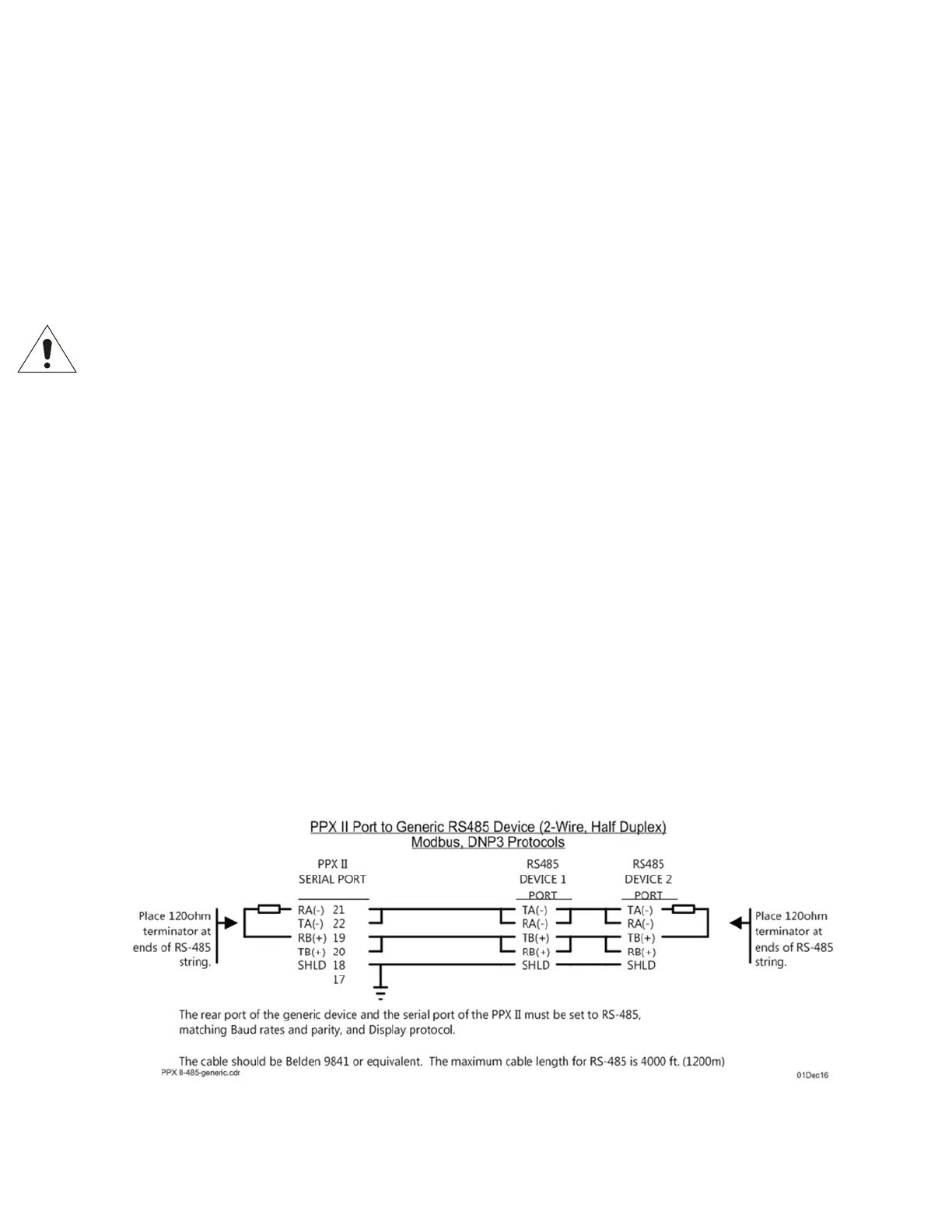
When making connections to serial ports for Modbus or DNP3 over RS485, 2-wire half
duplex is required. This is because it is imperative to maintain a minimum time period
(3 1/3 characters) from the time the transmitter shuts off to the next message on the
bus in order to guarantee reliable communications. However, when using ZMODEM
or connecting to the remote display, asynchronous 2-way communications are
required, and therefore a 4-wire full duplex (technically RS422) connection is needed.
See figure 8 below for RS485 cable wiring diagrams showing both 2 and 4 wire.


 To Next Page