59
ML0044B December 1, 2017 Copyright 2017 Bitronics, LLC
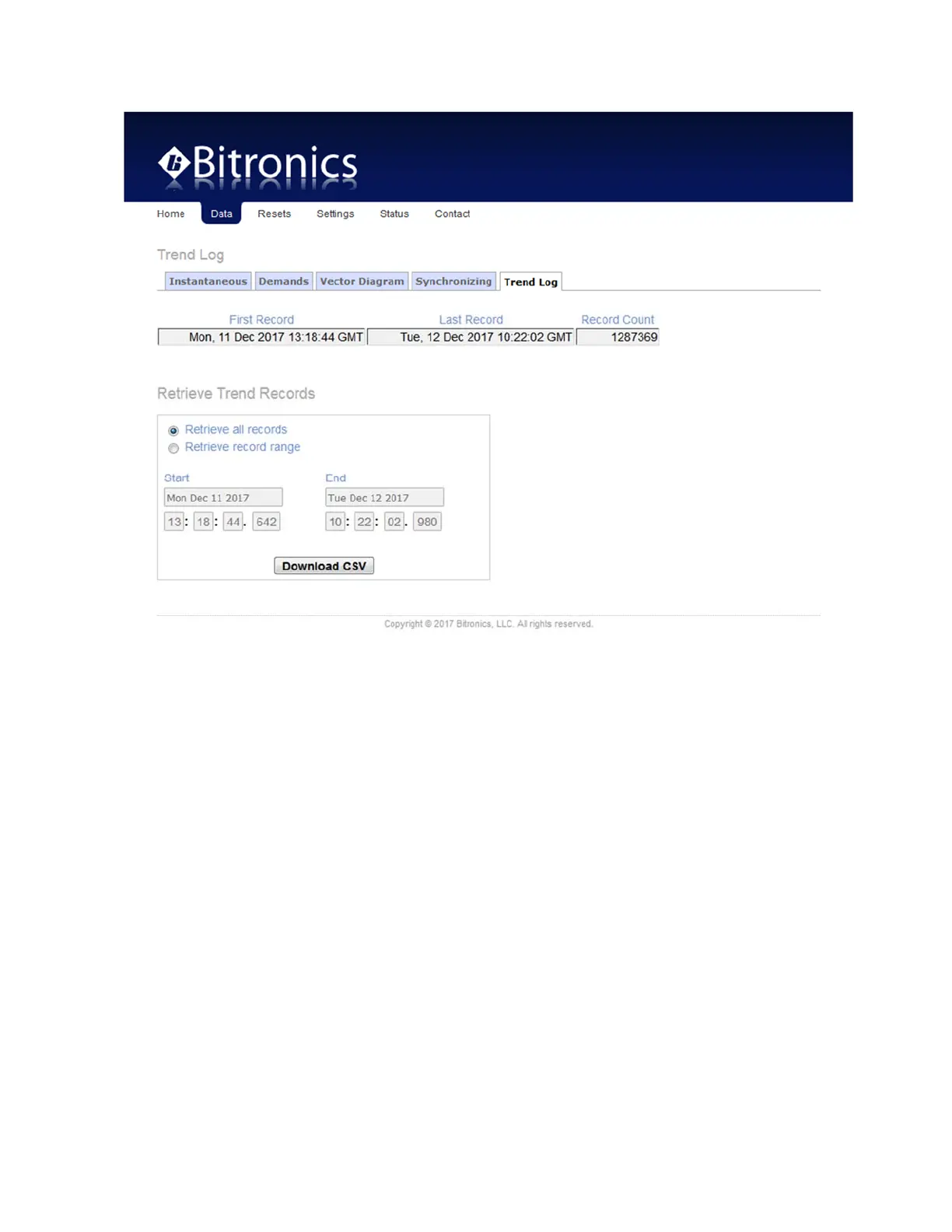
The data page for trend recording gives information about the trend record, but also
provides for retrieving it, or part of it via start and end times, in .csv format.
One trend record contains a timestamp and values for all measurements that are
selected for recording for that instant or time interval, depending on the
configuration.
When downloading a CSV file, navigating away from the log page will terminate
the download.
During a CSV download, the web interface will not respond to any other
requests. For example, one cannot open another browser window and make
configuration changes or view the other data pages.
It is up to 4x faster to download a CSV file with the trend recorder disabled than
to download while the trend recorder is actively recording at intervals of every
sample or every-other-sample. Active recording at intervals of 1 second or
greater will not slow down the CSV download.
Resets page: From this page select the quantity to be reset and click apply.
Optionally,
Energy values can be reset to specific non-zero values by entering the
desired reset value in the appropriate field as a whole number and clicking Apply. Any
fields that are left blank will be reset to zero.


 To Next Page