11
National Rejectors, Inc. GmbH, Buxtehude
de s i g nSRG – Internal HENRI functions
Design4
This chapter describes:
design and operating elements of the HENRI service tool•
the functions of the operating keys of the HENRI service tool•
the menu structure of the HENRI service tool•
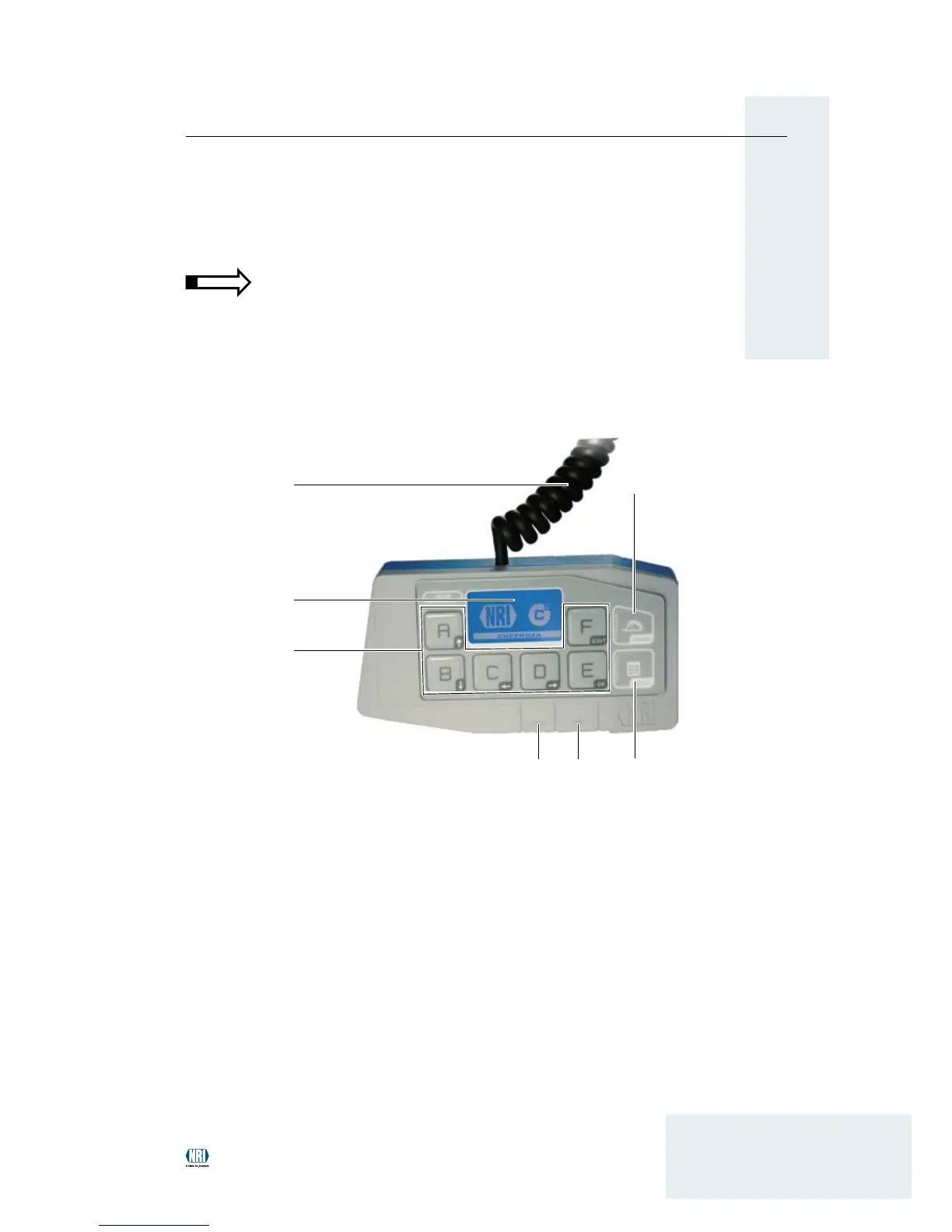
Operating elements
General menu key HENRI 1
(for general functions)
c2
2
menu key MENU
(for internal c
2
functions)
Slot – SIM card3
Operating elementsFig. 1:
1
3 2
7
6
4
5
USB port – PC4
Multifunction keys A–F5
Display6
Connecting cable (RJ-45 plug (8-pole)) – 7
payment system
To operate and service the coin changer connected, the service tool is
equipped with a display [1/6], six multifunction keys [1/5] and two menu
keys [1/1, 2]. It can be connected to an NRI payment system (e.g. coin
changer) using the connecting cable installed with RJ-45 plug [1/7]. For,
e.g., rmware updates the service tool can be connected to a PC using
the USB port [1/4].


 To Next Page