12
de s i g n
National Rejectors, Inc. GmbH, Buxtehude
SRG – Internal HENRI functions
Functions of the operating keys
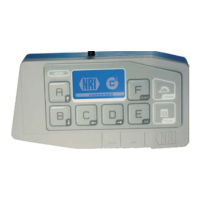
The HENRI keypad [1/1, 2, 5] can be divided in three groups:
Multifunction keys • A to F [1/5]
c•
2
menu key MENU [1/2]
General menu key • HENRI [1/1]
Multifunction keys A to F
The multifunction keys A to F [1/5] are arranged around the display [1/6].
The functions which can proceed using the keys depend on the:
payment system connected •
(currenza c
2
or other NRI payment systems)
active menu •
(for internal c
2
or general functions)
c
2
menu key MENU
Pressing the MENU key [1/2] you enter the main menu for operation, con-
guration and service work on the coin changer currenza c². Using this
main menu you are able to select the internal c
2
functions.
The menu is only available if HENRI is connected to a currenza c².
If not, the key has no function.
This short reference guide only describes the general operation and
proceeding of internal HENRI functions (cp. further manuals).
General menu key HENRI
Pressing the HENRI key [1/1] you enter the main menu for
work on the NRI coin changer currenza c•
2
which require an external
data media (e.g. reading out statistical data, updating rmware).
basic settings and service work on the HENRI service tool.•
service work and conguration of the NRI coin changers G-46.F4xxx •
and E-66/A-66.


 To Next Page