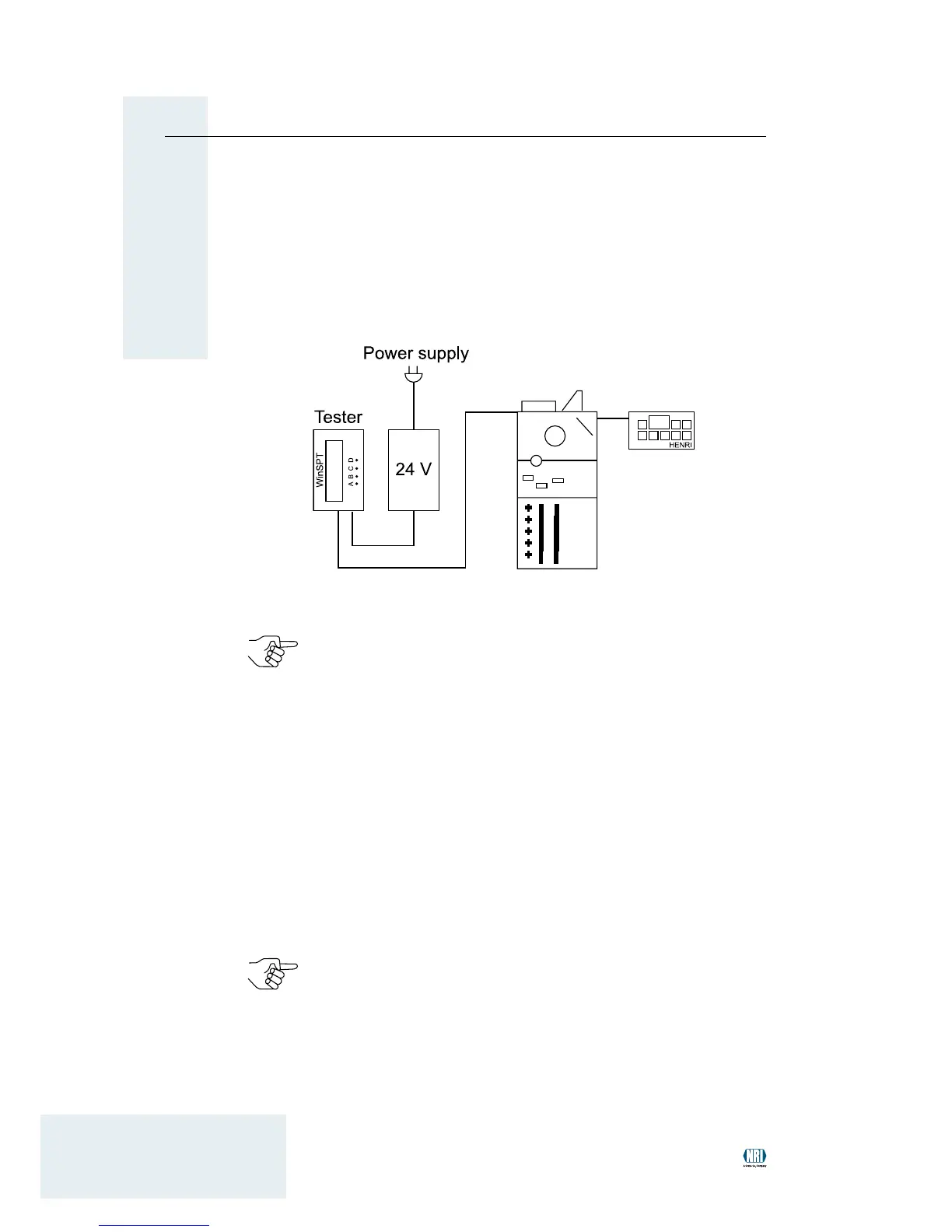
Connecting HENRI in the workshop
If the NRI payment system has been removed from the vending machine
for, e.g., update purposes, it has to be powered by a tester. The tester of
the WinSPT PC test station along with the appropriate power pack and
cable are used to supply the payment system with voltage (see Fig. 3):
Using the complete WinSPT PC test station all of the vending ma-
chine functions can be simulated in order to test a serial NRI payment
system. For further information regarding the WinSPT PC test station
and all ordering codes please refer to our product accessory pages
on the internet (www.nri24.com).
If necessary, connect 24V-power pack to appropriate power cable.1
Connect WinSPT tester to power pack using the DC interface.2
Connect WinSPT tester to, e.g., coin changer using the MDB inter-3
face and the machine connecting cable (if necessary, by means of
the adapter cables which are part of the accessory kits for other ma-
chine interfaces).
Connect the power pack to the power supply using the power cable.
4
The display of the WinSPT tester shows "SPT (C)NRI vx.x_".
Plug the HENRI connector into the socket on the top right of the coin
5
changer (see Fig. 2).
As HENRI identiesthe connectedpayment system automatically
thedisplayshowsdevicespecicdataaftertheconnectionwiththe
payment system has been established.
Connecting HENRI in the workshopFig. 3:


 To Next Page