Nuvoton Nu-Link Debug Adapter User Manual
Oct 24, 2019 - 12 - Revision V1.01
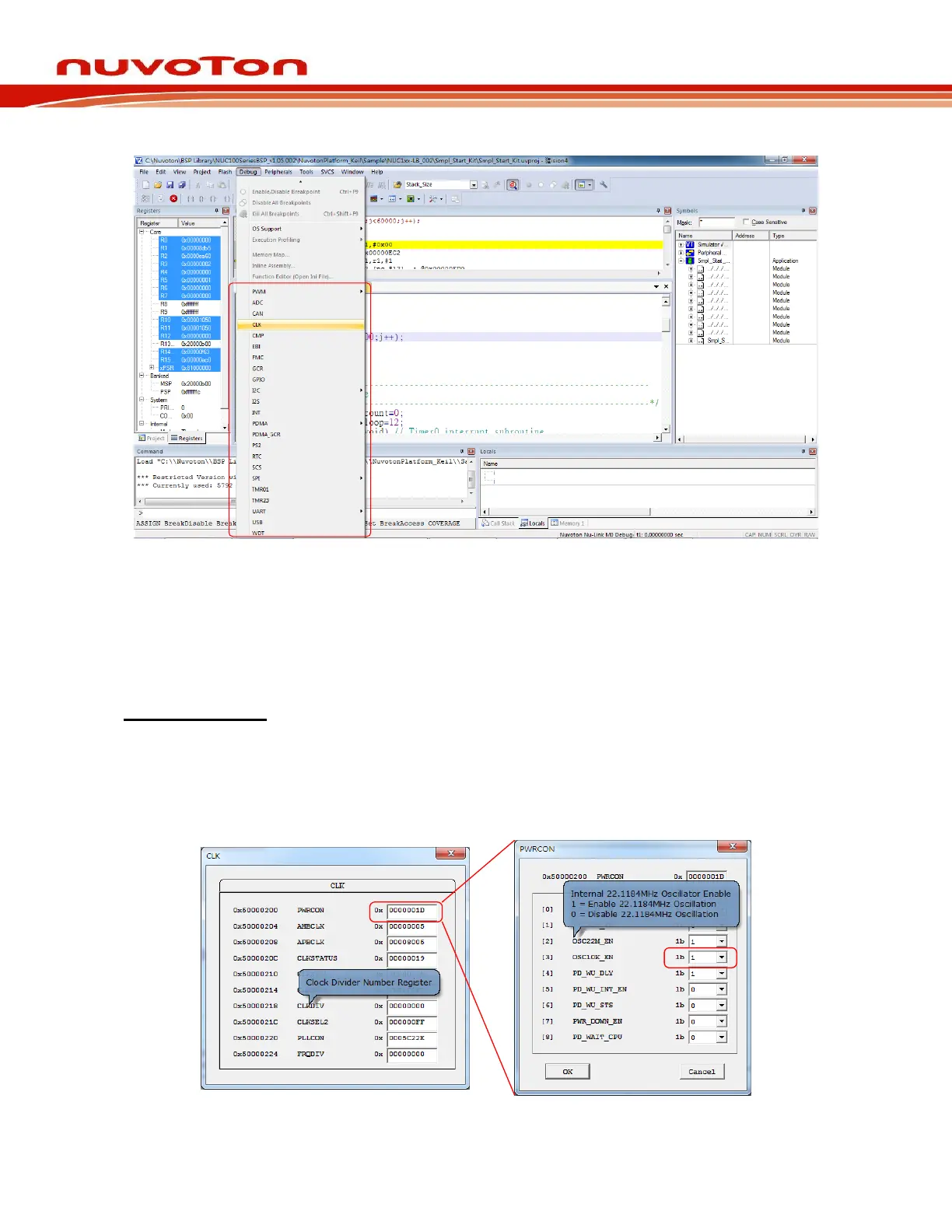
Figure 3-2 Direct Register Interface Control Related Options in Keil MDK Debug Mode
The Direct Register Control Interface for CLK is shown in the left part of Figure 3-3, where the left
column shows the register address, the middle column shows the register name, and the right column
shows the register value. The Direct Register Control Interface for PWRCON is shown in the right part
of the Figure 3-3, where the left column shows the function bit(s), the middle column shows the
function name, and the right column shows the function value.
Detailed Operation:
Double-clicking a “register value” will open the register control details, as shown in the right part of
Figure 3-3.
Moving the cursor over a “register name” or “control value” will show the tip. The “register value” or
“control value” can be modified directly. The Nu-Link Adapter will then modify the content of the target
chip.
Figure 3-3 Direct Register Control Interface in Keil MDK Debug Mode



 To Next Page