Nuvoton Nu-Link Debug Adapter User Manual
Oct 24, 2019 - 13 - Revision V1.01
3.1.4 Semihost
When using the Semihost function, the message of the NuMicro
®
Family microcontroller can be output
through UART to the debug window by the Nu-Link Adapter. That is, the message is output without
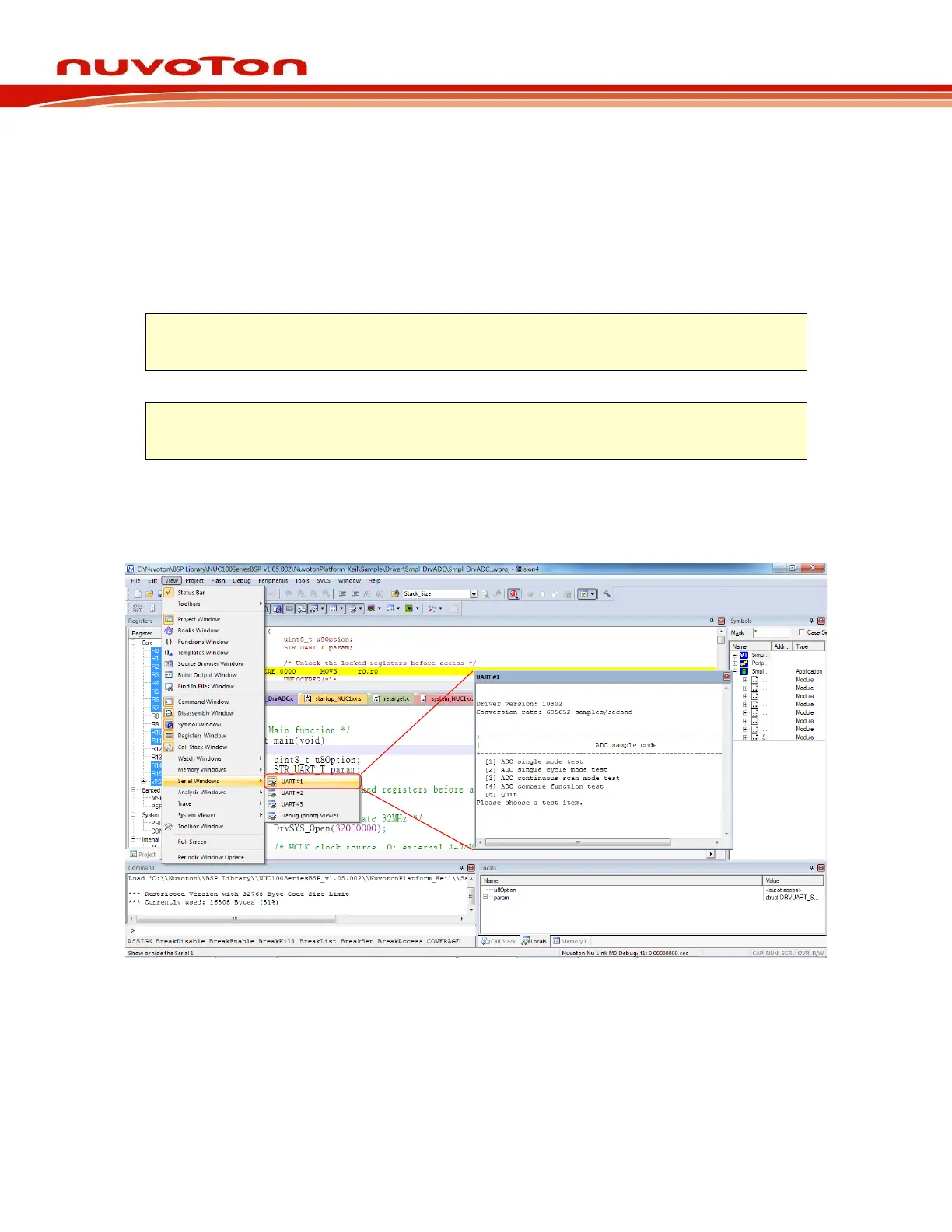
the GPIO. Figure 3-4 shows the debug messages in the “UART #1” form, which are the messages
output by the Nu-Link Adapter.
Follow the steps below to use the Semihost (taking the Keil MDK and M031AE series as example).
Step 1: Modify the strings in the “startup_NUC1xx.s” as follows.
Step 3: Invoke Rebuild to rebuild a project and enter Debug mode.
Step 4: In Debug mode, invoke View → Serial Windows → UART #1, as shown in Figure 3-4.
Step 5: Press F5 to program the target chip, and the debug messages are output to the UART #1
form.
Figure 3-4 Semihost Options in Keil MDK Debug Mode



 To Next Page