Nuvoton Nu-Link Debug Adapter User Manual
Oct 24, 2019 - 18 - Revision V1.01
4.2 Software Setup
This section briefly describes required software settings for connecting to the Nu-Link Adapter. For
detailed software operation, refer to the related user manuals.
4.2.1 ICP Tool
Step 1: Download and install Nuvoton NuMicro
®
ICP Programming Tool.
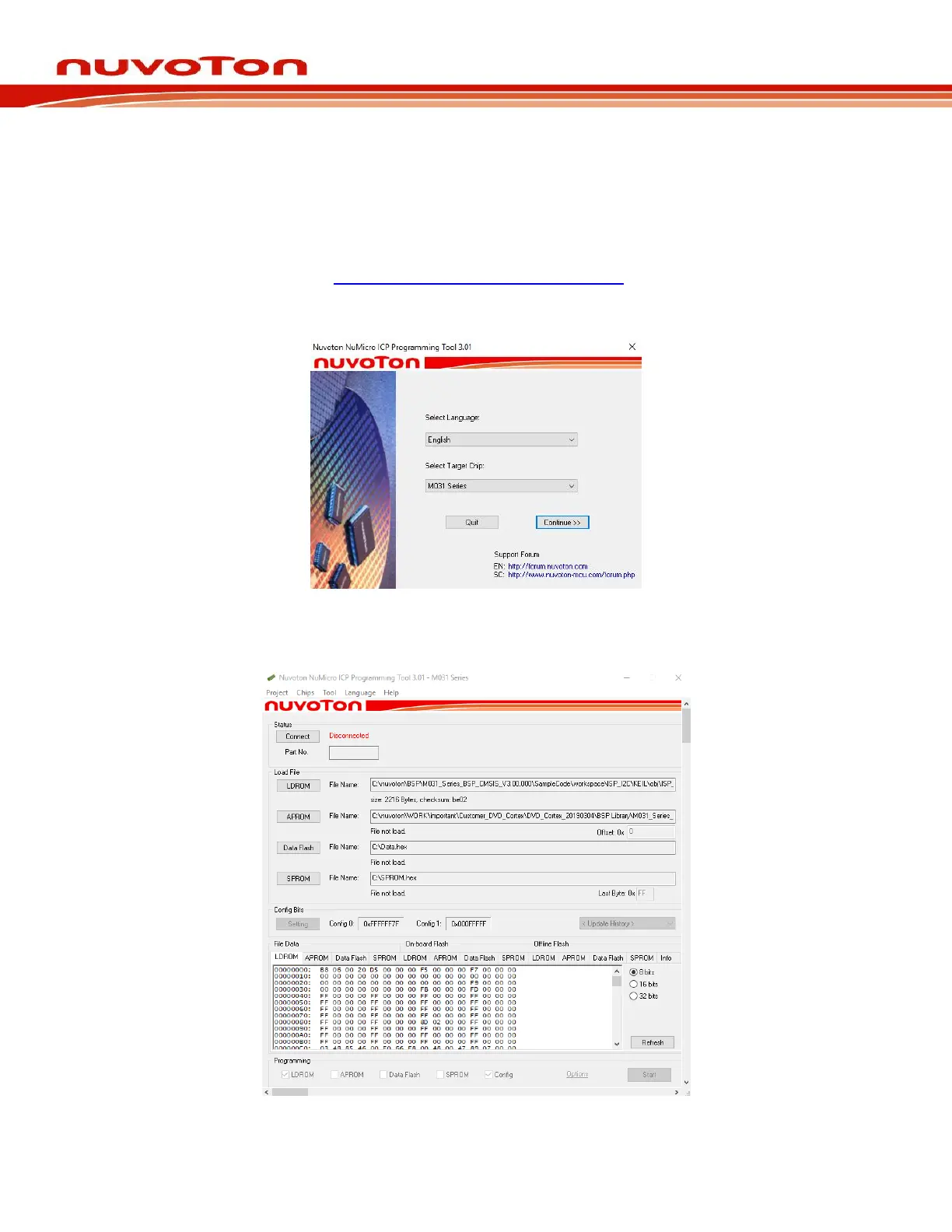
Step 2: Open the ICP Tool, specify the UI language and target chip, and then click Continue, as
shown in Figure 4-3.
Figure 4-3 Startup Screen of ICP Tool
Step 3: In the ICP Tool window, the connection status is shown as “Disconnected” since the ICP tool
has not been connected with the Nu-Link Adapter, as shown in Figure 4-4.
Figure 4-4 ICP Tool Main Window



 To Next Page