Nuvoton Nu-Link Debug Adapter User Manual
Oct 24, 2019 - 19 - Revision V1.01
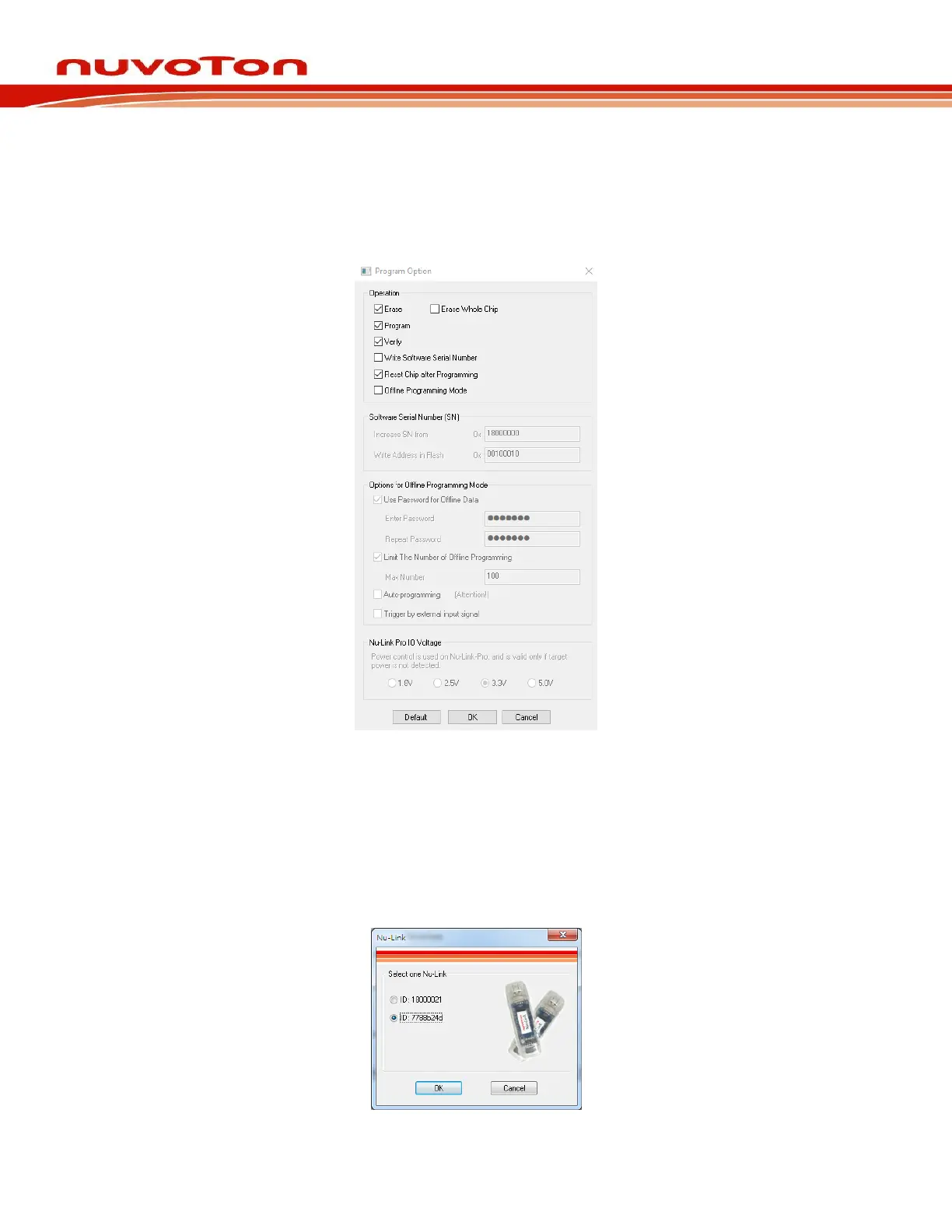
Step 4: Click Option in the Program section of the ICP Tool Window to open the Program Option
form, as shown in Figure 4-5.
Step 5: In the Nu-Link Pro IO Voltage section, specify the power voltage of the SWD port for the
target chip, and then click OK. To use the offline programming function, the Offline
Programming mode option needs to be selected, as shown in Figure 4-5.
Figure 4-5 ICP Tool Programming Options
Step 4: Return to the ICP Tool window, and then click the Connect button. Go to Step 5 if more than
two Nu-Link Adapters are connected with the host. Go to Step 6 if only one Nu-Link Adapter
is connected with the host.
Step 5: If two Nu-Link Adapters have been connected with the computer, a message appears and
asks to select one from the two adapters. Clicking OK will connect the selected adapter with
the host, as shown in Figure 4-6. When a Nu-Link Adapter is selected for connection, the
Status LED starts blinking. For the blinking details, refer to the Status LED description of the
“Select a Nu-Link Adapter to connect with the host” in Table 2-4.
Figure 4-6 Select One Nu-Link Adapter



 To Next Page