Nuvoton Nu-Link Debug Adapter User Manual
Oct 24, 2019 - 29 - Revision V1.01
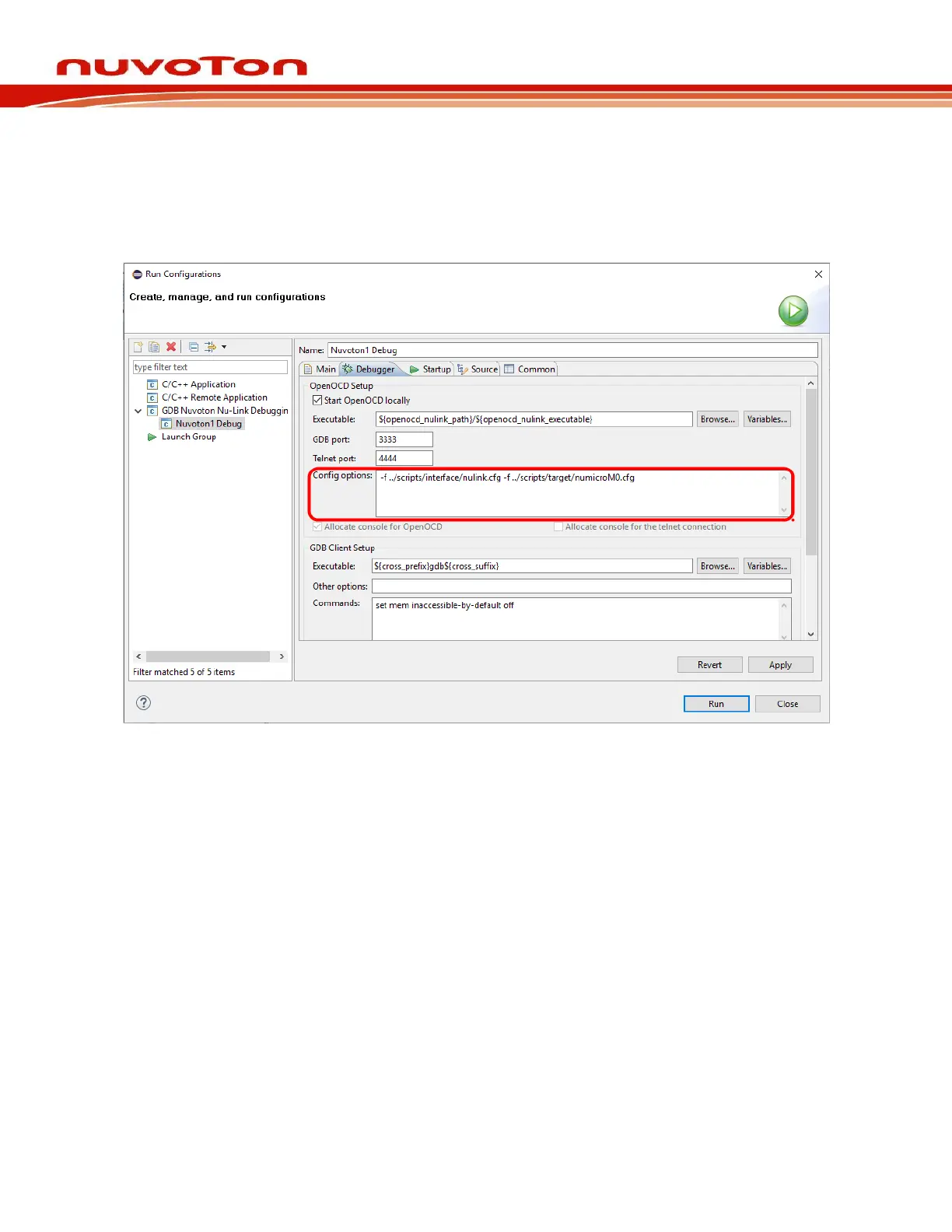
which uses the interface configuration file named nulink.cfg. In addition, Nuvoton has three
different ARM families, such as M0, M4, and M23. The corresponding target configuration
files are numicroM0.cfg, numicroM4.cfg, and numicroM23.cfg. For M0 2nd development, the
target configuration file would be numicroM0_NS.cfg, as shown in Figure 4-22.
.
Figure 4-22 Configuring the Debugger Tab
Step: 5: As the first step, we should choose the right Chip Series in the Startup tab. When done, the
corresponding target configuration file will be automatically written in the Config options field
of the Debugger tab. To load executable to flash, we need to select the Load executable to
flash checkbox. To load executable to RAM, we need to select the Load executable to
SRAM checkbox. When all the settings are done, click the Apply button to take effect. To
launch the application into the debug mode, click the Debug button.
Step 6: At last, click Apply to save the settings, as shown in Figure 4-23.



 To Next Page