OPERATING INSTRUCTIONS (Continued)
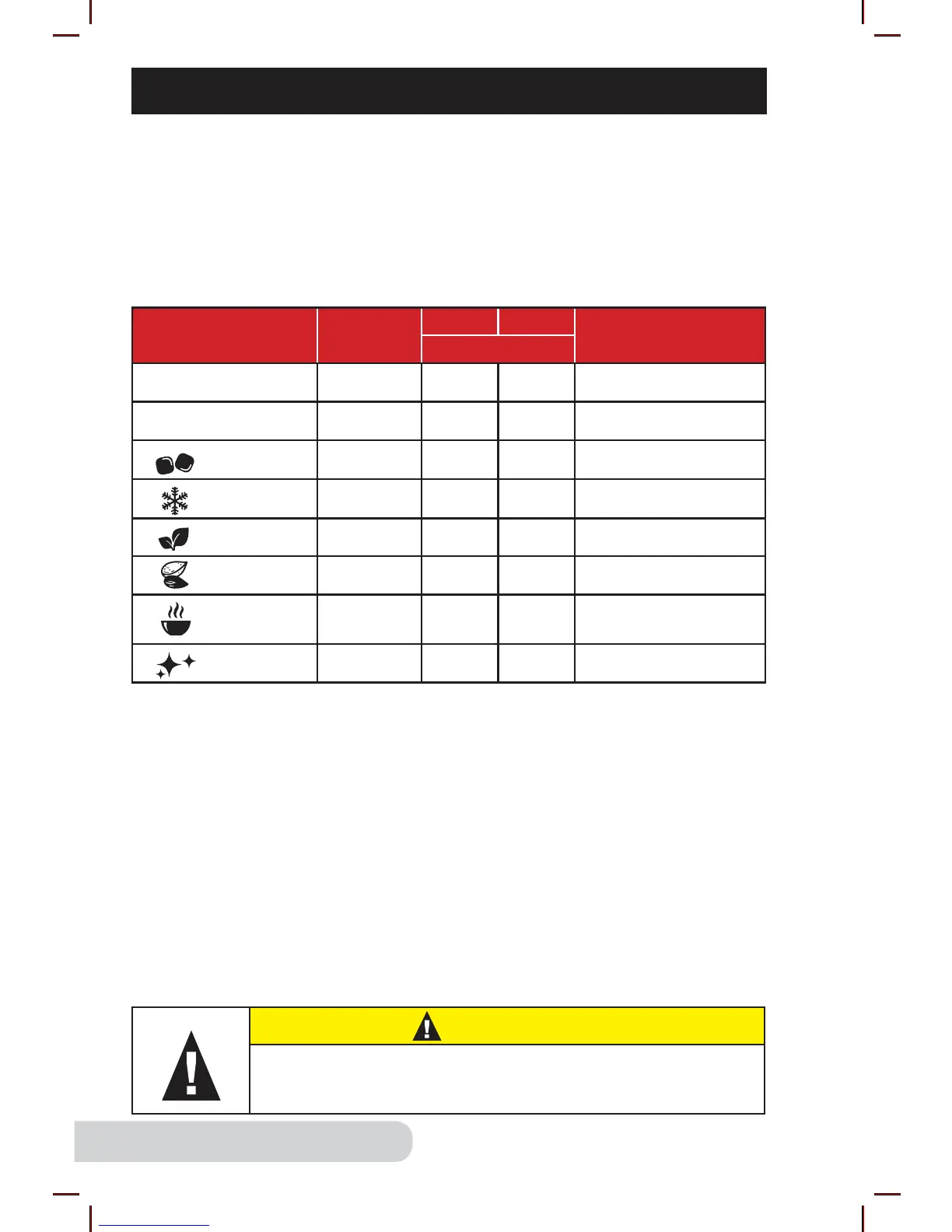
Icon
Default
Min. : Sec.
Min. Max.
Notes
Min. : Sec.
1-10 (With Vacuum)* 2:00 0:05 3:00 Adjustable speed
1-10 (Without Vacuum) 3:00 0:05 5:00 Adjustable speed
Ice 0:15 0:05 2:00 Smoothie and sorbet
Frozen 0:35 0:05 2:00 Ice-based drinks
Fresh 0:30 0:05 2:00 Sauces
Nuts 1:30 0:05 2:00 Jam and spread
Soup 3:00 0:05 5:00
Soup and hot
chocolate
Clean** 0:15 0:05 2:00 Self-cleaning
Icon Setting
For more specialized blending tasks, select one of the preset icons with
the dial. Each icon setting has a default time and RPM built into the unit.
1. Turn the dial to your desired icon setting. The LCD display will show the
default time.
2. Adjust the time, if needed, then press “Start/Stop” to begin blending at your
selected setting.
• If desired, increase or decrease time at any point while blending.
*Note:
• When blending for a long period of time, steam may escape from Plunger Cap.
• Always start with cold liquids when blending. DO NOT add hot liquids to
the blender.
• Do not fill Jar above 3/4 capacity. For best results, do not fill more than 1.5
liters (51 fl oz) of liquid.
**Tips for Cleaning:
• Add water and 1-2 drops of liquid dish soap to the Jar, place on the Base, and
close the Lid.
• Turn the dial to “Clean”. “0:15” will be shown on the LCD display. Adjust the
time if desired, then press “Start/Stop”.
• Once finished, remove the Jar, rinse thoroughly, and dry before using.
For detailed instructions on cleaning, see “Care and Maintenance.”
CAUTION
Moving parts may become hot with extended use.
DO NOT TOUCH.


 To Next Page