OPERATING INSTRUCTIONS
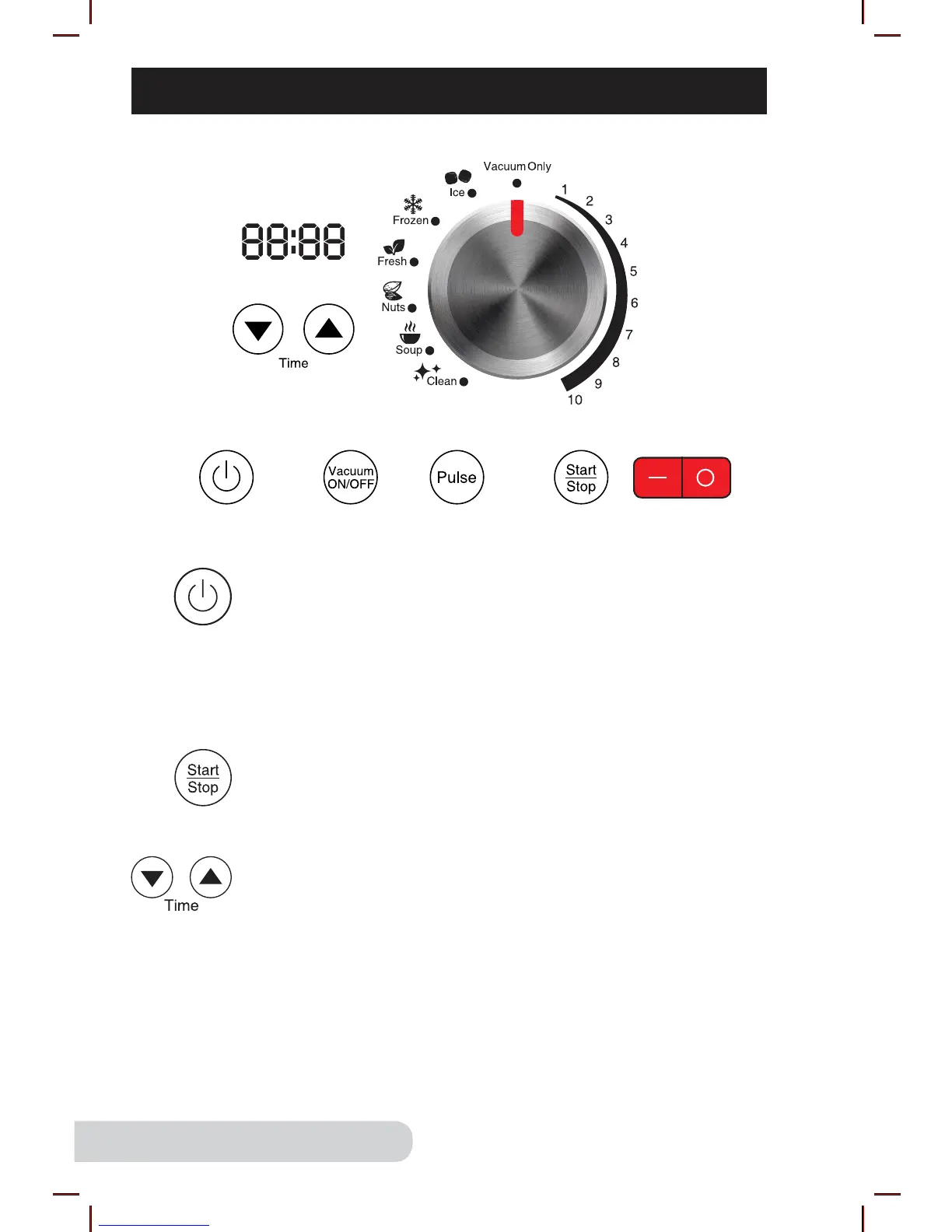
ON OFF
Power Button ON/OFF
1. Turn the red main Base Power Switch ON. Switch is located
on the right side of Blender Base.
• The “Power” button will flash.
2. Press “Power” button once to turn the unit on. The LCD
display will show the default time for the selected setting.
3. Press “Power” button again to turn the unit off.
Start/Stop
1. Turn the dial to choose the appropriate blending function.
2. Press “Start/Stop” to start blending.
3. Press “Start/Stop” again to stop blending.
Time Setting
Press the up and down arrows to increase or decrease the
time on the display.
• Times are displayed in minutes and seconds.
• This can be done on all settings except vacuum only.
Example:
Press “Power Button”. Turn dial to “Ice”. “0:15” (15 seconds)
will be displayed. Press up and down arrows to adjust the time.
Press “Start/Stop”.


 To Next Page