13
eAdvantage User Manual (15PL1033 Rev. 7, July 2022)
WARNING
The use of patient circuits, other than those approved by the
manufacturer, may interfere with the correct operation of this device.
Therefore, the use of non-approved circuits with this device will void the
product warranty.
Note: Ensure both the monitoring line and patient circuit are securely
connected.
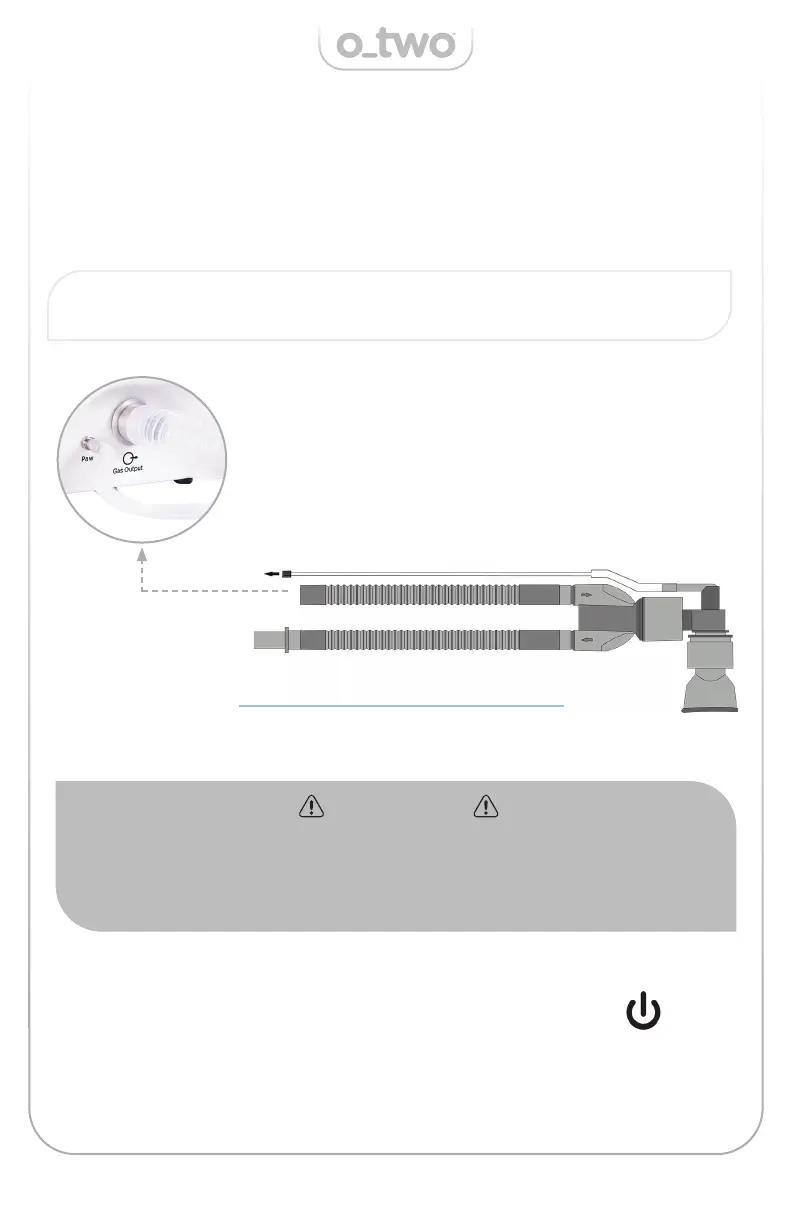
4.2.4. Connecting the patient circuit and Sensor line
Connect a new patient circuit (01CV8037) to the 22mm outlet connection
port, remove the monitoring line plug and connect to the monitoring line
connection port (Fig. 2).
4.2.5. Turning the Mixer ON
To turn the mixer ON, depress the ON/OFF Control Knob
for 1 second.
Fig. 2
Remove the plug and connect to the
monitoring line connection port.


 To Next Page