27
eAdvantage User Manual (15PL1033 Rev. 7, July 2022)
5.4.4. Stored Events
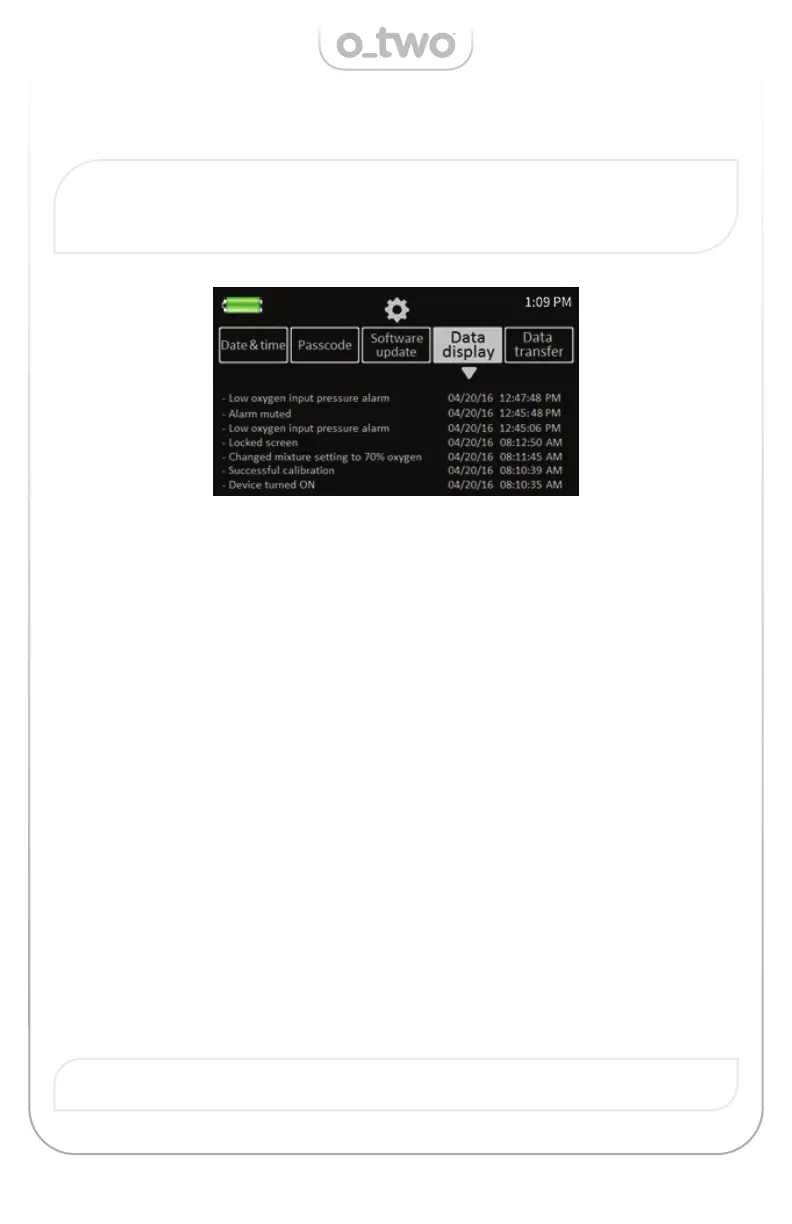
Note: The “Data display” is not protected by a passcode. To display
the stored events, follow the setting mode steps below and press the
“Data display” cell and the screen will change to:
Note: Individual stored events cannot be deleted by the user.
The mixer will store any event including all alarms and their related
actions, turning the device ON or OFF, pressing the Oxygen Flush key,
setting changes after confi rmation, activating and canceling the alarm
silence, calibration results, software update as well as locking and un-
locking the screen.
All stored events are saved, per event, up to a maximum of 2048 events
after which the software will start overwriting the older stored data
starting from the oldest event. The contents of the stored events can
be maintained for about 7 weeks after a total loss of both power supply
mains and internal battery.
To view the data, users must turn the control Knob (K) clockwise to move
the stored data down and display older events or counter clockwise to
display previous events. Scrolling the Control Knob will move the events
up or down by one event per turn.
If multi events occurred at the same time, their events will be saved
sequentially with no particular priority.
Once completed the user can exit the mode by pressing the Cancel Key.


 To Next Page