18
eAdvantage User Manual (15PL1033 Rev. 7, July 2022)
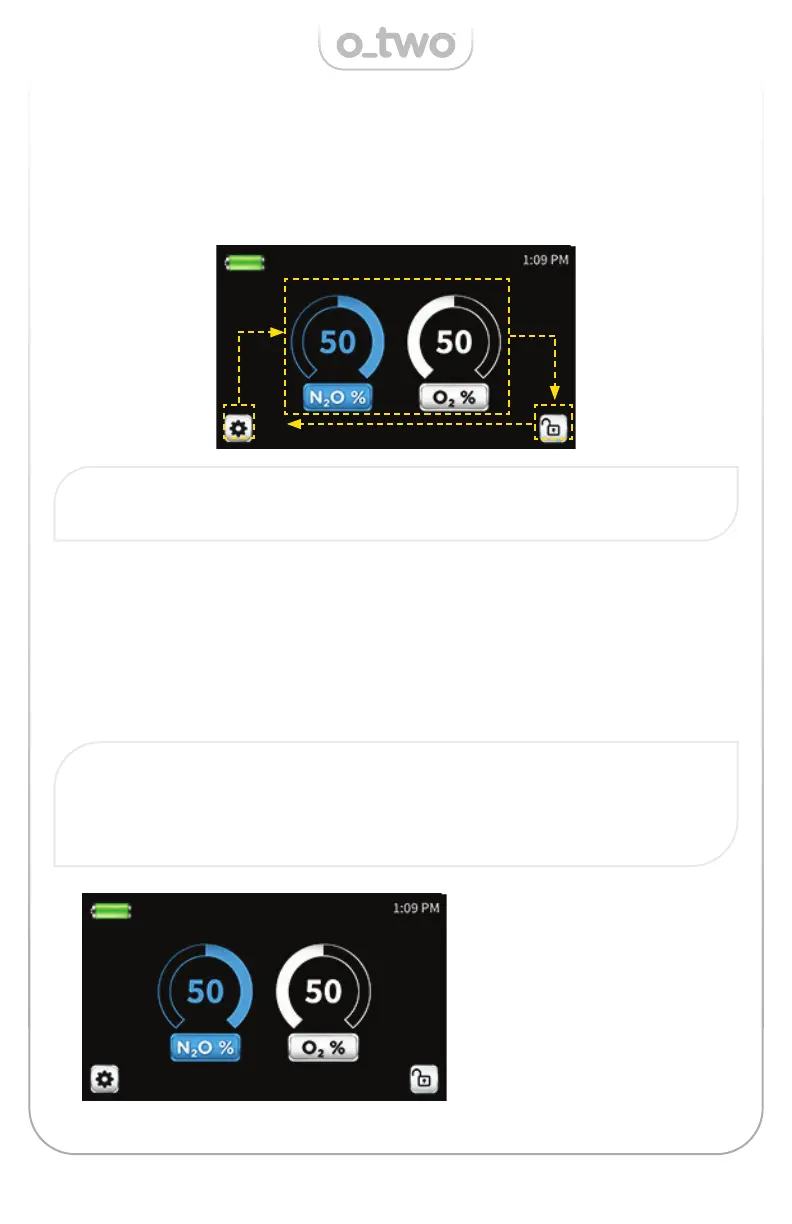
To select (or make changes to) the device settings, rotate the Control
Knob (K) and a frame will move around the selected fi gures following
the direction of the Control Knob rotation. Below is an illustration of
clockwise knob rotation:
To change the gas concentration, rotate the Control Knob (K) until
selection frame surrounds the gas mixture display on the screen as
shown below:
Press the Control Knob (K) to activate the selection. At this point the
percentages of both O
2
and N
2
O will commence fl ashes indicating that
a change is being initiated.
Note: If the screen is locked the selection of the mode, gas mixture
and setting will be inactive until the screen is un-locked.
Note: The setting change will be automatically cancelled if no change
is made within 10 seconds.
The Cancel Key (L) can be also used to exit this mode prior to making
any changes.
5.2 Demand Mode
Rotate the Control Knob
(K) to change the
concentration as listed
below:
0/100, 5/95, 10/90, 15/85,
20/80, 25/75, 30/70,
35/65, 40/60, 45/55,
60/40, 65/35, 70/30.


 To Next Page