31
eAdvantage User Manual (15PL1033 Rev. 7, July 2022)
7. ALARMS, WARNINGS AND NOTIFICATIONS
7.1 Functional Alarms
Note: Visual and audible alarms will continue until the cause of the
alarm is resolved.
Note: The dark grey cells shown below are invisible and shown for
illustration purpose only.
During alarm activation the user may press the audio paused key to
silence the Audible Alarm for 2 minutes, the visual alarm will continue
to fl ash until the cause of the problem is resolved.
During alarm mute, should a new alarm situation develop the mute
function will continue and only the new visual alarm will be displayed
on the screen.
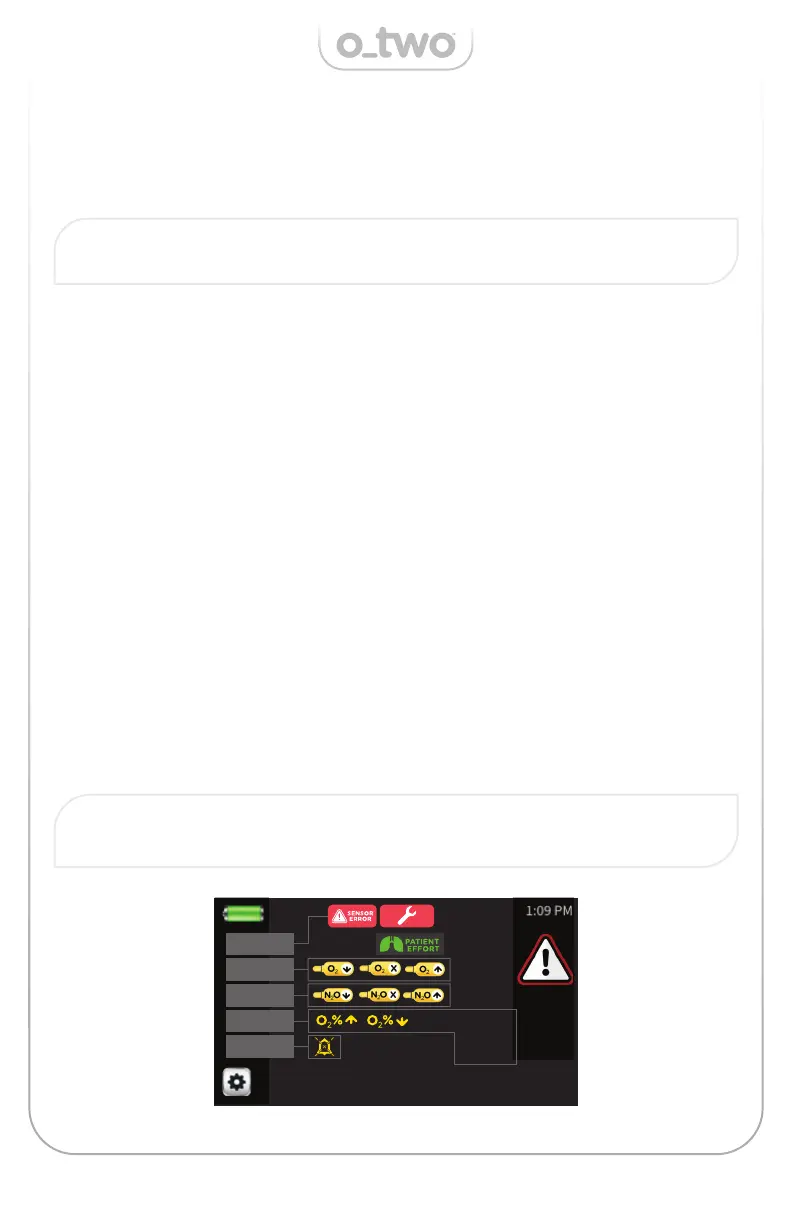
Alarms will be visible in the sub-sections A-D associated with a red
warning symbol for high priority alarms and yellow warning symbol for
medium and low priority alarms as shown below.
The device allows for multiple alarm symbols to be displayed on the
screen indicating multiple failures occurring at the same time. In this
case, the Audible Alarm will follow the highest alarm priority.
The patient e ort cell is located at the center of the screen above the
mixtures dials as shown below. This symbol will be displayed during
the whole phase of patient demanded breaths.
A
C
B
D
E
LEAK O
2
VALVE
LEAK N
2
O
VALVE
LEAK O
2
&
N
2
O VALVES


 To Next Page