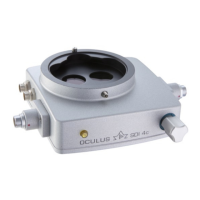
11 Change the Drive Module
Instruction Manual BIOM® 5 (G/55400/0413/en) 29 / 40
11 Change the Drive Module
Proceed as described in the Assembly Instructions for the drive
module.
12 Cleaning, Sterilization and Maintenance
12.1 Condition Components
Condition the BIOM® 5 and all BIOM® components before the first and
every subsequent use so that they are sterile.
Malfunction when using the
combination control unit
5-pole plug has been forcibly
plugged in the wrong way
round
Plug it in the right way round
(pay attention to the lug and
slot of the polarity reversal
protection)
Motorised focusing not possible with
the
BIOM® 5c when using the
combination control unit
BIOM® 5c connector not
plugged into the SDI® 4c
properly
Defective drive belt
Drive belt missing
Connecting cable damaged
Defective drive module
Plug in the connector correctly
Install a new, sterile drive belt
or focus manually using the
focusing knob at the BIOM® 5c
Install a sterile drive belt
Exchange the drive module
Exchange
Error Possible Cause Help



 To Next Page