10 Scan Menu
Instruction Manual Pentacam® AXL (G/70100/EN 1121 Rev04) 27 / 85
10 Scan Menu
Switching from the Pentacam® AXL program to the Scan menu:
In the Pentacam® AXL program (fig. 9-1, page 25) select the menu
item [Examination] and click [Scan].
10.1 Screen layout
The eye currently being examined is detected automatically and is
displayed in the "Eye" field (1).
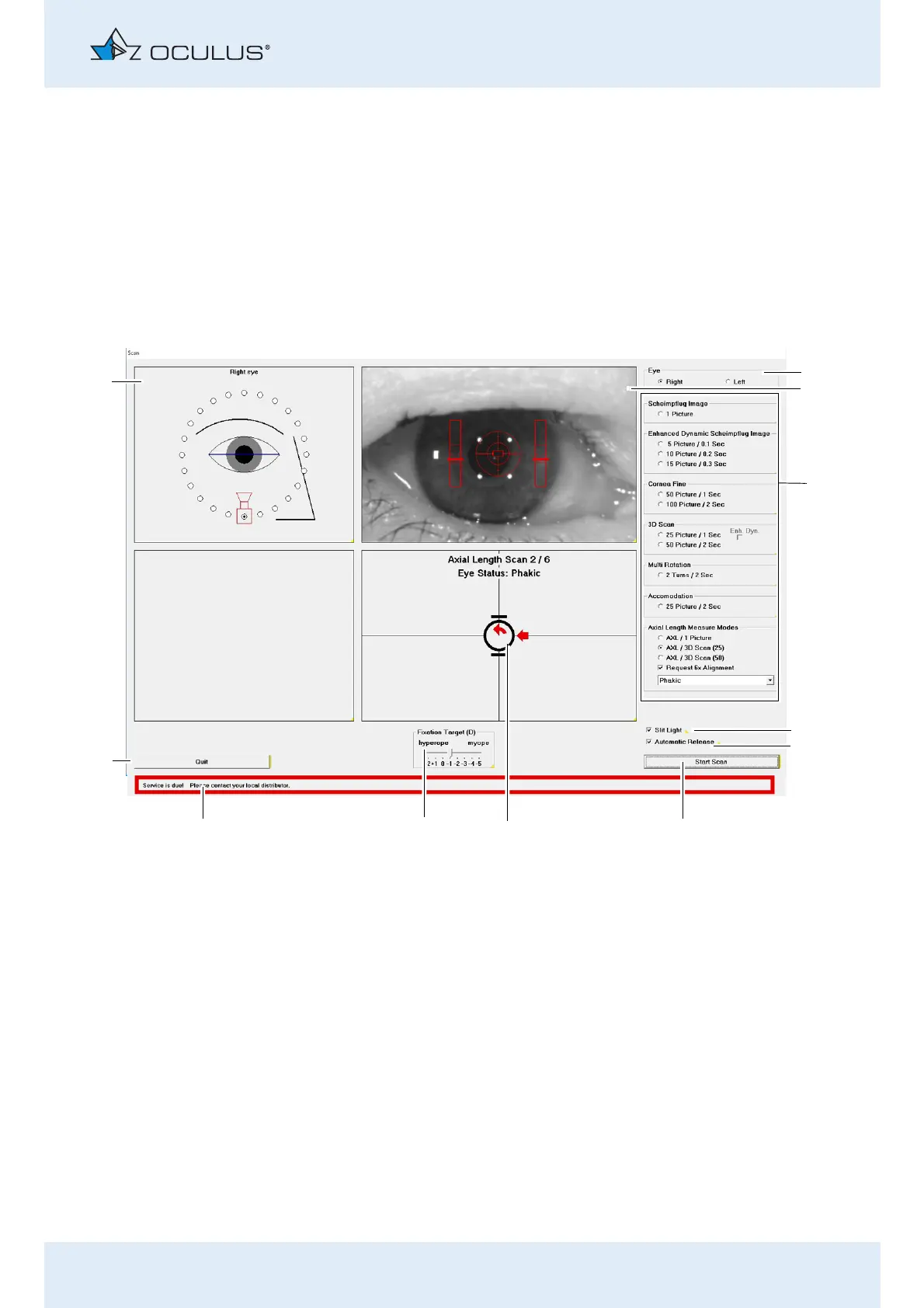
The Overview Image (2) shows the pupil and a cross hair as an
adjusting aid.
You can set the type of image required for the respective
examination in the "Image Options" area (3) (sec. 10.1.1, page 28
and sec. , page 29).
„Axis Length Measure Modes“: Click a button to enable a
1 "Eye" field 7 Adjustment window
2 Overview image with adjusting aid 8 Fixation Target
3 "Image Options" area 9 Message about device
4 [Slit Light] checkbox 10 [Quit] button
5 [Automatic Release] checkbox 11 "Orientation" field
6 [Start Scan] button
Fig. 10-1: "Scan" screen



 To Next Page