SCOUT PRO EN-11
1
PRINT
Unit
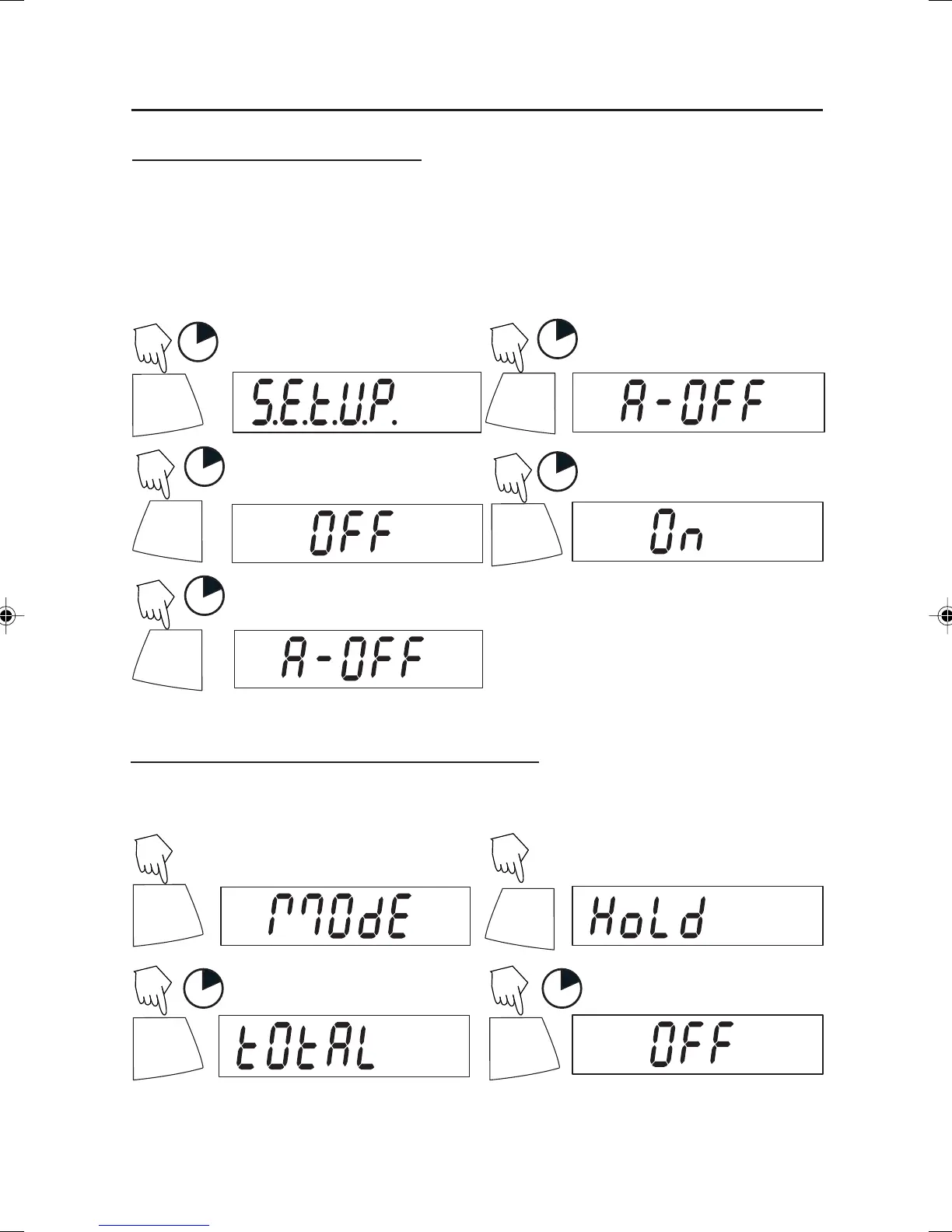
Entering the .S.E.T.U.P. Menu
The .S.E.T.U.P. menu contains Auto-Off, LFT (on certain models), Linearity Calibration,
Mode (Display Hold, Totalize) and END. Auto-Off and LFT can be turned ON or OFF.
Display Hold, and Totalize require entering the Mode submenu.
Starting from the .C.A.L. menu.
1
(First menu)
Select ON or OFF for Auto-Off or LFT. To
enter Display Hold or Totalize, you must
first enter the Mode sub-menu.
ON/ZERO
Off
1
ON/ZERO
Off
1
PRINT
Unit
1
ON/ZERO
Off
(To exit and save)
Turning Display Hold or Totalize Mode On
NOTE: Only one mode can be active at one time.
Start at the .S.E.T.U.P. menu.
PRINT
Unit
(Press repeatedly to)
ON/ZERO
Off
PRINT
Unit
1
PRINT
Unit
1
Select YES to desired mode, then continue.
Y
Y
Y
Y
N
N
N
N
N
4 Scout Pro English Operation 1 71160417.p65 3/6/2003, 11:00 AM11



 To Next Page