EN-12 SCOUT PRO
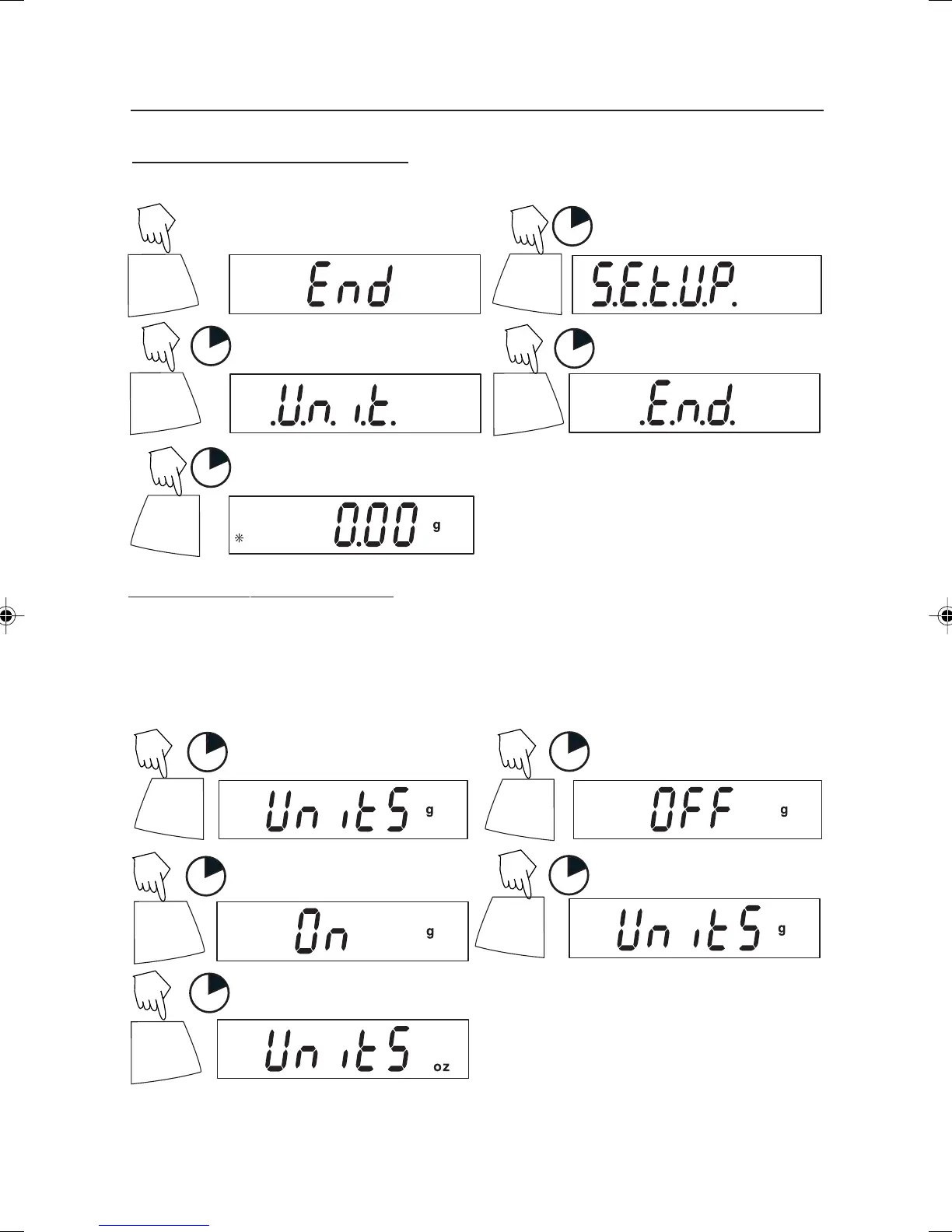
Exiting the .S.E.T.U.P. Menu
Select ON/OFF or YES/NO to desired menu items, proceed to .E.N.D. menu.
PRINT
Unit
(Short presses)
1
1
PRINT
Unit
1
PRINT
Unit
ON/ZERO
Off
1
Y
Y
N
N
N
Entering the .U.N.I.T. Menu
The .U.N.I.T. menu contains units of measure, PC (parts counting), % weighing and
END. Units vary with the model type. Determine which units are to be turned on or off.
ON/ZERO
Off
1
ON/ZERO
Off
1
Start in the .U.N.I.T. menu. Select either ON or OFF for each unit.
(Turn ON)
PRINT
Unit
1
ON/ZERO
Off
1
PRINT
Unit
1
(To advance)
(To accept)
Y
Y
Y
N
N
NOTE: Repeated presses of PRINT Unit button will go though all units, you then may
select ON or OFF. Parts Counting is slightly different.
4 Scout Pro English Operation 1 71160417.p65 3/6/2003, 11:00 AM12



 To Next Page