EasyManua.ls Logo

OHAUS STARTER 3100C - Maintenance and Troubleshooting; Error Messages; Meter Maintenance; Self Diagnosis

OHAUS STARTER 3100C
84 pages
Print Icon
To Next Page IconTo Next Page
To Previous Page IconTo Previous Page
Loading...
EN-14 STARTER 3100C Bench Conductivity Meter
5 MAINTENANCE
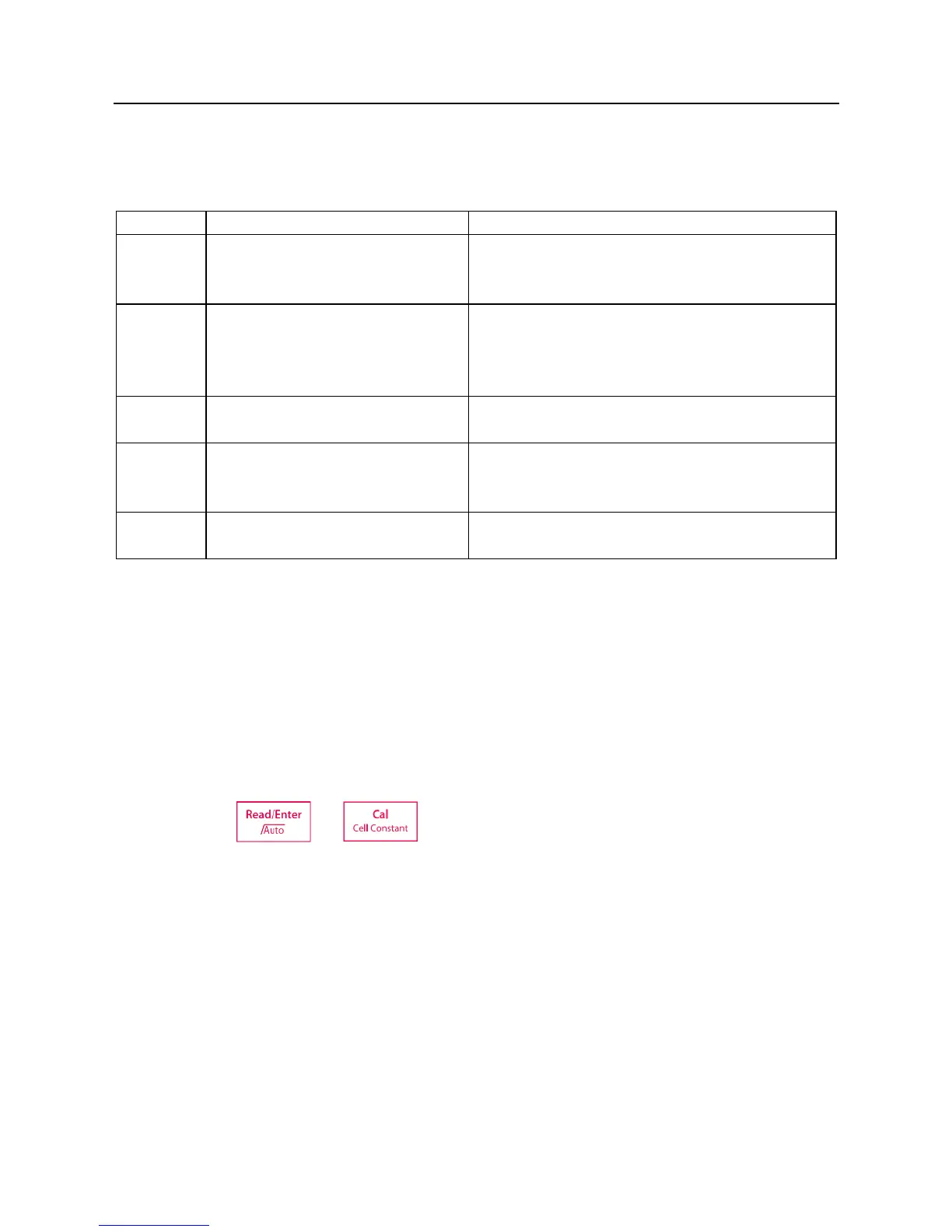
5.1 Error message
Error 0
Memory access error
Reset to factory settings
Error 1
Self-diagnosis failed
Repeat the self-diagnosis procedure and make
sure that you finish pressing all five keys within
two minutes.
Error 2
Measured values out of range
C: > 199.9 mS/cm
TDS: < 0.1 mg/L or > 199.9 g/L
SAL: > 100.0 psu
Make if the electrode is properly connected
and placed in the sample solution
Error 3
Measured standard temperature
out of range (5 ... 35 °C)
Keep the standard temperature within the
range for calibration
Error 4
Measuring temperature out of
range (0 ... 100 °C)
Check if the electrode is properly connected
and keep the sample temperature within the
range
Error 9
The current data set has already
been stored once
An endpoint reading can only be stored once.
Perform a new measurement to store.
If there is an error, the meter will beep 3 times to alert.
5.2 Meter maintenance
Never unscrew the two halves of the housing!
The STARTER 3100C does not require any maintenance. To clean, use a damp cloth.
The housing is made of acrylonitrile butadiene styrene (ABS). This material is susceptible to
damage by some organic solvents, such as toluene, xylene and methyl ethyl ketone (MEK). Any
spillage should be immediately wiped off.
5.3 Self diagnosis
Press and hold and simultaneously until the meter displays the full screen.
Each icon blinks one after the other. This way you may check whether all icons are correctly
shown. The next step is to check that the keys are functioning correctly. This requires user
interaction.
When b blinks, five icons are displayed. Press the 6 keys in any order. Each time you press a key
an icon disappears from the screen, continue to press the other keys until all the icons have
disappeared.
When the self-diagnosis has been completed successfully, PAS appears. If self-diagnosis fails,
error message Err 1 appears .

Table of Contents

Related product manuals