EasyManua.ls Logo

Ohme Go - Understanding the indicator lights

Default Icon
36 pages
Print Icon
To Next Page IconTo Next Page
To Previous Page IconTo Previous Page
Loading...
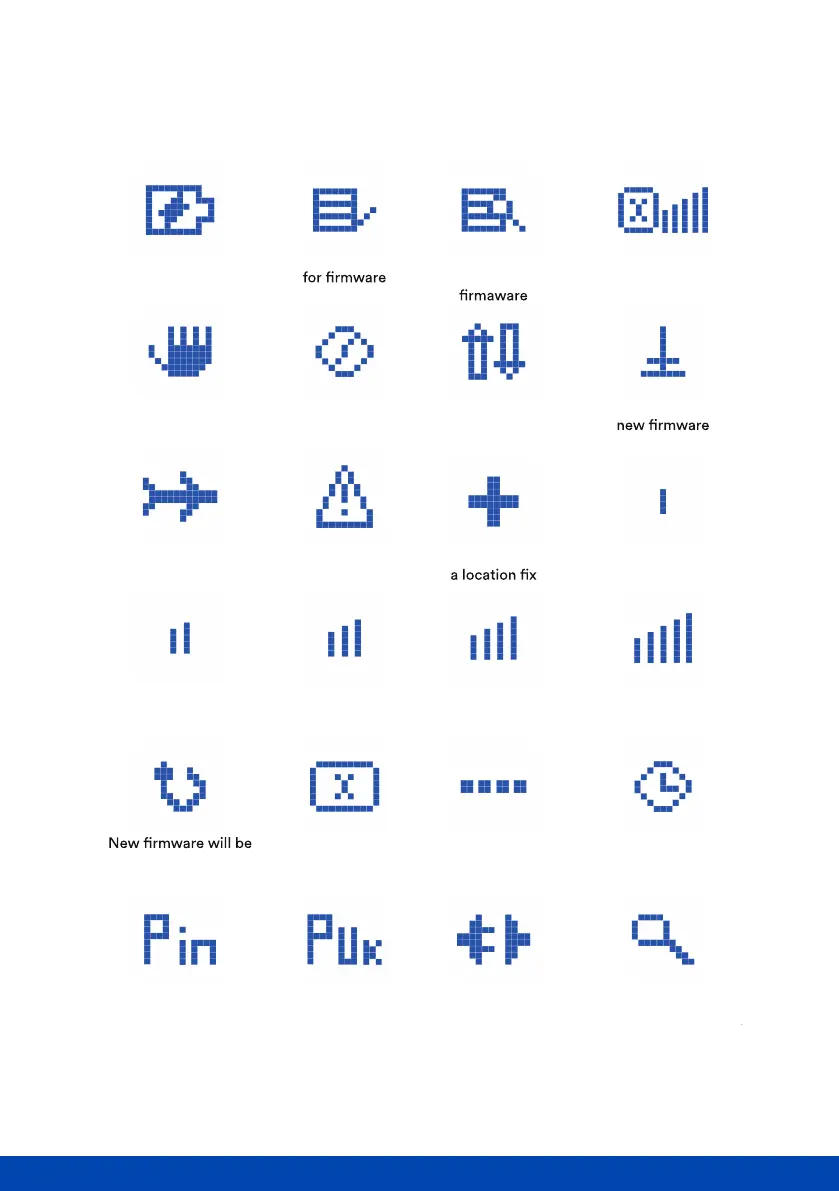
Understanding the display icons
Page of 10 30
V2.0
Charging Checking server Attempting to
download new
Charging suspended
due to vehicle
communications error
EV Supply Equipment
(EVSE) connected, but not
ready to charge
Level 2 signal
strength
installed on device,
awaiting reboot
PIN number
needed
PUK code
needed
Ready to charge
Searching for
network
No SIM Not charging
due to schedule
No network
Level 3 signal
strength
Level 4 signal
strength
Level 5 signal
strength
GPS has secured
Level 1 signal
strength
Fault
Connection to
network denied
Connected to
server
Downloading
Connected to network,
but unable to send
or receive data
What do the LED symbols on the screen mean?

Related product manuals