EasyManua.ls Logo

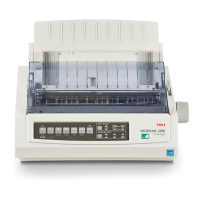
Oki ML1120 Plus - User Manual

Oki ML1120 Plus
89 pages
Print Icon
To Next Page IconTo Next Page
Loading...
User’s Guide
ML1120 Plus/ML1190 Plus

Table of Contents

Questions and Answers

  • J
    Joseph MolinaSep 12, 2025
    What to do if printing cannot be resumed at this stage on Oki ML1120 Plus?
    • J
      Jeremiah FitzgeraldSep 12, 2025
      Turn the power OFF, verify that the carriage moves properly, then turn the power ON again. If the problem is still there after you turn the power ON again, contact your dealer.
  • J
    Jason LeonSep 10, 2025
    Why horizontal printing position is offset on Oki Printer?
    • L
      Lori WhiteSep 10, 2025
      If the horizontal printing position is offset on your Oki Printer, it may be because the start position changes after the printer is powered on. To fix this, when the printer is powered ON, switch from off-line mode to on-line mode by pressing the SEL button. Reset the start position, setting the Power Switch to OFF before you change the start position.
  • K
    Kirk HarrisSep 9, 2025
    Why Oki Printer receives print data but printing does not start?
    • D
      Darren OwensSep 9, 2025
      If your Oki Printer receives print data but doesn't start printing because no paper is being fed, insert paper.
  • F
    fitzgeraldjasonSep 8, 2025
    Why ribbon is not transferring properly on Oki Printer?
    • L
      leejeffSep 8, 2025
      If the ribbon is not transferring properly in your Oki Printer, replace the ribbon cartridge with a new one.
  • J
    Jeremiah WoodAug 23, 2025
    How to fix cut sheet paper jammed in Oki ML1120 Plus Printer?
    • C
      Carol GregoryAug 23, 2025
      If cut sheet paper is jammed in your Oki Printer, first, turn the power off. Then, remove the top cover and set the Paper Thickness lever to position 6. After that, remove the ribbon cartridge and move the Print Head away from the paper. Rotate the Platen Knob and pull the sheet out. If a fragment remains, use tweezers or a folded sheet to extract it. Finally, replace the ribbon cartridge and top cover, and turn the power back on.
  • L
    lindasmithSep 6, 2025
    How to fix problem with cut sheet feeding on Oki Printer?
    • D
      Denise BushSep 6, 2025
      If there is a problem with cut sheet feeding in your Oki Printer, remove the cut sheet.
  • C
    Cynthia JohnsonSep 4, 2025
    What to do if ribbon cartridge is not installed correctly on Oki Printer?
    • J
      jessicacarterSep 5, 2025
      If the ribbon cartridge is not installed correctly in your Oki Printer, reinstall the ribbon cartridge correctly.
  • T
    Timothy GraySep 3, 2025
    Why print direction changes suddenly to unidirectional on Oki ML1120 Plus?
    • M
      Matthew HughesSep 3, 2025
      When the print head overheats in Oki Printer, the printer automatically starts unidirectional split printing.
  • M
    Megan Clark PhDSep 2, 2025
    What to do if Paper Type lever is wrongly set on Oki ML1120 Plus?
    • L
      Lauren JohnsonSep 3, 2025
      If the Paper Type lever is wrongly set for the type of paper in use with your Oki Printer, press the SEL button and set the Paper Type lever to the correct position.
  • M
    Michael GrossSep 1, 2025
    Why SEL indicator is unlit on Oki ML1120 Plus?
    • J
      johnloweSep 1, 2025
      If the SEL indicator is unlit on your Oki Printer, try the following: Re-install the printer driver correctly, press the SEL button, and load paper.

Summary

ML1120 Plus;ML1190 Plus Users Guide

Preface

Introduction and disclaimers for the user guide.

Introduction and Guide Overview

Overview of the printer and explanation of the user guide's content and navigation.

Getting Started

Initial setup, component identification, and basic operation of the printer.

Connecting to a Computer

Steps for connecting the printer to a computer and installing necessary drivers.

Printer Utilities

Details on available software utilities for controlling and managing the printer.

Paper Handling

Comprehensive guide on loading, feeding, and managing various paper types.

Operating Instructions

How to use the printer's control panel, buttons, menus, and settings.

Troubleshooting

Solutions for common printer problems, including paper jams and error conditions.

Cleaning Your Printer

Procedures for maintaining printer cleanliness, covering both exterior and interior parts.

Consumables and Accessories

Information on printer consumables, replacement procedures, and ordering details.

Printer Specifications

Technical details and performance characteristics for both ML1120 Plus and ML1190 Plus models.

Oki Contact Details

Contact information for Oki support and service centers globally.

Oki ML1120 Plus Specifications

General IconGeneral
TypeDot Matrix Printer
Print Head9-pin
ConnectivityParallel
Number of Pins9
InterfaceParallel
Paper SizeA4, Letter, Legal
Resolution240 x 216 dpi
Print MethodImpact
Print Width80 columns
Paper HandlingContinuous Forms, Cut Sheet

Related product manuals