- 96 -
Printer Maintenance
5
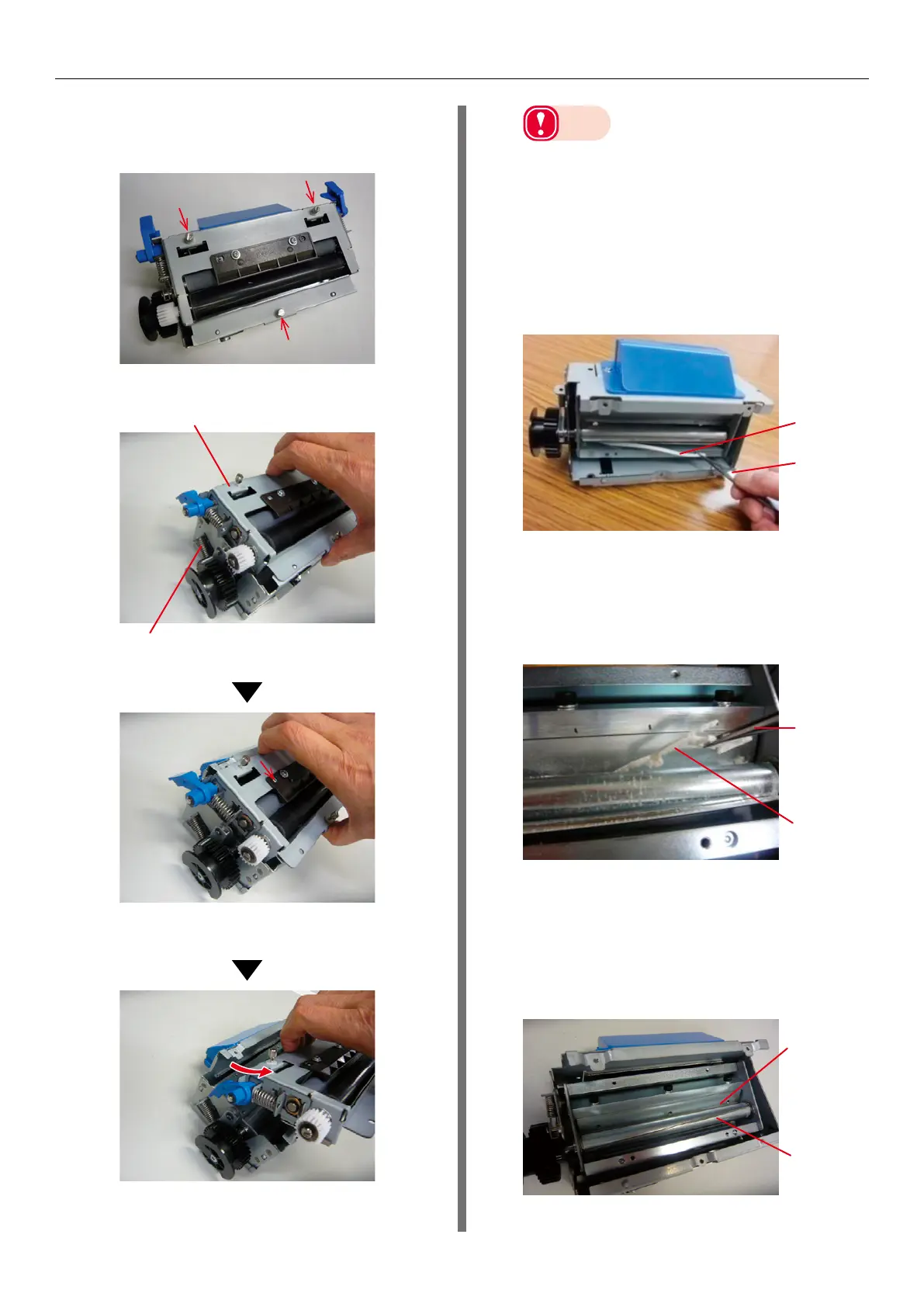
Disassemble the cutter unit.
(1)
Remove the 3 screws.
(2)
Remove the F1 roller unit.
F0 roller unit
Cutter part
Hold the F0 roller unit.
Slide the F0 roller unit in the direction
of the arrow.
Slide the F0 roller unit at an angle
(arrow direction) and remove it.
Note
z
There are blades inside the cutter unit for cutting
roll paper. Do not touch the blades of the cutter
with your hands. There is a risk of injury.
6
Remove any paper left inside the cutter
unit.
If there is paper left inside the cutter
unit after you have disassembled it, use
the tweezers to remove that paper.
Left over
paper
Tweezers
7
Clean the blades of the cutter.
(1)
If there is glue stuck to the inside
of the cutter unit, use the tweezers
to remove as much as possible.
Tweezers
Glue stuck
inside
cutter
(2)
Clean the glue off the cutter
blades.
There are two types of cutter
blades; the spiral blade (rotating
blade) and the straight blade (fixed
blade).
Straight
blade
(fixed blade)
Spiral blade
(rotating
blade)



 To Next Page