5.2 3D GROUND SCAN
The operating mode 3D Ground Scan provides
a graphical measurement of any area for further
analysis on a computer.
Get general information on performing a geophysical
measurement in the "3D Ground Scan Guide" and find
further information in the infobox on page 33.
5.2.1 Preparing a 3D Ground Scan
1
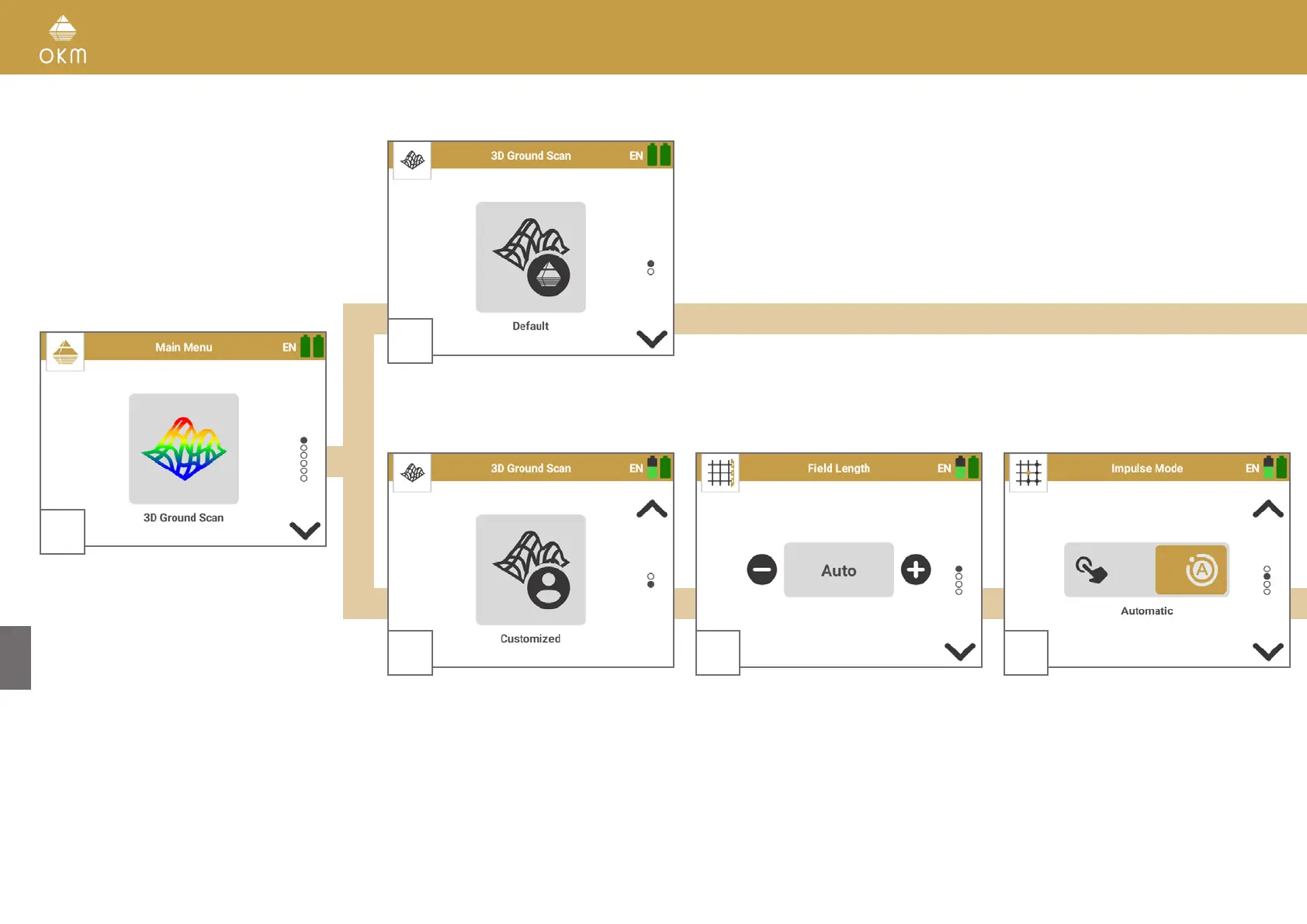
Start the OKM Rover UC App and select the
operating mode 3D Ground Scan from the
main menu.
2
Select Default to use the preset parameters that we recommend for fast scans:
Field Length: Auto | Impulse Mode: Automatic | Scan Mode: Parallel
2
Select Customized to adjust the parameters
individually.
3
Choose the Field Length.
Auto: Determine the length by pressing the
Trigger at the end of the first scan line. All suc-
ceeding lines will stop automatically.
10m, 20m, ... : The length of the scan lines is
defined before the scan. All lines will stop au-
tomatically.
4
Select the Impulse Mode to
determine how the
single impulses (scan values) will be released by
the detector.
Automatic: All scan values will be recorded con
-
tinuously line by line without any break.
Manual: Every single scan value will only be re
-
corded by pressing the Trigger.
16 / 34



 To Next Page