OK ! NO ! NO ! NO !
ENGLISH
EN - 11
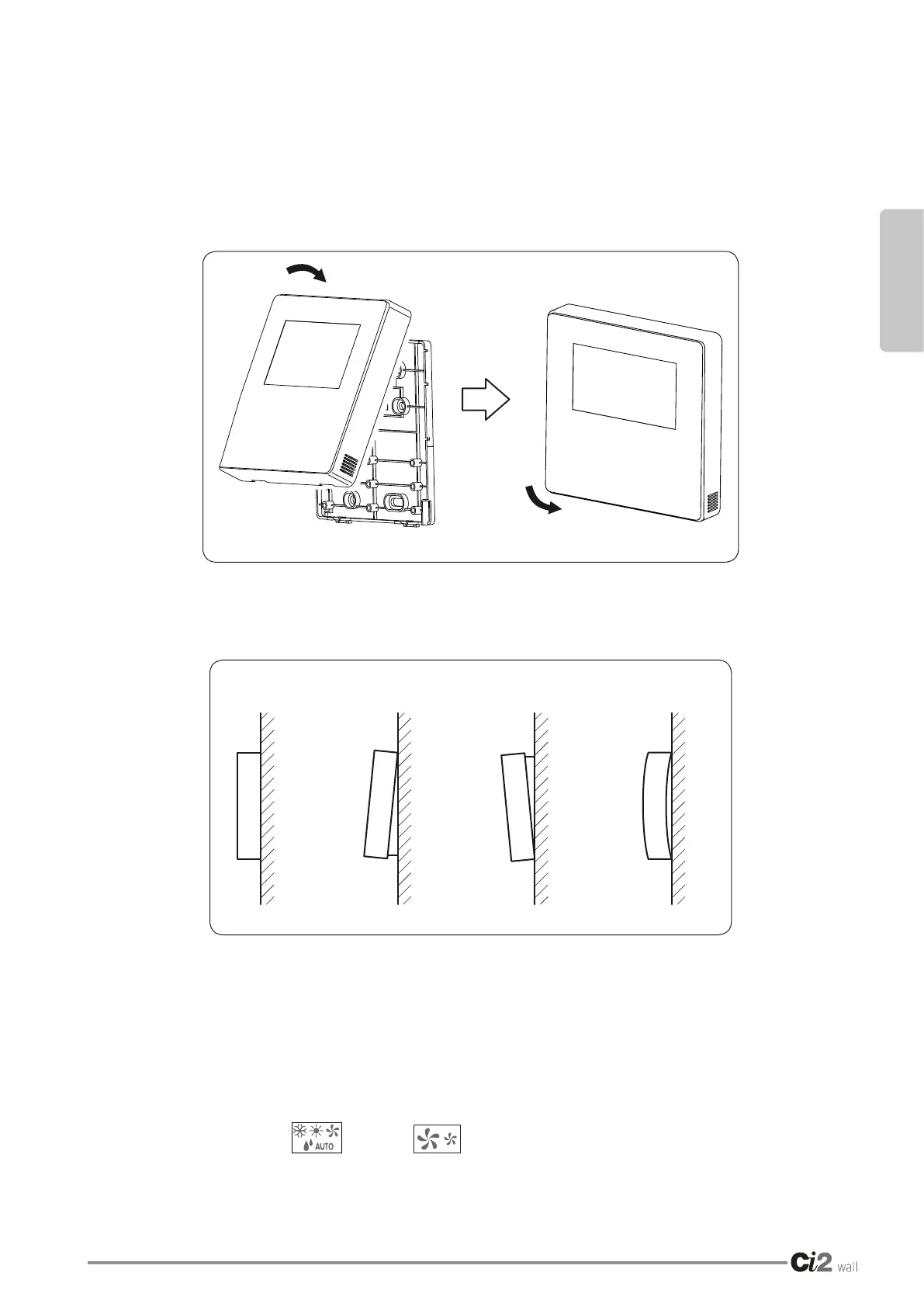
1.6 - INSTALLATION OF THE FRONT COVER
IMPORTANT
• Position the front cover on the lower cover and attach it by pressing delicately from the top
downwards(g.9).
• Make sure that the connection cables to not remain entangled between the front cover and
the rear cover.
• The front cover must be attached correctly to the lower cover so that it cannot release and
fall(g.10).
1.7 - INITIAL SETTING OF THE WIRED REMOTE CONTROL PARAMETERS
1. Modify the appliance functions by adjustment of the parameters, the details of which are given in the
table.
2. The initial parameter of the remote control includes two codes “XY”;therstcode“X” indicates the class
of functions, the second code “Y”indicatesthedetailedcongurationofthisfunction.
3. Setting method:
- Hold the MODE and FAN keys down for 5 seconds to enter the parameters setting
status;
Fig. 9
Fig. 10





 To Next Page