L
M
N
O
P
Q
R
S
T
IH
G
F
E
D
C
B
A
ENGLISH
EN - 13
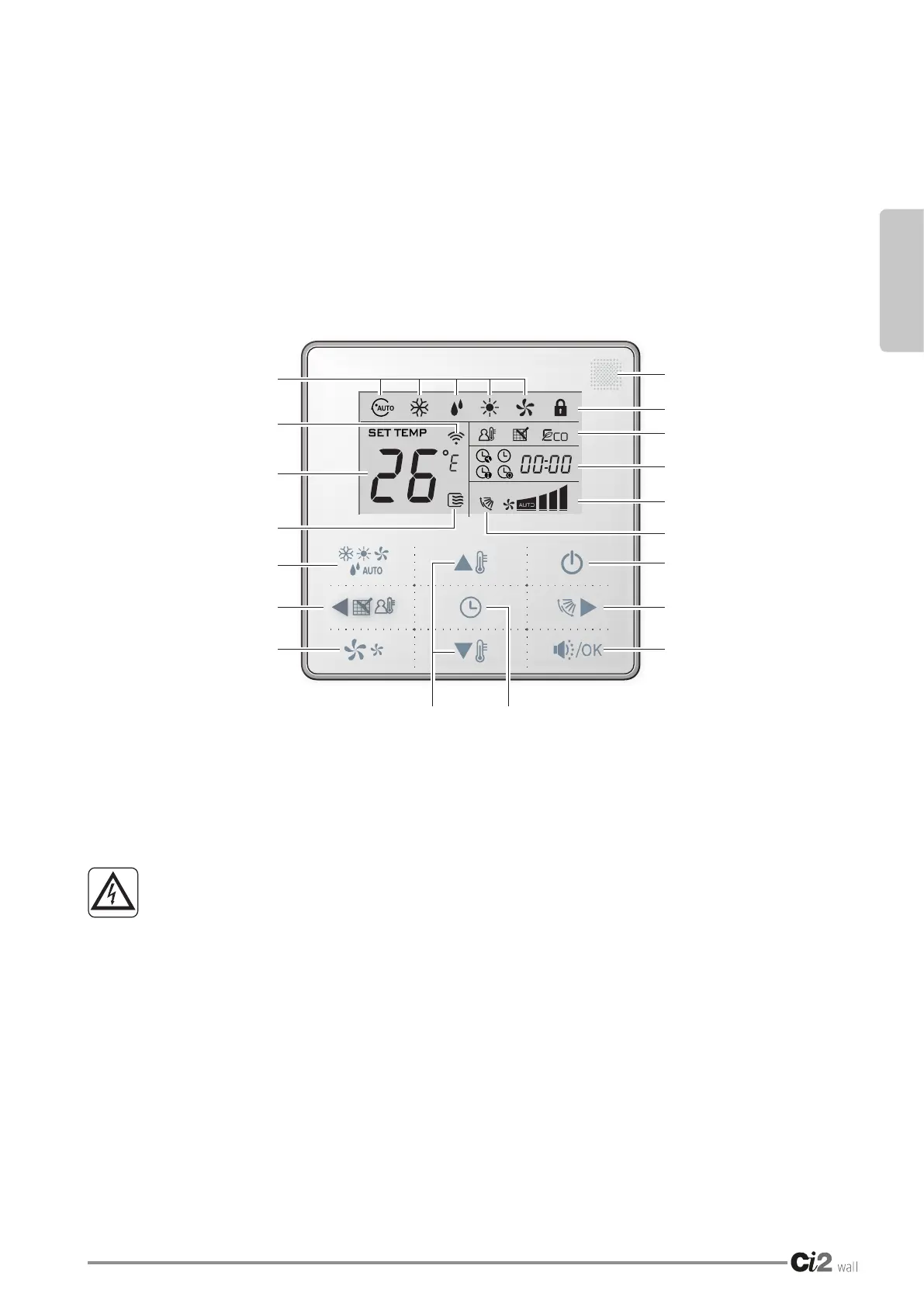
3 - DESCRIPTION OF THE KEYS AND ICONS
A. Operating mode
B. Signal transmission icon
E Setting the temperature
N. Operating function icon
E. Operating mode selection key
F. Left key
G. Fan speed key
H. Temperature setting key
I. Timer/clock selection key
L. Remote reception window
M. Commands block icon
N. Selected function icon
O. Timer/clock display area
P. Fan speed level display
Q. Active swing function icon
R. ON/OFF key
S. Right key
T. Silent/OK function key
The remote control does not have an economical operating function.
4 - INSTRUCTIONS FOR USE
• DO NOT SPRAY DIRECTLY ONTO THE REMOTE CONTROL CONNECTED
ELECTRICALLY OR ONTO THE GAS APPLIANCE OR INFLAMMABLE
SUBSTANCES. FIRE HAZARD.
• DO NOT USE THE REMOTE CONTROL WITH WET OR DAMP HANDS.
• DO NOT ALLOW WATER (OR OTHER LIQUIDS) TO ENTER THE ELECTRICALLY-
CONNECTED REMOTE CONTROL. IF THIS IS NOT THE CASE, ELECTRIC
SHOCKS MAY OCCUR.
4.1 - REMOTE SIGNAL RECEPTION FUNCTION
Once wired, the wired remote control can be used as a signal reception device; when the appliance is on,
it is possible to use the wireless remote control (supplied with the appliance) to control the fan coil through
the wired remote control.





 To Next Page