15
EN
Video
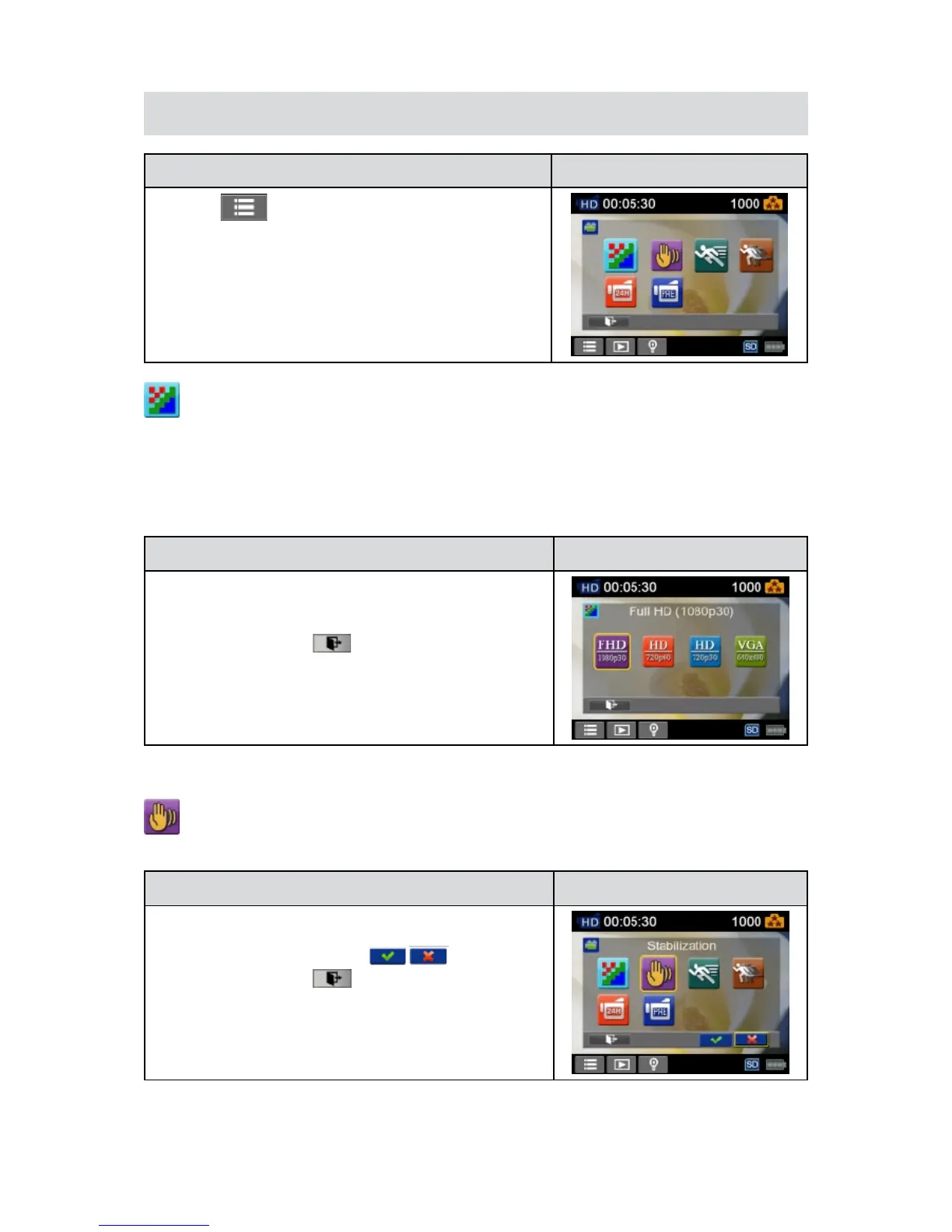
Operation Display Screen
T1. ouch
on the screen inRecordMode.Themenu
will show on the screen.
Touchthe[Video]icononthescreen.SubmenuofVideo2.
will pop out on the screen.
The Video submenu contains 6 options-- Resolution,3.
Stabilization, Motion Detect, Slow Motion, Time Lapse
,and Pre-record--foryoutoadjustthecamerasettings.
Video Resolution
Four resolution settings are available.
FHD (1080p 30)• (FullHD(1080p30)):Recordvideosat1920x1080p30fpsresolution.
HD+ (720p 60):• Recordvideosat1280x720p60fpsresolution.
HD (720p 30):• Recordvideosat1280x720p30fpsresolution.
VGA (640X480): • Recordvideosat640x480p30fpsresolution.
Operation Display Screen
In the Video menu, touch the [Resolution] icon on the1.
screen.
Touch to select the desired option.2.
Touch the Exit icon 3. (
)to exit.
Stabilization
Recordwithaneffectofreducingcamerashaketoresultinmorestablevideo.
Operation Display Screen
In theVideo menu, touch the [Stabilization] icon onthe1.
screen.
Touch to select [On] or [Off] 2. (
).
Touch the Exit icon 3. (
)to exit.


 To Next Page