4
EN
Section 1
Getting to Know Your Camera
Overview
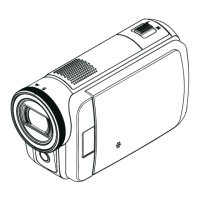
Thecameraequippeda5MegaPixelsensorthatcantakeH.264formatvideos.TheH.264technology
allowsforextendedvideorecordingwithlessmemory.Highqualityimagesupto16mega-pixelscan
also be delivered smoothly. With a color LCD monitor, you can view and examine the videos and photos
easily.
The 3” LCD touch panel is an ideal platform for you to operate your camera. The menu options are
accessiblewithyournger.Withthetouchpanel,youcanselecttheoptionsdirectlyandquickly.
ThecameraalsofeaturesvideorecordingatanHDresolutionof1920x1080.Youcanalsoconnectitto
anHDTVviaanHDMIcable,andeasilyplaybacktherecordedhigh-denitionvideosonthewidescreen
HDTV.
Moreover,thecamerahasanadvanceduploadingfeature.Withtheexclusivebuilt-inInternet Direct
application, you can upload the videos captured by the camera to the web site more effortlessly .
ISOsensitivityandcolorbalancecaneitherbeadjustedautomaticallyorchangedmanually.A16xdigital
zoomhelpsyoutocontroloverthevideosandphotosyoutake.
Thevariedeffectoptions,suchasTimeLapseandSlowMotion,makerecordingmorefun.
Thebuilt-inmemoryallowsyoutotakephotosandtorecordvideoswithoutamemorycard.Thememory
card slot allows users to increase the storage capacity.
Note
Partial memory of the built-in memory is used for the camera’s Firmware code and software.
Standard Accessories
Unpackthepackageandmakesureallstandardaccessorieslistedareincluded:
Camera•
USBCable•
AVCable•
HDMICable•
Adaptor•
Lithium-ionRechargeableBattery•
CD-ROM(Software,User’sManual)•
ClothBag•
Remote Control•


 To Next Page