26
EN
Section 5
Setting Your Camera
Setting Menu
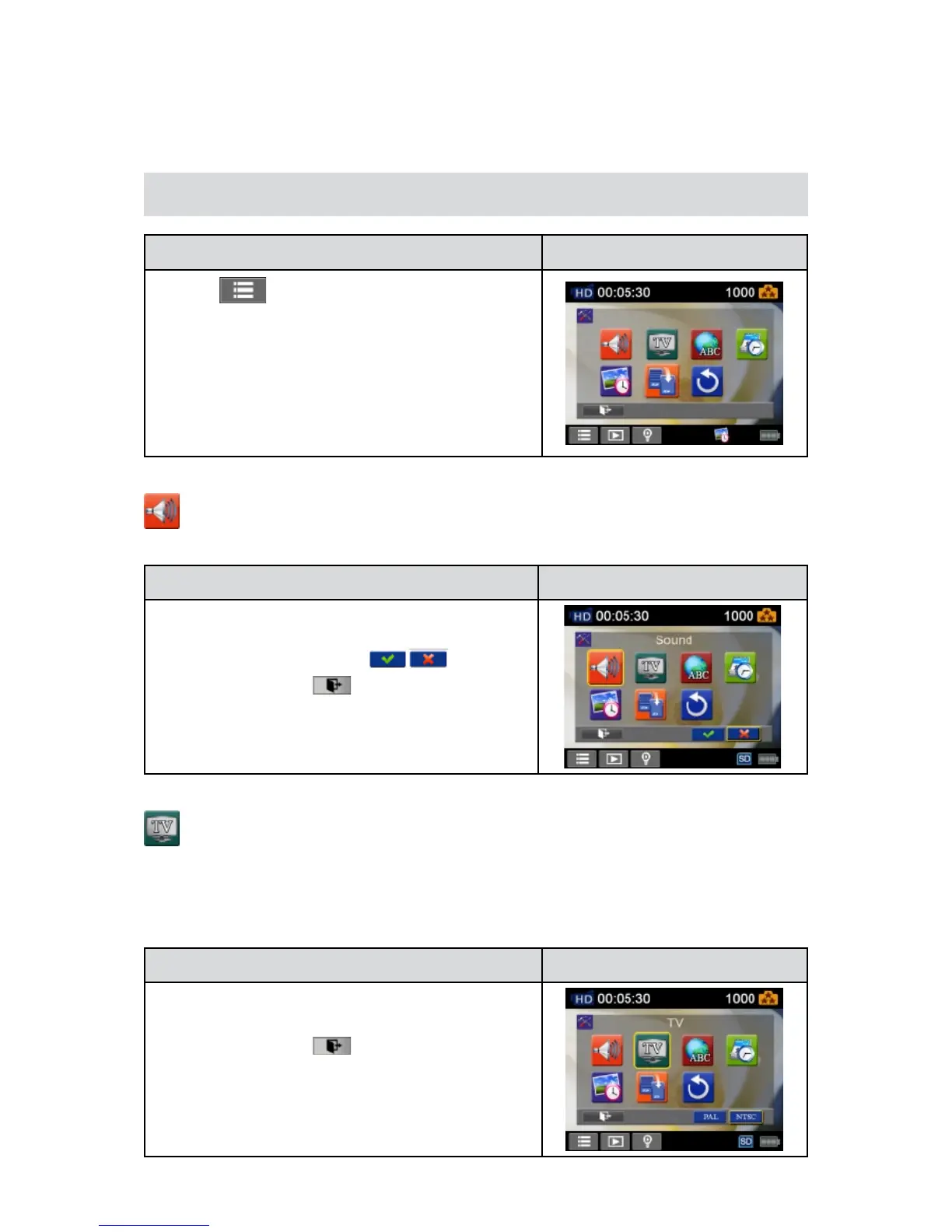
Operation Display Screen
T1. ouch
on the screen inRecordMode.Themenu
will show on the screen.
Touch the [Setting] icon on the screen. Submenu of2.
Settingwillpopoutonthescreen.
TheSettingsubmenucontains7optionsforconguring3.
your camerasetup.TheyareSound(operationsound),
TV,Language,TimeSetting,DatePrinting,Format,and
DefaultSetting.
Sound
Enableordisablethekeypadtoneandtheoperationsound.
Operation Display Screen
In the Setting menu, touch the [Sound] icon on the1.
screen.
Touch to select [On] or [Off] 2. ( ).
Touch the Exit icon 3. (
)to exit.
TV
Ensure that theappropriateTV standardof your areais selected– eitherNTSC or PAL. WrongTV
systemsettingmaycauseimageickers.
NTSC• (60Hz):USA,Canada,Japan,SouthKoreaandTaiwan,etc.
PAL• (50Hz):UK,Europe,China,Australia,SingaporeandHongKong,etc.
Operation Display Screen
IntheSettingmenu,touchthe[TV]icononthescreen.1.
Touchtoselect[PAL]or[NTSC].2.
Touch the Exit icon 3. (
)to exit.


 To Next Page