EasyManua.ls Logo

Olin DVC-380 - Section 11 Using Remote Control; Remote Control Overview; Remote Control Button Functions

Olin DVC-380
44 pages
Print Icon
To Next Page IconTo Next Page
To Previous Page IconTo Previous Page
Loading...
38
EN
Section 11
Using Remote Control
Remote Control
Button Functions
Video Button:
Presstotakevideo.1.
To stop recording, press it again.2.
Pause Button:
Press to pause the recording. 1.
To continue the recording, press it again.2.
InVideoPlaybackMode,presstopausetherecordedvideo.3.
Tele Button:
Zoomin.1.
Wide Button
Zoom out.1.
Photo Button:
P1. resstotakephoto.
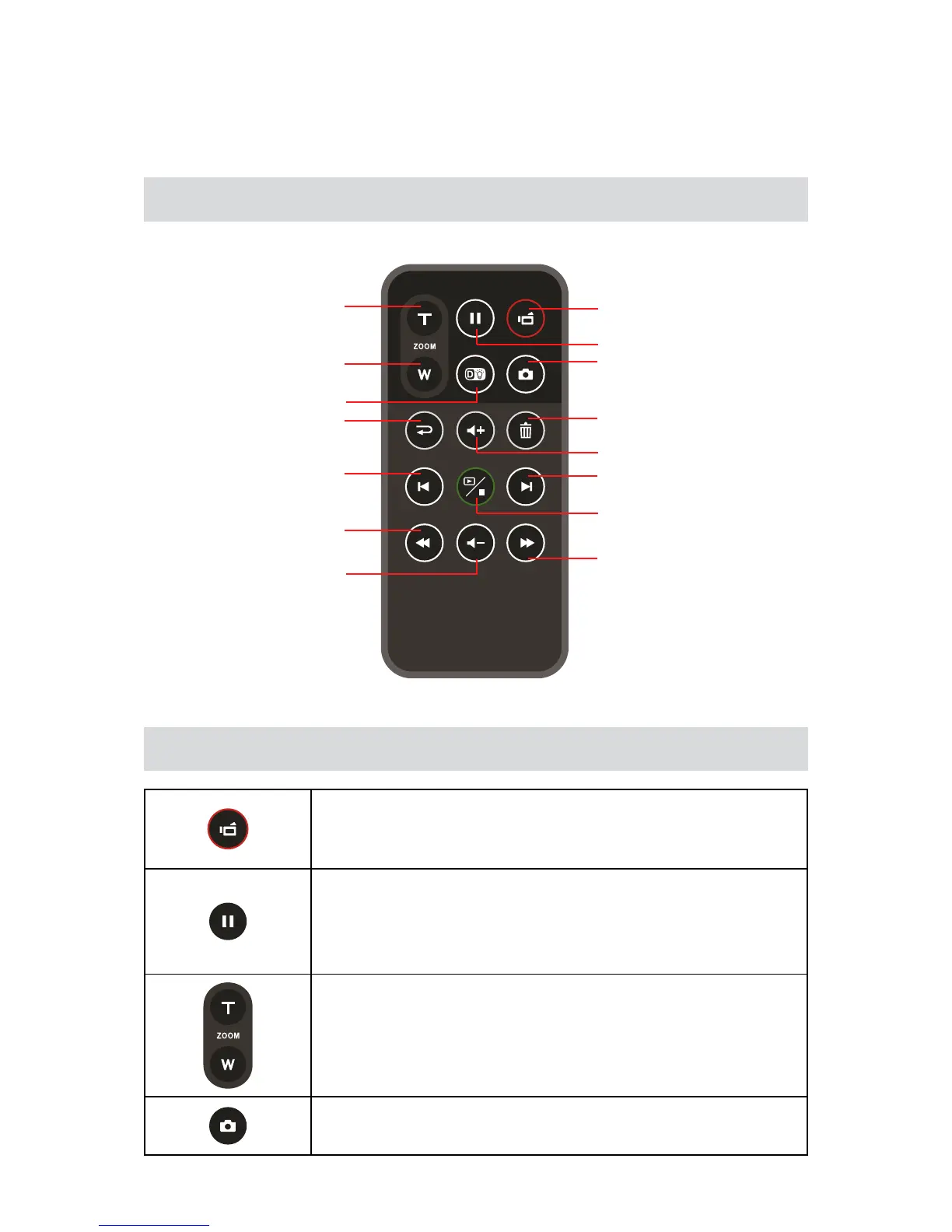
[Photo] Button
[Playback]/[Stop]
Button
[Pause] Button
[Video] Button
[Delete] Button
[Volume Up] Button
[Volume Down] Button
[Forward] Button
[Tele] Button
[Wide] Button
[Digital Light] Button
[Return] Button
[Previous] Button
[Next] Button
[Rewind] Button