30
EN
Section 6
Viewing Photos and Videos on TV
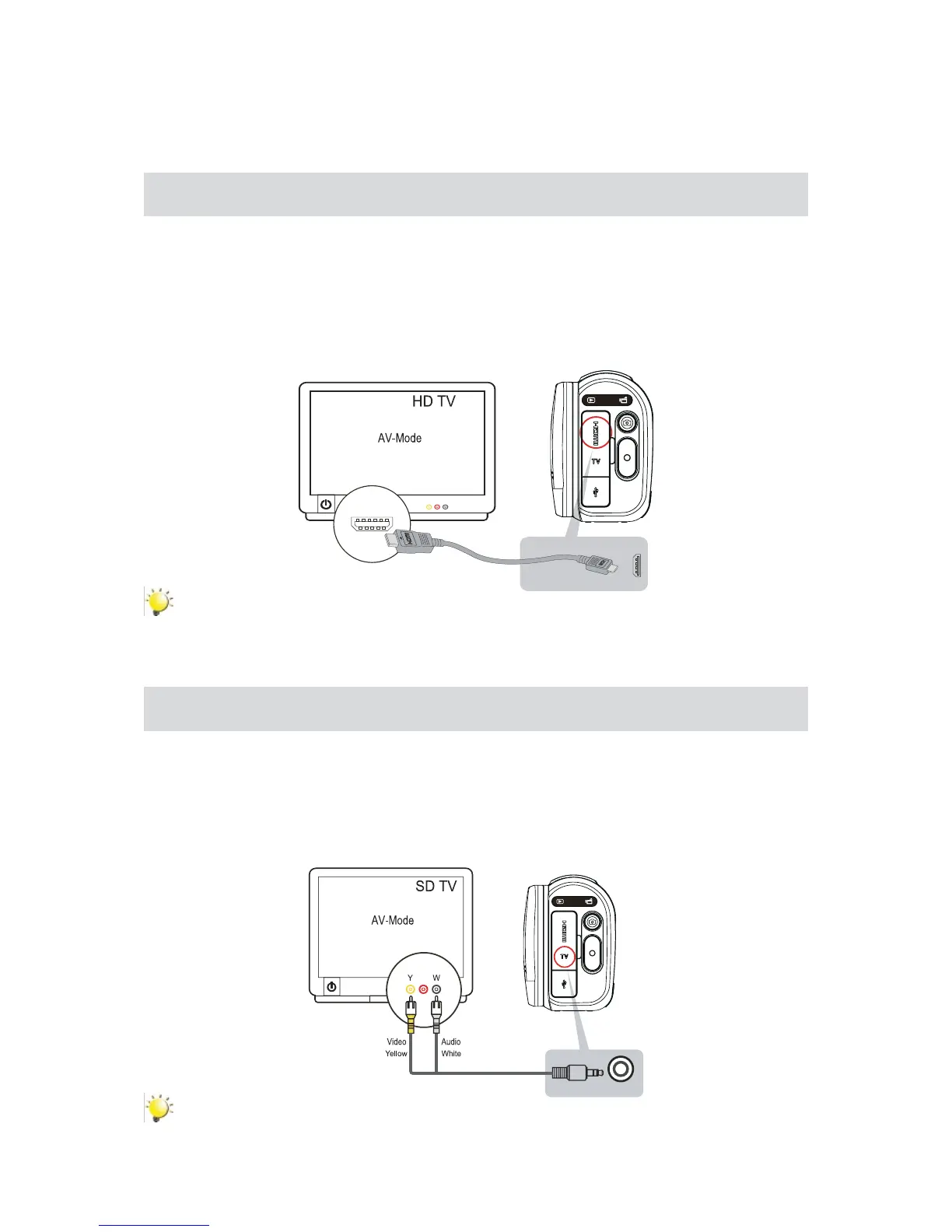
Connecting to a High-Denition 16:9(Wide) TV
ConnecttheHDMIcabletoyourcamera’sHDMIOutport.1.
Connect the other end of the cable to a television.2.
SetthevideoinputsourceofyourTVto“HDMI.”3.
ThestepsforviewingstoredvideosandphotosonHDTVareexactlythesameasforviewingthem4.
on the LCD screen.
(16:9)
Note
Some icons on the LCD screen do not display when the camera is connected to an HDTV.•
Some functions may not be accessible while the camera is connected to an HDTV.•
Connecting to a non-high-denition 4:3 TV
ConnectoneendoftheAVcabletoyourcamera’sAVoutport.1.
Connect the other end of the cable to a television.2.
ThestepsforviewingstoredvideosandphotosonTVareexactlythesameasforviewingthemon3.
the LCD screen.
( 4 : 3 )
Note
Some icons on the LCD screen do not display when the camera is connected to a TV.•
Some functions may not be accessible while the camera is connected to a TV.•


 To Next Page