32
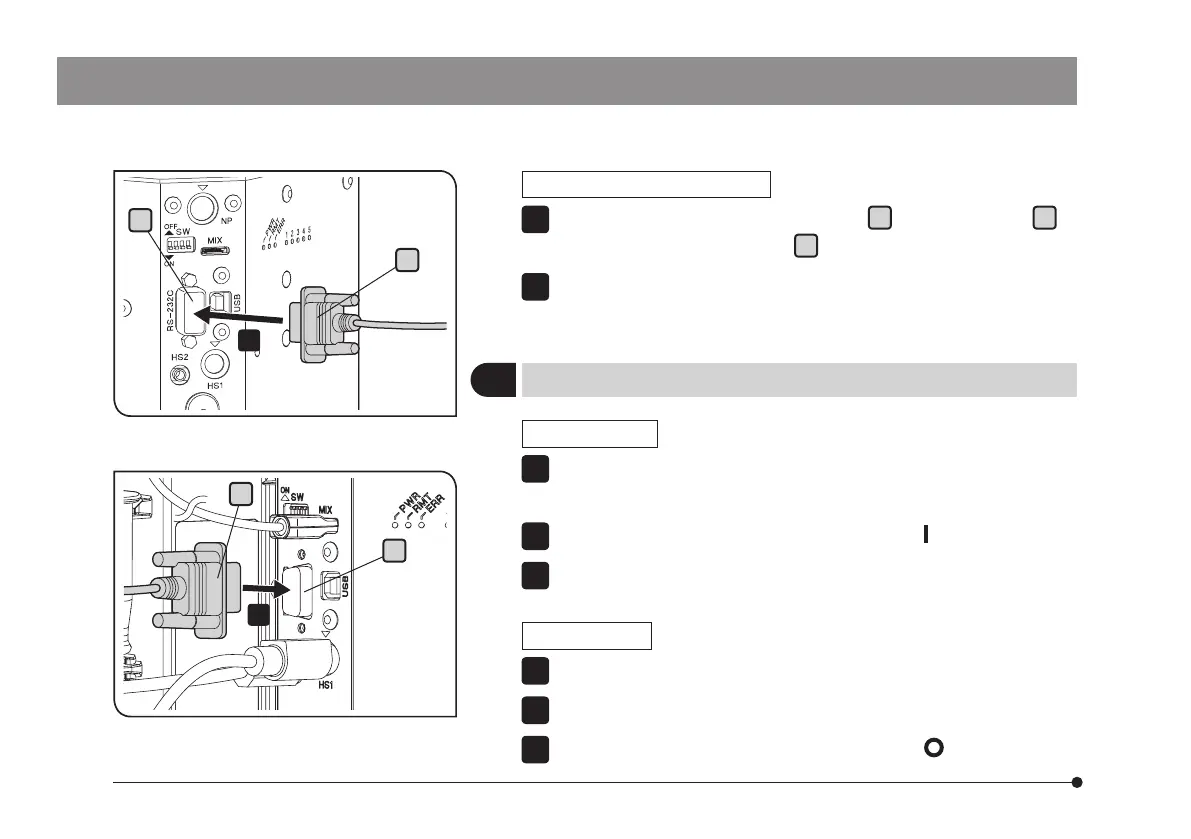
Connecting the RS-232C cable
Connect the RS-232C cable connector
a
to the connector
b
of
BX3M-CBFM or the connector
c
of BX3M-CB.
Connect the other connector of the RS-232C cable to the RS-232C
connector of PC.
1
2
a
c
1
b
1
BX3M-CB
BX3M-CBFM
a
2
Start procedures /Exit procedures
Start procedures
Turn ON the power of PC and log on Windows
®
. Wait until the desktop
appears.
Set the main switch of the microscope frame to
(ON).
Start the application software.
Exit procedures
Exit from the application software.
Shutdown Windows
®
.
Set the main switch of the microscope frame to
(OFF).
1
2
3
1
2
3



 To Next Page