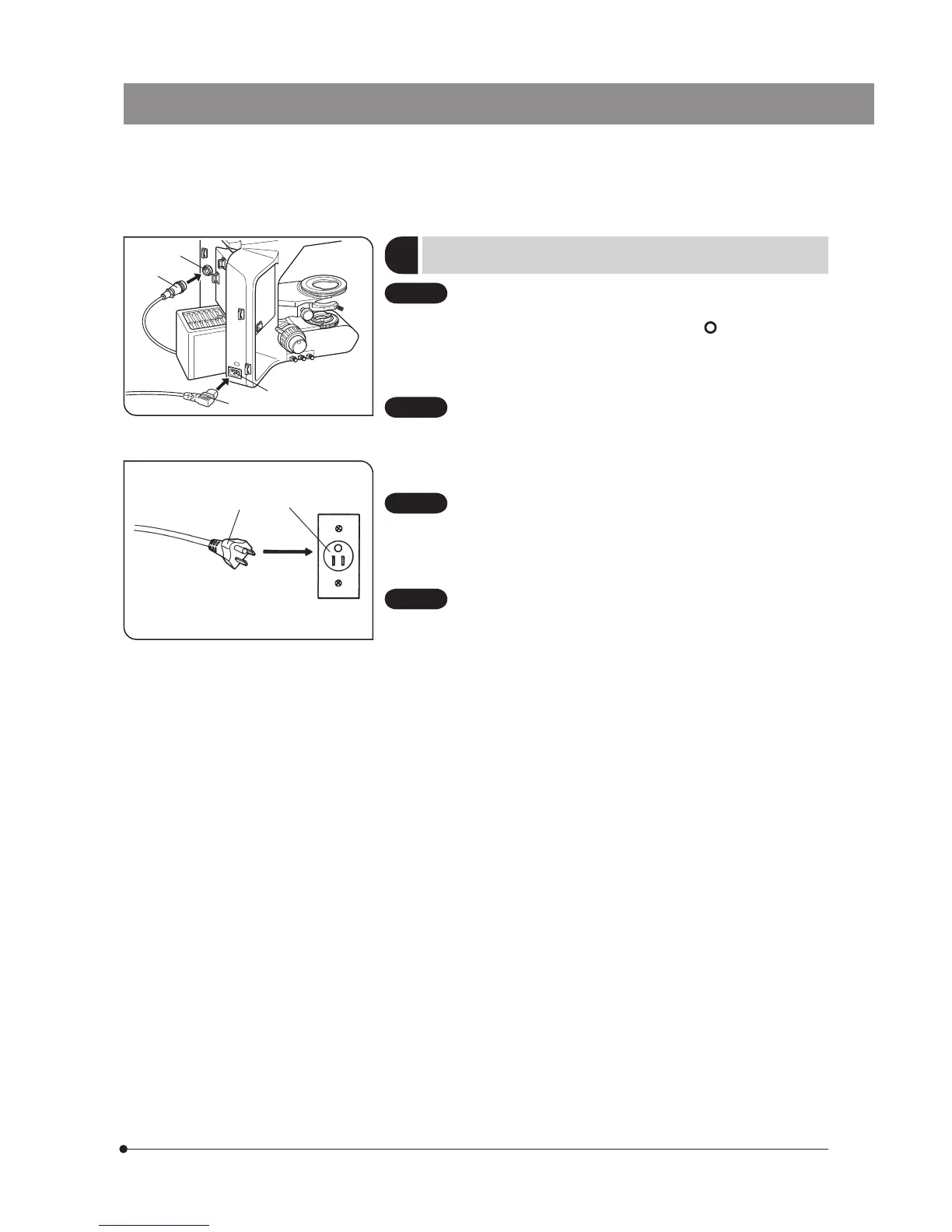
Fig. 52
Fig. 53
11
Attaching the Lamp Housing Cable
and Power Cord
(Figs. 52 & 53)
· Cables and cords are vulnerable when bent or twisted. Never
subject them to excessive force.
· Make sure that the main switch is set to “
” (OFF) before con-
necting the power cord.
1. Connect the lamp housing cable connector @ into the connector 2 on
the rear of the microscope.
Always use the power cord provided by Olympus. If no power
cord is provided with the microscope, please select the proper
power cord by referring to section “ PROPER SELECTION OF THE
POWER SUPPLY CORD ” at the end of this instruction manual.
2. Connect the power cord plug 3 to the AC receptacle |.
The power cord should be connected to a grounded/earthed,
3-conductor power outlet. If the power outlet is not grounded/
earthed properly, Olympus can no longer warrant the electrical
safety performance of the equipment.
3. Plug the power cord plug 5 into the wall outlet 6.
Should the power cord come in contact with the hot lamp
housing, the power cord could melt and cause electric shock.
Be sure to route the power cord away from the lamp housing.
65
1
2
3
4
CAUTION
CAUTION
CAUTION
CAUTION



 To Next Page