Flash shooting
7
73
EN
If you shoot a subject using a lens that is wider than 14 mm (equivalent to 28 mm on a 35 mm
film camera), the light emitted by the flash may produce a vignette effect. Whether or not
vignetting occurs also depends on lens type and shooting conditions (such as distance to the
subject).
1
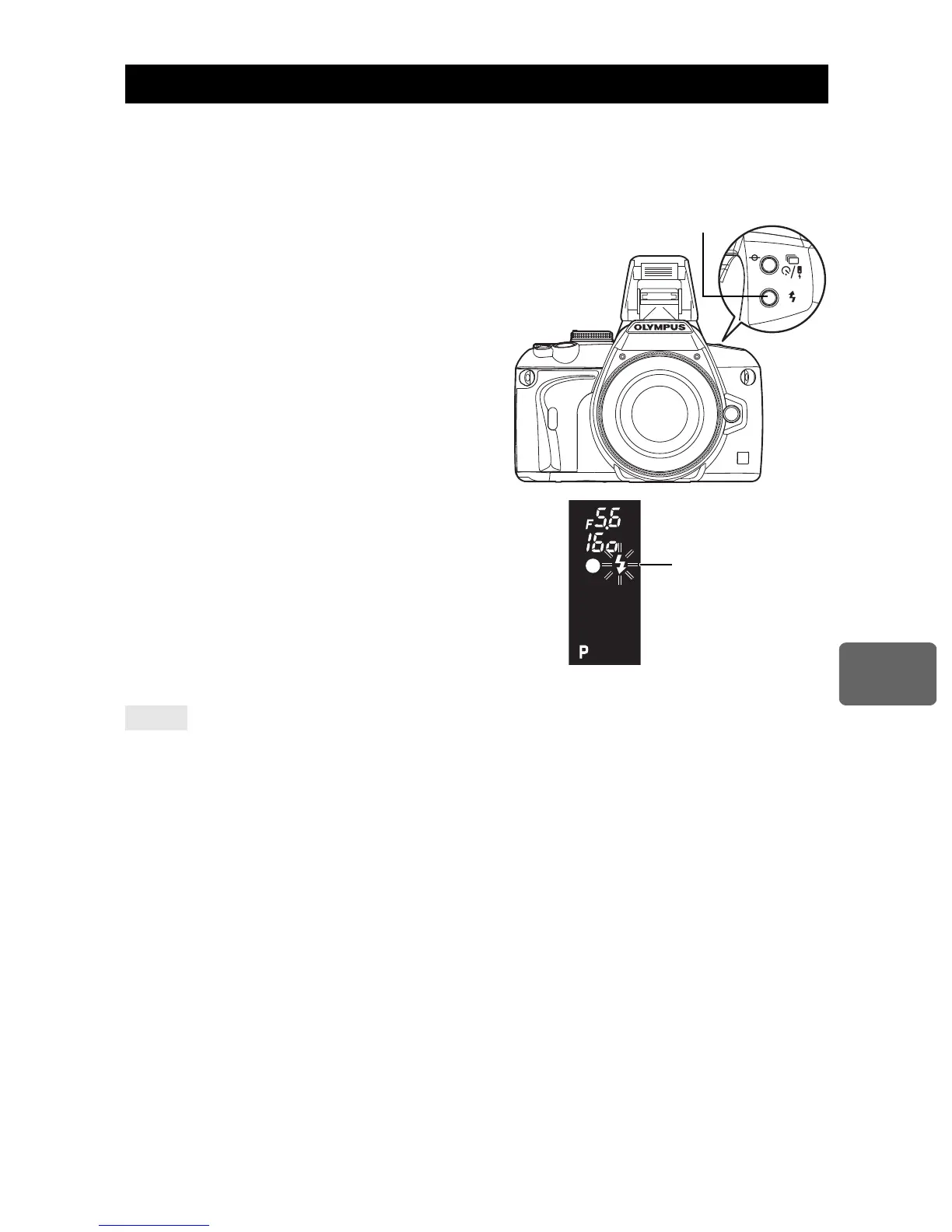
Press the
#
button to raise the built-in
flash.
•
The built-in flash will pop up automatically and
fire in low light conditions under the following
modes.
AUTO /
i
/
&
/
/
/
B
/
U
/
G
/
J
/
r
/
g
2
Press the shutter button halfway.
•
The
#
(flash stand-by) mark lights when the flash
is ready to fire. If the mark is blinking, the flash is
charging. Wait until charging is complete.
3
Press the shutter button all the way.
When you do not want the flash to pop up automatically:
j
Set
[AUTO POP UP]
to
[OFF]
.
g
“AUTO POP UP” (P. 92).
x
Notes
•
When
[
#
RC MODE]
is set to
[ON]
, the built-in flash will fire only to communicate with the
external flash so it will not function as a flash.
g
“Shooting with the Olympus wireless RC flash system” (P. 76)
Built-in flash shooting
TIPS
Viewfinder
Flash stand-by mark



 To Next Page