88
EN
9
Customizing your camera
Custom Menu 1
b
BUTTON / DIAL
DIAL FUNCTION
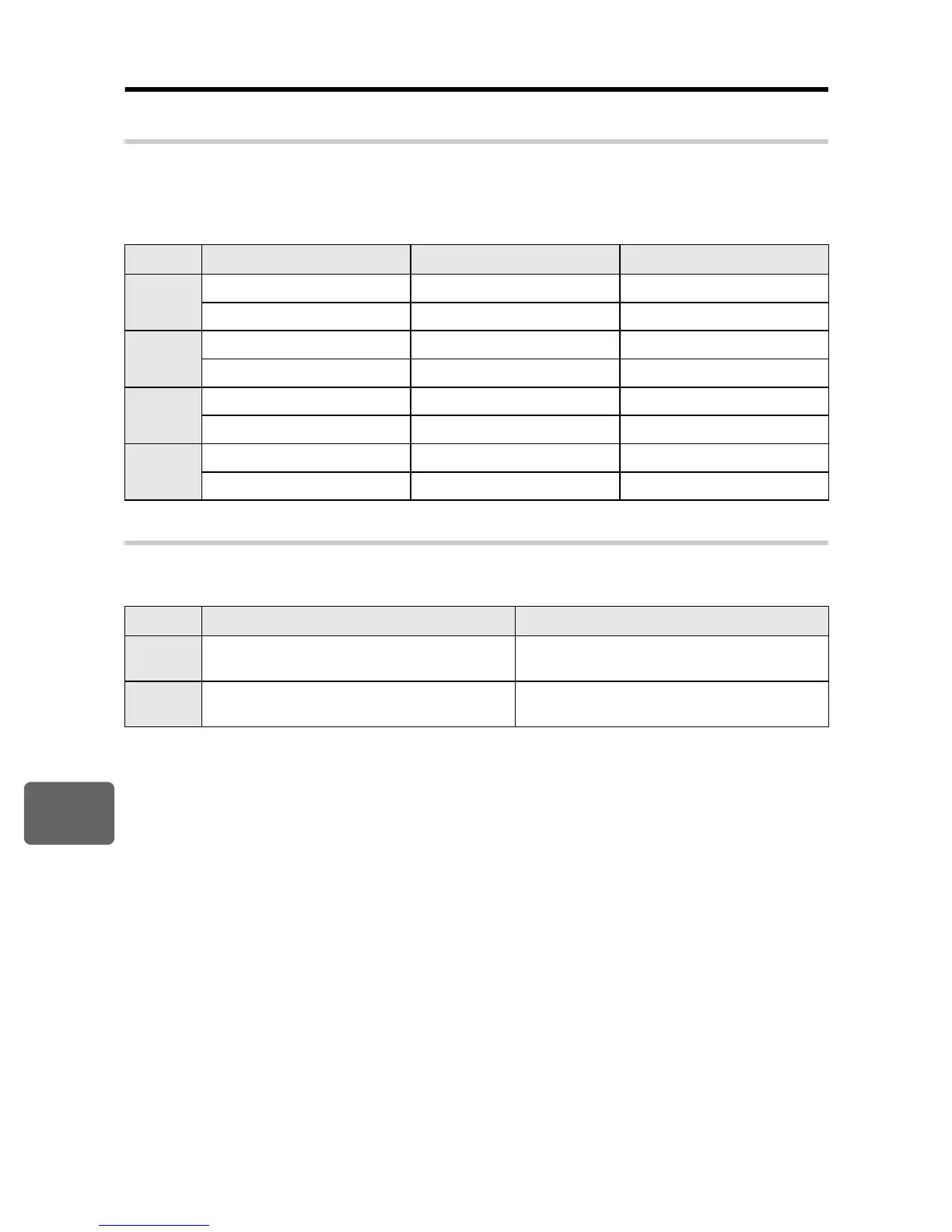
You can also switch the operation of the control dial to the opposite of factory default settings.
For example, after setting
[P]
to
[
F
]
, in
P
mode you can adjust the exposure compensation
using the control dial and set the program shift using the control dial while holding down the
F
button.
DIAL DIRECTION
You can select the rotational direction of the control dial and the direction in which the shutter
speed / aperture value will increase or decrease.
Mode Setting
j F
button +
j
P
%
(program shift) Program shift Exposure compensation
F
Exposure compensation Program shift
A
FNo. Aperture value Exposure compensation
F
Exposure compensation Aperture value
S
SHUTTER Shutter speed Exposure compensation
F
Exposure compensation Shutter speed
M
SHUTTER Shutter speed Aperture value
FNo. Aperture value Shutter speed
Setting
q
(rotational direction of the dial)
r
(rotational direction of the dial)
DIAL1
•
Slower shutter speed
•
Open the aperture (f-number is decreased)
•
Faster shutter speed
•
Close the aperture (f-number is increased)
DIAL2
•
Faster shutter speed
•
Close the aperture (f-number is increased)
•
Slower shutter speed
•
Open the aperture (f-number is decreased)



 To Next Page