7
2. Placing the Specimen
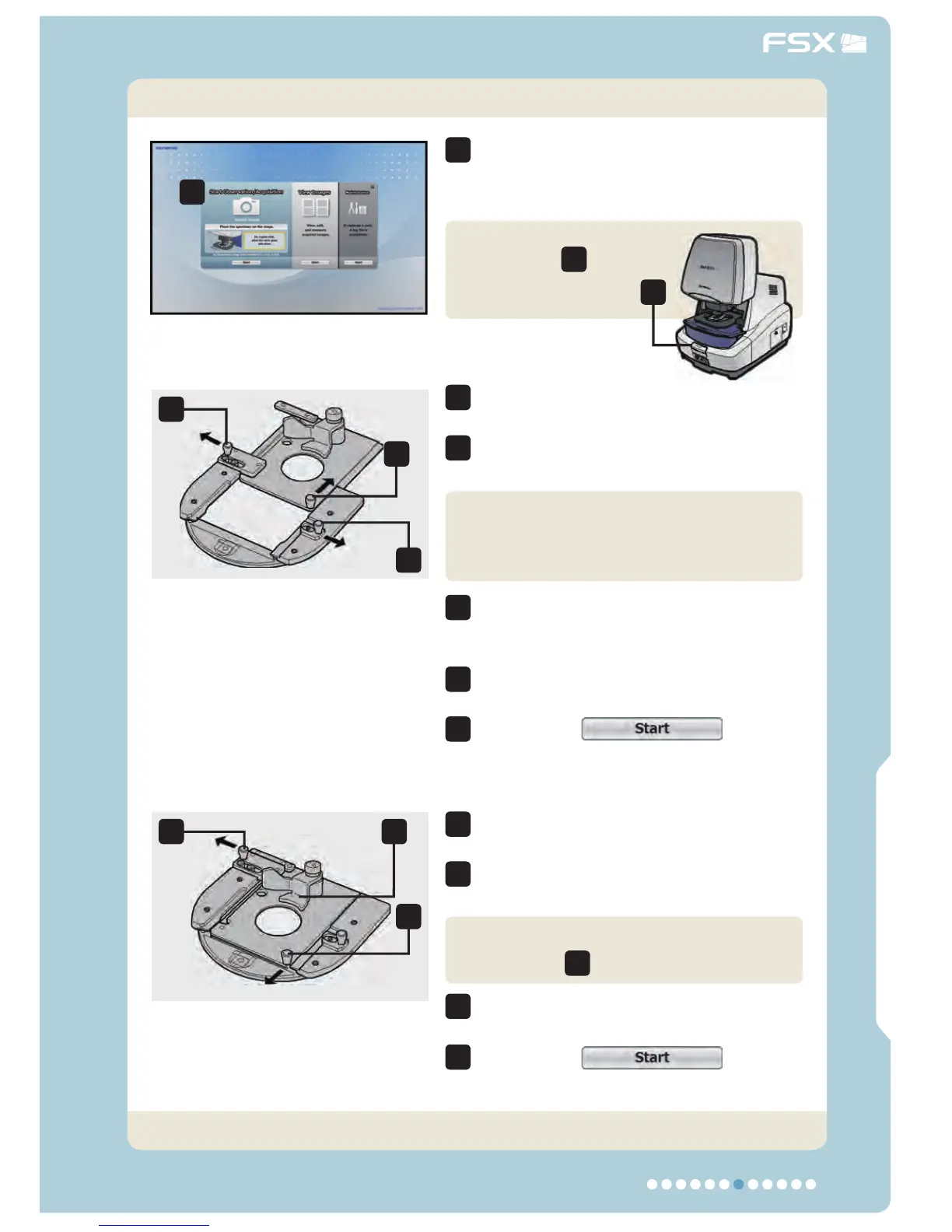
The specimen can be placed in position
when the instruction to place the
specimen is displayed.
Push down the
open button
2
,
open the cover and
place the specimen.
1
4
5
5
4
3
3
Push down the close lever and close
the cover.
Click on the
button
and open the Acquisition menu.
Push in the lock lever toward the left
and hold it in the pushed-in position.
Pull out the moving lever toward you
(all the way until it stops).
Pull out the slide glass holder toward
the right to set the slide glass in
position.
Push down the close lever and close
the cover.
Click on the
button
and open the Acquisition menu.
Push in the lock lever toward the left
and hold it in the pushed-in position.
Push in the moving lever toward the
deep (all the way until it stops).
Observation/Acquisition Flow
Main ControlsIntroduction
1
3
3
5
6
6
4
4
7
7
2
Place the slide glass.
Be sure to place it with the cover glass
facing down.
Slide glass specimen
Now the specimen has been placed in position.
Place the dish by applying against the
dish stopper
5
.
Φ 35 mm dish specimen



 To Next Page